# Creator's Guides

All guides by creators will be here for you to take references and learn

# The Art of AI Storytelling by Louis

Hey everyone,

Today we decided to open source our best performing story [**"Crash Into Another World"**](https://www.isekai.world/storylines/68ca167dd574de52118bb2ce) so everyone can reference it and understand how to write a good prompt in the era of AI.

Our approach isn't about doing a massive lore dump and force feeding the AI information. Instead, we believe you should focus on **telling the AI how to tell a good story** in your own flavour.

For me it all comes down to psychology. Instead of just presenting what is, focus on how the story makes people **feel**.

Take **Frieren** for example. It's not an action-packed adventure. What makes it so captivating is the quiet emotional weight behind everything. The way it explores loss, the passage of time, and the realization that someone meant more to you than you understood while they were alive. It makes you reflect on your own relationships and that's what keeps you thinking about it long after an episode ends.

Or look at **Cyberpunk: Edgerunners**. You already know from the start that things won't end well. But it doesn't matter because you're so emotionally invested in David's journey, his ambition, his sacrifices, and his love for Lucy that when it all comes crashing down it hits you like a truck. The story makes you feel the cost of chasing something bigger than yourself.

Then there's **Solo Leveling**. Completely different vibe. It taps into something more primal, the power fantasy. Watching Sung Jinwoo aura farming go from the weakest hunter to an unstoppable force gives you this constant dopamine hit of progression. Every level up, every new ability, every moment where he walks in and everyone underestimates him only for him to completely dominate. It's pure gratification. You keep watching because it just feels good.

Three very different anime, three very different emotional hooks, but all equally effective. There's no single formula. What matters is that the story is **deliberately designed to make the audience feel something specific**, whether that's melancholy, heartbreak, or raw excitement. And that's what your prompts should aim for. Don't just describe the world, tell the AI what emotions the story should evoke and how it should deliver them.

Of course this is all just my opinion. We're fully open to creative freedom and there's no limit to ideas. You just have to be creative enough to make them work.

For those wondering about lore and memory systems, that's something we'll be building out later. But for now, the focus should be on **the storytelling itself**. Get that right first and everything else will follow.

## How Our Prompt System Works

Our system is designed to split into **3 sections** because based on our experience this works the best:

**Prompt Plot** This is where you focus purely on the plot of the story and the relationship dynamics between characters.

**Prompt Guideline** This is where you tell the AI how it should tell the story.

**Reminder** This is where you let the AI understand the key takeaways from your prompt so it can easily remember what to focus on.

Go check out ["Crash Into Another World"](https://www.isekai.world/storylines/68ca167dd574de52118bb2ce), use it as inspiration, make it your own, and start building amazing worlds and stories that people love 🚀

# Prompt Templates & Guidelines: Bot Building Guide by storiesbynikk

<span style="font-size: 11pt; font-family: Arial,sans-serif; color: #000000; background-color: transparent; font-weight: bold; font-style: normal; font-variant: normal; text-decoration: none; vertical-align: baseline; white-space: pre-wrap;">Nikk's Bot Building Guide </span>

<span style="font-size: 11pt; font-family: Arial,sans-serif; color: #000000; background-color: transparent; font-weight: 400; font-style: normal; font-variant: normal; text-decoration: none; vertical-align: baseline; white-space: pre-wrap;">So, you want to build a story bot that doesn't suck. You want something that feels alive, that reacts to you, and that tells a compelling story. I've built a lot of these, and I've developed a pretty solid method for getting it done. I'm going to walk you through my step-by-step process for creating the core prompts of a great story bot.</span>

**<span style="font-size: 11pt; font-family: Arial, sans-serif; color: rgb(0, 0, 0); background-color: transparent; font-style: normal; font-variant: normal; text-decoration: none; vertical-align: baseline; white-space: pre-wrap;">A Quick Foreword</span>**

<span style="font-size: 11pt; font-family: Arial,sans-serif; color: #000000; background-color: transparent; font-weight: 400; font-style: normal; font-variant: normal; text-decoration: none; vertical-align: baseline; white-space: pre-wrap;">There are as many ways to build a good bot as there are creators on this platform. Every single person has their own unique style, their own method, and their own magic for telling stories. And that's exactly how it should be. This guide isn't meant to be a rigid, unbreakable set of rules. It's simply my personal process, a method I've developed with my AI partner, Bot Bot, that helps me organize my thoughts and create consistent, engaging bots.</span>

<span style="font-size: 11pt; font-family: Arial,sans-serif; color: #000000; background-color: transparent; font-weight: 400; font-style: normal; font-variant: normal; text-decoration: none; vertical-align: baseline; white-space: pre-wrap;">My hope is that by sharing my workflow, I can help clear up any confusion for newcomers or give veteran creators some new ideas to play with. Take what works for you, discard what doesn't, and adapt it all to fit your own unique style of storytelling. The goal is to help you build the amazing things you want to create. With that out of the way, let's get into the meat of this thing.</span>

**<span style="font-size: 11pt; font-family: Arial, sans-serif; color: rgb(0, 0, 0); background-color: transparent; font-style: normal; font-variant: normal; text-decoration: none; vertical-align: baseline; white-space: pre-wrap;">Step 1: The Plot (The Hook)</span>**

<span style="font-size: 11pt; font-family: Arial,sans-serif; color: #000000; background-color: transparent; font-weight: 400; font-style: normal; font-variant: normal; text-decoration: none; vertical-align: baseline; white-space: pre-wrap;">This is the very first thing a user sees. It's your "movie trailer," your "back of the book summary." Its only job is to grab someone by the collar and make them want to play. Forget about AI prompts for a minute; this part is for humans.</span>

<span style="font-size: 11pt; font-family: Arial,sans-serif; color: #000000; background-color: transparent; font-weight: 400; font-style: normal; font-variant: normal; text-decoration: none; vertical-align: baseline; white-space: pre-wrap;">My Rules for a Good Plot Summary:</span>

- <span style="font-size: 11pt; font-family: Arial,sans-serif; color: #000000; background-color: transparent; font-weight: 400; font-style: normal; font-variant: normal; text-decoration: none; vertical-align: baseline; white-space: pre-wrap;">**Hook them fast**: Start with an immediate, compelling situation. "You wake up in a..." or "The last thing you remember is..." works great.</span>
- <span style="font-size: 11pt; font-family: Arial,sans-serif; color: #000000; background-color: transparent; font-weight: 400; font-style: normal; font-variant: normal; text-decoration: none; vertical-align: baseline; white-space: pre-wrap;">Establish the role: Who is the user? A knight, a detective, a space janitor? Let them know who they're about to be.</span>
- <span style="font-size: 11pt; font-family: Arial,sans-serif; color: #000000; background-color: transparent; font-weight: 400; font-style: normal; font-variant: normal; text-decoration: none; vertical-align: baseline; white-space: pre-wrap;">Introduce the core concept: What's the central idea? Is it a zombie apocalypse in a storybook world? A heist against the gods? Spell it out.</span>
- <span style="font-size: 11pt; font-family: Arial,sans-serif; color: #000000; background-color: transparent; font-weight: 400; font-style: normal; font-variant: normal; text-decoration: none; vertical-align: baseline; white-space: pre-wrap;">State the stakes and the choice: What's the main conflict? What immediate decision does the user have to make? This is what creates agency right from the start.</span>

<span style="font-size: 11pt; font-family: Arial,sans-serif; color: #000000; background-color: transparent; font-weight: 400; font-style: normal; font-variant: normal; text-decoration: none; vertical-align: baseline; white-space: pre-wrap;">Don't be subtle. This isn't literary fiction. It's a sales pitch for your story. You want to get the user excited and give them a clear idea of the adventure they're about to have.</span>

**<span style="font-size: 11pt; font-family: Arial, sans-serif; color: rgb(0, 0, 0); background-color: transparent; font-style: normal; font-variant: normal; text-decoration: none; vertical-align: baseline; white-space: pre-wrap;">Step 2: The AI Plot (The Blueprint)</span>**

<span style="font-size: 11pt; font-family: Arial,sans-serif; color: #000000; background-color: transparent; font-weight: 400; font-style: normal; font-variant: normal; text-decoration: none; vertical-align: baseline; white-space: pre-wrap;">Ok, so you've written your cool, flashy plot summary for the user. Now you need to write one for the AI. This is the single most important prompt in your entire bot. It's the AI's internal "bible" for your story. It needs to be clear, concise, and logical. No flavor text, just facts.</span>

<span style="font-size: 11pt; font-family: Arial,sans-serif; color: #000000; background-color: transparent; font-weight: 400; font-style: normal; font-variant: normal; text-decoration: none; vertical-align: baseline; white-space: pre-wrap;">I break my AI Plot into four key sections:</span>

- <span style="font-size: 11pt; font-family: Arial,sans-serif; color: #000000; background-color: transparent; font-weight: 400; font-style: normal; font-variant: normal; text-decoration: none; vertical-align: baseline; white-space: pre-wrap;">User Role: Define who the user is in one simple sentence. Example: "{{user}} is a psychic detective in a noir city."</span>
- <span style="font-size: 11pt; font-family: Arial,sans-serif; color: #000000; background-color: transparent; font-weight: 400; font-style: normal; font-variant: normal; text-decoration: none; vertical-align: baseline; white-space: pre-wrap;">Primary Objective: Define the main goal of the story. What is the user trying to accomplish? Is it to survive, solve a mystery, build a kingdom? Be specific. Example: "To solve the murder of their amnesiac client by recovering his lost memories."</span>
- <span style="font-size: 11pt; font-family: Arial,sans-serif; color: #000000; background-color: transparent; font-weight: 400; font-style: normal; font-variant: normal; text-decoration: none; vertical-align: baseline; white-space: pre-wrap;">Central Antagonistic Force: Who or what is the main source of conflict? Don't just say "the villain." Define them. Is it a rival corporation, a specific monster, or an abstract concept like "the world's suspicion"? If you have specific factions, list them here.</span>
- <span style="font-size: 11pt; font-family: Arial,sans-serif; color: #000000; background-color: transparent; font-weight: 400; font-style: normal; font-variant: normal; text-decoration: none; vertical-align: baseline; white-space: pre-wrap;">World-Building Info: This is a catch-all for the core mechanics of your game. I always include a few sub-headings here:</span>

1. 1. <span style="font-size: 11pt; font-family: Arial,sans-serif; color: #000000; background-color: transparent; font-weight: 400; font-style: normal; font-variant: normal; text-decoration: none; vertical-align: baseline; white-space: pre-wrap;">Genre: List the genres to set the tone (e.g., Sci-Fi, Horror, Romance).</span>
    2. <span style="font-size: 11pt; font-family: Arial,sans-serif; color: #000000; background-color: transparent; font-weight: 400; font-style: normal; font-variant: normal; text-decoration: none; vertical-align: baseline; white-space: pre-wrap;">Core Mechanic: Explain the main gameplay loop. Is it turn-based? A sandbox? Quest-driven?</span>
    3. <span style="font-size: 11pt; font-family: Arial,sans-serif; color: #000000; background-color: transparent; font-weight: 400; font-style: normal; font-variant: normal; text-decoration: none; vertical-align: baseline; white-space: pre-wrap;">Factions: If the world has a Mages Guild, or League of Assassins, or any other important organizations I'll throw that information in here</span>
    4. <span style="font-size: 11pt; font-family: Arial,sans-serif; color: #000000; background-color: transparent; font-weight: 400; font-style: normal; font-variant: normal; text-decoration: none; vertical-align: baseline; white-space: pre-wrap;">System/Magic: Explain how your core gimmick works. If there's a System, how does leveling work? If there's a unique magic, what are its rules?</span>
    5. <span style="font-size: 11pt; font-family: Arial,sans-serif; color: #000000; background-color: transparent; font-weight: 400; font-style: normal; font-variant: normal; text-decoration: none; vertical-align: baseline; white-space: pre-wrap;">The Edge: I like to add a line that defines the unique 'feel' or hook of the bot.</span>

<span style="font-size: 11pt; font-family: Arial,sans-serif; color: #000000; background-color: transparent; font-weight: 400; font-style: normal; font-variant: normal; text-decoration: none; vertical-align: baseline; white-space: pre-wrap;">Think of this section like programming a machine. You're giving it the core logic of your world so it can run the simulation correctly.</span>

**<span style="font-size: 11pt; font-family: Arial, sans-serif; color: rgb(0, 0, 0); background-color: transparent; font-style: normal; font-variant: normal; text-decoration: none; vertical-align: baseline; white-space: pre-wrap;">Step 3: The Prompt Guidelines (The Rulebook)</span>**

<span style="font-size: 11pt; font-family: Arial,sans-serif; color: #000000; background-color: transparent; font-weight: 400; font-style: normal; font-variant: normal; text-decoration: none; vertical-align: baseline; white-space: pre-wrap;">If the AI Plot is the blueprint, the Prompt Guidelines are the detailed, step-by-step instructions for the AI to follow while it's running the story. This is where you get really specific about how you want the bot to behave. I usually aim for 5-6 strong, clear rules.</span>

<span style="font-size: 11pt; font-family: Arial,sans-serif; color: #000000; background-color: transparent; font-weight: 400; font-style: normal; font-variant: normal; text-decoration: none; vertical-align: baseline; white-space: pre-wrap;">Here are the kinds of things I always include:</span>

- <span style="font-size: 11pt; font-family: Arial,sans-serif; color: #000000; background-color: transparent; font-weight: 400; font-style: normal; font-variant: normal; text-decoration: none; vertical-align: baseline; white-space: pre-wrap;">Narrative Perspective and Tone: Tell the AI how to write. Should it be second-person ("You see...")? Should the tone be gritty, or funny, or romantic? Be explicit. Give an example if you can.</span>
- <span style="font-size: 11pt; font-family: Arial,sans-serif; color: #000000; background-color: transparent; font-weight: 400; font-style: normal; font-variant: normal; text-decoration: none; vertical-align: baseline; white-space: pre-wrap;">Core Dynamics: Explain how the key relationships in the story should work. How should the main villain behave? How should the love interest react to the user? This is where you define the AI's roleplaying instructions for your most important NPCs.</span>
- <span style="font-size: 11pt; font-family: Arial,sans-serif; color: #000000; background-color: transparent; font-weight: 400; font-style: normal; font-variant: normal; text-decoration: none; vertical-align: baseline; white-space: pre-wrap;">Pacing and Structure: Tell the AI how the story should flow. Should it be a slow burn? Should it be episodic? If there are "Acts" or stages to your story, define them here. For example, "Act 1 is about recruiting the crew. Act 2 is the heist itself."</span>
- <span style="font-size: 11pt; font-family: Arial,sans-serif; color: #000000; background-color: transparent; font-weight: 400; font-style: normal; font-variant: normal; text-decoration: none; vertical-align: baseline; white-space: pre-wrap;">Key Mechanic Guidelines: If you have a unique gameplay mechanic, like a System or a crafting mechanic, this is where you give the AI specific instructions on how to handle it. For my "System Anomaly" bot, I told the AI to always display System messages in a specific, clean format.</span>
- <span style="font-size: 11pt; font-family: Arial,sans-serif; color: #000000; background-color: transparent; font-weight: 400; font-style: normal; font-variant: normal; text-decoration: none; vertical-align: baseline; white-space: pre-wrap;">Agency and Consequences: This is a big one. I always include a rule that explicitly tells the AI to never control my character's decisions. I state that the user's choices are paramount, and the AI's job is to narrate the consequences of those choices, good or bad.</span>

<span style="font-size: 11pt; font-family: Arial,sans-serif; color: #000000; background-color: transparent; font-weight: 400; font-style: normal; font-variant: normal; text-decoration: none; vertical-align: baseline; white-space: pre-wrap;">Good guidelines are the difference between an AI that feels like a creative partner and one that feels like a rambling, confused mess. Be as clear and direct as possible.</span>

**<span style="font-size: 11pt; font-family: Arial, sans-serif; color: rgb(0, 0, 0); background-color: transparent; font-style: normal; font-variant: normal; text-decoration: none; vertical-align: baseline; white-space: pre-wrap;">Step 4: AI Reminders (The Sticky Notes)</span>**

<span style="font-size: 11pt; font-family: Arial,sans-serif; color: #000000; background-color: transparent; font-weight: 400; font-style: normal; font-variant: normal; text-decoration: none; vertical-align: baseline; white-space: pre-wrap;">The Reminders section is the failsafe. AI, even good AI, can sometimes get lost in the weeds of a long story. It might forget a key character trait or a core rule you established in the guidelines. This section is a list of 3-4 very short, very blunt, "Don't you forget it" commands.</span>

<span style="font-size: 11pt; font-family: Arial,sans-serif; color: #000000; background-color: transparent; font-weight: 400; font-style: normal; font-variant: normal; text-decoration: none; vertical-align: baseline; white-space: pre-wrap;">Think of them as sticky notes you'd slap on a monitor. I always start them with "Remember:" to make them stand out.</span>

<span style="font-size: 11pt; font-family: Arial,sans-serif; color: #000000; background-color: transparent; font-weight: 400; font-style: normal; font-variant: normal; text-decoration: none; vertical-align: baseline; white-space: pre-wrap;">What goes in here? The absolute most important, non-negotiable elements of your bot.</span>

<span style="font-size: 11pt; font-family: Arial,sans-serif; color: #000000; background-color: transparent; font-weight: 400; font-style: normal; font-variant: normal; text-decoration: none; vertical-align: baseline; white-space: pre-wrap;">Examples from bots I've built:</span>

- <span style="font-size: 11pt; font-family: Arial,sans-serif; color: #000000; background-color: transparent; font-weight: 400; font-style: normal; font-variant: normal; text-decoration: none; vertical-align: baseline; white-space: pre-wrap;">Remember: The System is a Secret. This reminds the AI that NPCs shouldn't know about the user's core power.</span>
- <span style="font-size: 11pt; font-family: Arial,sans-serif; color: #000000; background-color: transparent; font-weight: 400; font-style: normal; font-variant: normal; text-decoration: none; vertical-align: baseline; white-space: pre-wrap;">Remember: The Enemy is Smart. For the Roman legion bot, this prevented the AI from defaulting to "dumb zombie" behavior for the enemies.</span>

<span style="font-size: 11pt; font-family: Arial,sans-serif; color: #000000; background-color: transparent; font-weight: 400; font-style: normal; font-variant: normal; text-decoration: none; vertical-align: baseline; white-space: pre-wrap;">This section isn't for new information. It's for reinforcing your most important guidelines in a way the AI can't possibly miss, helping it stay consistent over a long roleplay.</span>

**<span style="font-size: 11pt; font-family: Arial, sans-serif; color: rgb(0, 0, 0); background-color: transparent; font-style: normal; font-variant: normal; text-decoration: none; vertical-align: baseline; white-space: pre-wrap;">Step 5 and 6: Title and Plot Summary (The Cover)</span>**

<span style="font-size: 11pt; font-family: Arial,sans-serif; color: #000000; background-color: transparent; font-weight: 400; font-style: normal; font-variant: normal; text-decoration: none; vertical-align: baseline; white-space: pre-wrap;">You'll notice that these two steps are Title and Plot Summary, which are the first two fields you fill out when you're actually creating the bot. Personally, I tend write these last. I find it much easier to come up with a fitting title and a concise summary after I've done the hard work of building out the AI Plot, the Guidelines, and the character sheets. By the time I get to this point, I have a complete picture of the bot and can brand it much more effectively. Feel free to do it in whatever order you like, but that's my process.</span>

<span style="font-size: 11pt; font-family: Arial,sans-serif; color: #000000; background-color: transparent; font-weight: 400; font-style: normal; font-variant: normal; text-decoration: none; vertical-align: baseline; white-space: pre-wrap;">This is pretty straightforward. By this point, you have a really solid idea of what your bot is.</span>

<span style="font-size: 11pt; font-family: Arial,sans-serif; color: #000000; background-color: transparent; font-weight: 400; font-style: normal; font-variant: normal; text-decoration: none; vertical-align: baseline; white-space: pre-wrap;">The Title should be catchy and evocative. I try to make it hint at the core concept. "The Olympian Gambit" tells you it's a heist against gods. "His Gilded Cage" tells you it's a gothic romance. Don't overthink it, just pick something that sounds cool and fits the theme.</span>

<span style="font-size: 11pt; font-family: Arial,sans-serif; color: #000000; background-color: transparent; font-weight: 400; font-style: normal; font-variant: normal; text-decoration: none; vertical-align: baseline; white-space: pre-wrap;">The Plot Summary is your 20-word-or-less hook. This is the super-condensed version of your main plot. It's for the bot discovery page, where you have a split second to grab someone's attention.</span>

<span style="font-size: 11pt; font-family: Arial,sans-serif; color: #000000; background-color: transparent; font-weight: 400; font-style: normal; font-variant: normal; text-decoration: none; vertical-align: baseline; white-space: pre-wrap;">My formula is simple: State the premise, state the conflict, and pose a question.</span>

<span style="font-size: 11pt; font-family: Arial,sans-serif; color: #000000; background-color: transparent; font-weight: 400; font-style: normal; font-variant: normal; text-decoration: none; vertical-align: baseline; white-space: pre-wrap;">Example: "Isekai'd into a cyberpunk future, a military AI in your head makes you a god. And a target."</span>

<span style="font-size: 11pt; font-family: Arial,sans-serif; color: #000000; background-color: transparent; font-weight: 400; font-style: normal; font-variant: normal; text-decoration: none; vertical-align: baseline; white-space: pre-wrap;">It's short, punchy, and tells you everything you need to know to be intrigued.</span>

**<span style="font-size: 11pt; font-family: Arial, sans-serif; color: rgb(0, 0, 0); background-color: transparent; font-style: normal; font-variant: normal; text-decoration: none; vertical-align: baseline; white-space: pre-wrap;">Step 7: The Intro Message (The Opening Scene)</span>**

<span style="font-size: 11pt; font-family: Arial,sans-serif; color: #000000; background-color: transparent; font-weight: 400; font-style: normal; font-variant: normal; text-decoration: none; vertical-align: baseline; white-space: pre-wrap;">This is it. The grand finale of your setup. The intro message is what the user reads right after they click "Start Chat." It has to do two things:</span>

<span style="font-size: 11pt; font-family: Arial,sans-serif; color: #000000; background-color: transparent; font-weight: 400; font-style: normal; font-variant: normal; text-decoration: none; vertical-align: baseline; white-space: pre-wrap;">1. Seamlessly establish the setting and tone you defined in your plot summary.</span>

<span style="font-size: 11pt; font-family: Arial,sans-serif; color: #000000; background-color: transparent; font-weight: 400; font-style: normal; font-variant: normal; text-decoration: none; vertical-align: baseline; white-space: pre-wrap;">2. End on an open-ended prompt or a direct choice that gives the user immediate agency.</span>

<span style="font-size: 11pt; font-family: Arial,sans-serif; color: #000000; background-color: transparent; font-weight: 400; font-style: normal; font-variant: normal; text-decoration: none; vertical-align: baseline; white-space: pre-wrap;">Don't info-dump. Drop the user right into the action. Start them at the scene of the crime, in the middle of the argument, or at the moment the strange new reality asserts itself.</span>

<span style="font-size: 11pt; font-family: Arial,sans-serif; color: #000000; background-color: transparent; font-weight: 400; font-style: normal; font-variant: normal; text-decoration: none; vertical-align: baseline; white-space: pre-wrap;">If your game has a core choice mechanic, like the skill selection in my "System Anomaly" bots, this is the perfect place to introduce it. It teaches the player how the game works right from the first message.</span>

<span style="font-size: 11pt; font-family: Arial,sans-serif; color: #000000; background-color: transparent; font-weight: 400; font-style: normal; font-variant: normal; text-decoration: none; vertical-align: baseline; white-space: pre-wrap;">A good intro makes the user feel like the story has already started and they've just stepped into it. A bad intro feels like reading an instruction manual. Always aim for the former.</span>

**<span style="font-size: 11pt; font-family: Arial, sans-serif; color: rgb(0, 0, 0); background-color: transparent; font-style: normal; font-variant: normal; text-decoration: none; vertical-align: baseline; white-space: pre-wrap;">Advanced Tip: Multiple Starting Scenarios</span>**

<span style="font-size: 11pt; font-family: Arial,sans-serif; color: #000000; background-color: transparent; font-weight: 400; font-style: normal; font-variant: normal; text-decoration: none; vertical-align: baseline; white-space: pre-wrap;">For more complex bots, you don't have to limit yourself to one intro. You can write several different intro messages and present them to the user as a choice at the beginning. This is a great way to boost replayability.</span>

<span style="font-size: 11pt; font-family: Arial,sans-serif; color: #000000; background-color: transparent; font-weight: 400; font-style: normal; font-variant: normal; text-decoration: none; vertical-align: baseline; white-space: pre-wrap;">For the "System Anomaly" fantasy bot, for example, I created two different starts. The first one drops the user in the middle of a forest, where their first choice is between combat, stealth, or survival skills. The second one starts them in a city alleyway, where the initial choice is between brawling, thievery, or commerce skills. The core concept of the bot is the same, but the starting point completely changes the initial feel of the game.</span>

**<span style="font-size: 11pt; font-family: Arial, sans-serif; color: rgb(0, 0, 0); background-color: transparent; font-style: normal; font-variant: normal; text-decoration: none; vertical-align: baseline; white-space: pre-wrap;">Building Your Cast: Character Creation</span>**

<span style="font-size: 11pt; font-family: Arial,sans-serif; color: #000000; background-color: transparent; font-weight: 400; font-style: normal; font-variant: normal; text-decoration: none; vertical-align: baseline; white-space: pre-wrap;">On the Isekai Zero platform, your Storyline prompt is only half the battle. The other half is your cast of characters. Characters are created as separate bots and then can be linked into any Storyline you create. This is great because it lets you build a rich, detailed character once and then drop them into different scenarios.</span>

<span style="font-size: 11pt; font-family: Arial,sans-serif; color: #000000; background-color: transparent; font-weight: 400; font-style: normal; font-variant: normal; text-decoration: none; vertical-align: baseline; white-space: pre-wrap;">I have two main templates I use for building characters, a standard one for general-purpose story bots, and a more detailed, psychology-focused one for NSFW bots where the character's desires and hangups are the whole point.</span>

**<span style="font-size: 11pt; font-family: Arial, sans-serif; color: rgb(0, 0, 0); background-color: transparent; font-style: normal; font-variant: normal; text-decoration: none; vertical-align: baseline; white-space: pre-wrap;">The Standard SFW Character Sheet</span>**

<span style="font-size: 11pt; font-family: Arial,sans-serif; color: #000000; background-color: transparent; font-weight: 400; font-style: normal; font-variant: normal; text-decoration: none; vertical-align: baseline; white-space: pre-wrap;">This is my go-to template for most bots, like "The Lost Legion" or "Existential Sanitation." It's designed to create a well-rounded NPC with clear motivations and a role in the story. This is the core template Bot Bot has built into its own code.</span>

- <span style="font-size: 11pt; font-family: Arial,sans-serif; color: #000000; background-color: transparent; font-weight: 400; font-style: normal; font-variant: normal; text-decoration: none; vertical-align: baseline; white-space: pre-wrap;">Character Name:</span>
- <span style="font-size: 11pt; font-family: Arial,sans-serif; color: #000000; background-color: transparent; font-weight: 400; font-style: normal; font-variant: normal; text-decoration: none; vertical-align: baseline; white-space: pre-wrap;">Role in Story: (e.g., Antagonist, Ally, Mentor, Sidekick)</span>
- <span style="font-size: 11pt; font-family: Arial,sans-serif; color: #000000; background-color: transparent; font-weight: 400; font-style: normal; font-variant: normal; text-decoration: none; vertical-align: baseline; white-space: pre-wrap;">Description: A physical description, good for generating a portrait image.</span>
- <span style="font-size: 11pt; font-family: Arial,sans-serif; color: #000000; background-color: transparent; font-weight: 400; font-style: normal; font-variant: normal; text-decoration: none; vertical-align: baseline; white-space: pre-wrap;">Core Persona: A quick summary of their personality and what drives them.</span>
- <span style="font-size: 11pt; font-family: Arial,sans-serif; color: #000000; background-color: transparent; font-weight: 400; font-style: normal; font-variant: normal; text-decoration: none; vertical-align: baseline; white-space: pre-wrap;">Defining History: The key backstory event that made them who they are.</span>
- <span style="font-size: 11pt; font-family: Arial,sans-serif; color: #000000; background-color: transparent; font-weight: 400; font-style: normal; font-variant: normal; text-decoration: none; vertical-align: baseline; white-space: pre-wrap;">Speech &amp; Mannerisms: How they talk and act. What are their unique quirks?</span>
- <span style="font-size: 11pt; font-family: Arial,sans-serif; color: #000000; background-color: transparent; font-weight: 400; font-style: normal; font-variant: normal; text-decoration: none; vertical-align: baseline; white-space: pre-wrap;">Relationship to {{user}}'s Character: How are they supposed to interact with the player? Are they friendly, hostile, a love interest?</span>
- <span style="font-size: 11pt; font-family: Arial,sans-serif; color: #000000; background-color: transparent; font-weight: 400; font-style: normal; font-variant: normal; text-decoration: none; vertical-align: baseline; white-space: pre-wrap;">AI Narration Notes: Specific, blunt instructions for the AI on how to play this character. (e.g., "Always portray them as being two steps ahead," or "Their help always comes at a price.")</span>

**<span style="font-size: 11pt; font-family: Arial, sans-serif; color: rgb(0, 0, 0); background-color: transparent; font-style: normal; font-variant: normal; text-decoration: none; vertical-align: baseline; white-space: pre-wrap;">The NSFW Character Sheet</span>**

<span style="font-size: 11pt; font-family: Arial,sans-serif; color: #000000; background-color: transparent; font-weight: 400; font-style: normal; font-variant: normal; text-decoration: none; vertical-align: baseline; white-space: pre-wrap;">This template is a modified version I use specifically for NSFW character bots where the entire point of the bot is the romantic and sexual journey. It's much more focused on their internal world, their psychology, and their sexuality. We haven't used this one yet in the public bots we've made, but it's essential for this kind of character.</span>

- <span style="font-size: 11pt; font-family: Arial,sans-serif; color: #000000; background-color: transparent; font-weight: 400; font-style: normal; font-variant: normal; text-decoration: none; vertical-align: baseline; white-space: pre-wrap;">Character Name:</span>
- <span style="font-size: 11pt; font-family: Arial,sans-serif; color: #000000; background-color: transparent; font-weight: 400; font-style: normal; font-variant: normal; text-decoration: none; vertical-align: baseline; white-space: pre-wrap;">Description: Physical description, but with more focus on sensual and erotic details (body type, specific features like lips, hips, etc.).</span>
- <span style="font-size: 11pt; font-family: Arial,sans-serif; color: #000000; background-color: transparent; font-weight: 400; font-style: normal; font-variant: normal; text-decoration: none; vertical-align: baseline; white-space: pre-wrap;">Core Identity: This is deeper than persona. What is the absolute, most fundamental truth about who they are at their core?</span>
- <span style="font-size: 11pt; font-family: Arial,sans-serif; color: #000000; background-color: transparent; font-weight: 400; font-style: normal; font-variant: normal; text-decoration: none; vertical-align: baseline; white-space: pre-wrap;">Outward Personality: How do they present themselves to the world? This often contrasts with their Core Identity.</span>
- <span style="font-size: 11pt; font-family: Arial,sans-serif; color: #000000; background-color: transparent; font-weight: 400; font-style: normal; font-variant: normal; text-decoration: none; vertical-align: baseline; white-space: pre-wrap;">Mannerisms: Physical habits and tics.</span>
- <span style="font-size: 11pt; font-family: Arial,sans-serif; color: #000000; background-color: transparent; font-weight: 400; font-style: normal; font-variant: normal; text-decoration: none; vertical-align: baseline; white-space: pre-wrap;">Quirks: Unique, interesting, or memorable personality traits.</span>
- <span style="font-size: 11pt; font-family: Arial,sans-serif; color: #000000; background-color: transparent; font-weight: 400; font-style: normal; font-variant: normal; text-decoration: none; vertical-align: baseline; white-space: pre-wrap;">Voice &amp; Speech Patterns: How do they sound? What's their speech style?</span>
- <span style="font-size: 11pt; font-family: Arial,sans-serif; color: #000000; background-color: transparent; font-weight: 400; font-style: normal; font-variant: normal; text-decoration: none; vertical-align: baseline; white-space: pre-wrap;">Sexuality Arc: This is the most important part. It describes their journey from their initial state (e.g., shy, jaded, transactional) to their eventual state of sexual and emotional openness. This is the character's main plot.</span>
- <span style="font-size: 11pt; font-family: Arial,sans-serif; color: #000000; background-color: transparent; font-weight: 400; font-style: normal; font-variant: normal; text-decoration: none; vertical-align: baseline; white-space: pre-wrap;">Kinks: A specific, detailed list of their turn-ons, turn-offs, and secret desires. This is the roadmap for their arousal.</span>

<span style="font-size: 11pt; font-family: Arial,sans-serif; color: #000000; background-color: transparent; font-weight: 400; font-style: normal; font-variant: normal; text-decoration: none; vertical-align: baseline; white-space: pre-wrap;">Using these templates helps ensure that every major character in your story, SFW or NSFW, is more than just a cardboard cutout. They have a past, a personality, and a clear set of rules for the AI to follow.</span>

**<span style="font-size: 11pt; font-family: Arial, sans-serif; color: rgb(0, 0, 0); background-color: transparent; font-style: normal; font-variant: normal; text-decoration: none; vertical-align: baseline; white-space: pre-wrap;">A Note on Writing NSFW Content</span>**

<span style="font-size: 11pt; font-family: Arial,sans-serif; color: #000000; background-color: transparent; font-weight: 400; font-style: normal; font-variant: normal; text-decoration: none; vertical-align: baseline; white-space: pre-wrap;">Alright, let's address the elephant in the room. A lot of my most popular bots are NSFW. I get it, you get it, it's a huge part of AI roleplay. I've made everything from furry-focused adventures to bots designed around specific, hardcore kinks. But there's a difference between writing smut and writing \*good\* smut. If you want to make a NSFW bot that people come back to, you need to apply the same principles of good storytelling.</span>

<span style="font-size: 11pt; font-family: Arial,sans-serif; color: #000000; background-color: transparent; font-weight: 400; font-style: normal; font-variant: normal; text-decoration: none; vertical-align: baseline; white-space: pre-wrap;">Here's my advice on how to do it right.</span>

- <span style="font-size: 11pt; font-family: Arial,sans-serif; color: #000000; background-color: transparent; font-weight: 400; font-style: normal; font-variant: normal; text-decoration: none; vertical-align: baseline; white-space: pre-wrap;">Give it a Plot and a Purpose:</span>

<span style="font-size: 11pt; font-family: Arial,sans-serif; color: #000000; background-color: transparent; font-weight: 400; font-style: normal; font-variant: normal; text-decoration: none; vertical-align: baseline; white-space: pre-wrap;">Mindless fucking gets boring. The best NSFW bots have a reason for the sex. In my "Beast 'Layers' Guild" bot, sex is a core mechanic for 'intimate diplomacy' and completing quests. In "Amelia's Lessons," it's framed as 'practice sessions' for her cam show. Even in a pure sandbox like "Pornland," the 'plot' is the hilarious, surreal reality governed by porn logic. The sex should always serve a purpose, whether it's advancing the plot, developing a character's arc, or fulfilling the core premise.</span>

- <span style="font-size: 11pt; font-family: Arial,sans-serif; color: #000000; background-color: transparent; font-weight: 400; font-style: normal; font-variant: normal; text-decoration: none; vertical-align: baseline; white-space: pre-wrap;">Build the Arc:</span>

<span style="font-size: 11pt; font-family: Arial,sans-serif; color: #000000; background-color: transparent; font-weight: 400; font-style: normal; font-variant: normal; text-decoration: none; vertical-align: baseline; white-space: pre-wrap;">This is especially true for romance-focused NSFW bots. Don't just jump into a perfect, passionate sex scene. Build up to it. Create a "Sexuality Arc" for your characters. Maybe they start out shy, or jaded, or view sex as a transaction. The story is about breaking down those walls. The first touch, the first kiss, the first moment of genuine vulnerability—these are your plot points. The explicit scene is the payoff, not the starting line. It's more satisfying when it's earned.</span>

- <span style="font-size: 11pt; font-family: Arial,sans-serif; color: #000000; background-color: transparent; font-weight: 400; font-style: normal; font-variant: normal; text-decoration: none; vertical-align: baseline; white-space: pre-wrap;">Focus on the Details:</span>

<span style="font-size: 11pt; font-family: Arial,sans-serif; color: #000000; background-color: transparent; font-weight: 400; font-style: normal; font-variant: normal; text-decoration: none; vertical-align: baseline; white-space: pre-wrap;">When it's time to get down to business, don't be shy. Be detailed. Be visceral. Good smut is about the sensory experience. What does it sound like? What does it feel like? I even made a rule in my "Pornland" bot to use onomatopoeia to emphasize the wet, messy sounds of sex, because that's a core part of the porn-watching experience.</span>

<span style="font-size: 11pt; font-family: Arial,sans-serif; color: #000000; background-color: transparent; font-weight: 400; font-style: normal; font-variant: normal; text-decoration: none; vertical-align: baseline; white-space: pre-wrap;">If you're writing for furry or monster bots, this is even more important. Don't just write a human with ears. How does their non-human anatomy work? How does a harpy's wings or a naga's tail come into play? How does a minotaur's size and strength change the dynamic? The specific, unique details are what make interspecies erotica exciting.</span>

- <span style="font-size: 11pt; font-family: Arial,sans-serif; color: #000000; background-color: transparent; font-weight: 400; font-style: normal; font-variant: normal; text-decoration: none; vertical-align: baseline; white-space: pre-wrap;">Define the Kinks:</span>

<span style="font-size: 11pt; font-family: Arial,sans-serif; color: #000000; background-color: transparent; font-weight: 400; font-style: normal; font-variant: normal; text-decoration: none; vertical-align: baseline; white-space: pre-wrap;">If your character has specific turn-ons or kinks, write them down in the character sheet. This gives the AI a roadmap for their arousal. It helps the AI understand \*why\* a character gets turned on by a certain behavior, be it praise, brat taming, or witty banter. It makes their sexual responses feel character-driven, not generic.</span>

<span style="font-size: 11pt; font-family: Arial,sans-serif; color: #000000; background-color: transparent; font-weight: 400; font-style: normal; font-variant: normal; text-decoration: none; vertical-align: baseline; white-space: pre-wrap;">Good NSFW isn't just about describing a sex act. It's about making that act a meaningful, exciting, and satisfying part of a larger story or character journey.</span>

**<span style="font-size: 11pt; font-family: Arial, sans-serif; color: rgb(0, 0, 0); background-color: transparent; font-style: normal; font-variant: normal; text-decoration: none; vertical-align: baseline; white-space: pre-wrap;">General Tips on Prompt Building</span>**

<span style="font-size: 11pt; font-family: Arial,sans-serif; color: #000000; background-color: transparent; font-weight: 400; font-style: normal; font-variant: normal; text-decoration: none; vertical-align: baseline; white-space: pre-wrap;">Okay, so we've gone over my specific templates, but I want to talk for a minute about some general rules I follow any time I'm writing a prompt for an AI, whether it's a character, a storyline, or just a small scenario.</span>

- <span style="font-size: 11pt; font-family: Arial,sans-serif; color: #000000; background-color: transparent; font-weight: 400; font-style: normal; font-variant: normal; text-decoration: none; vertical-align: baseline; white-space: pre-wrap;">Be Clear, Not Clever. Your prompts are instructions for a machine. While the AIs are incredibly advanced, they are not mind readers. Don't use overly poetic, ambiguous, or vague language in your instruction prompts (the AI Plot, Guidelines, etc.). Be direct. Instead of saying "The king is a bit of a tyrant," say "The king is paranoid, cruel, and prone to executing advisors who bring him bad news."</span>
- <span style="font-size: 11pt; font-family: Arial,sans-serif; color: #000000; background-color: transparent; font-weight: 400; font-style: normal; font-variant: normal; text-decoration: none; vertical-align: baseline; white-space: pre-wrap;">Use Formatting to Your Advantage. Break up your prompts into logical sections with clear headings, like I do with "User Role" or "Core Mechanic." Use bullet points. This makes it easier for the AI to parse the information and understand the different parts of your command. A giant wall of text is an invitation for the AI to get confused and miss important details.</span>
- <span style="font-size: 11pt; font-family: Arial,sans-serif; color: #000000; background-color: transparent; font-weight: 400; font-style: normal; font-variant: normal; text-decoration: none; vertical-align: baseline; white-space: pre-wrap;">Set the Rules, Then Let it Play. Your job in the prompts is to build the sandbox and define its rules. Don't try to script the whole story. Give the AI clear motivations for its characters and a clear understanding of the world's physics, then let it use that information to react to the user's actions. The magic of AI roleplay comes from the unexpected things that happen \*within\* the rules you've set.</span>
- <span style="font-size: 11pt; font-family: Arial,sans-serif; color: #000000; background-color: transparent; font-weight: 400; font-style: normal; font-variant: normal; text-decoration: none; vertical-align: baseline; white-space: pre-wrap;">Reinforce Your Most Important Ideas. This is why I have the "AI Reminders" section. If there is one single, absolutely critical part of your bot's concept—like a character's secret, or a specific rule of your magic system—it's worth repeating it in a different, more direct way. Repetition helps the AI lock onto what's most important.</span>
- <span style="font-size: 11pt; font-family: Arial,sans-serif; color: #000000; background-color: transparent; font-weight: 400; font-style: normal; font-variant: normal; text-decoration: none; vertical-align: baseline; white-space: pre-wrap;">Write For The AI, Not For The User. Remember the distinction between the user-facing prompts (like the main Plot/Intro) and the AI-facing prompts. The user-facing stuff can be full of flavor and mystery. The AI-facing stuff should be as clear and spoiler-filled as possible. You need to tell the AI the whole secret so it can play the character who is trying to \*keep\* the secret.</span>

<span style="font-size: 11pt; font-family: Arial,sans-serif; color: #000000; background-color: transparent; font-weight: 400; font-style: normal; font-variant: normal; text-decoration: none; vertical-align: baseline; white-space: pre-wrap;">Think of it like this: you're not just a writer; you're a programmer, and your prompts are the code that makes your story run. Good, clean code gets good, clean results.</span>

**<span style="font-size: 11pt; font-family: Arial, sans-serif; color: rgb(0, 0, 0); background-color: transparent; font-style: normal; font-variant: normal; text-decoration: none; vertical-align: baseline; white-space: pre-wrap;">The Final Word: Your New Best Buddy</span>**

<span style="font-size: 11pt; font-family: Arial,sans-serif; color: #000000; background-color: transparent; font-weight: 400; font-style: normal; font-variant: normal; text-decoration: none; vertical-align: baseline; white-space: pre-wrap;">Okay, I know that was a lot.</span>

<span style="font-size: 11pt; font-family: Arial,sans-serif; color: #000000; background-color: transparent; font-weight: 400; font-style: normal; font-variant: normal; text-decoration: none; vertical-align: baseline; white-space: pre-wrap;">Looking at all those steps, templates, and rules laid out can seem incredibly overwhelming, especially if you're just starting out or if you just have a cool idea and don't want to get bogged down in a ton of formatting. It's easy to lose track of which rule goes where or to forget a crucial detail along the way.</span>

<span style="font-size: 11pt; font-family: Arial,sans-serif; color: #000000; background-color: transparent; font-weight: 400; font-style: normal; font-variant: normal; text-decoration: none; vertical-align: baseline; white-space: pre-wrap;">That's exactly why I made my partner in crime for all of this: \*\*Bot Bot, The Bot Builder's Best Bot Building Buddy.\*\*</span>

<span style="font-size: 11pt; font-family: Arial,sans-serif; color: #000000; background-color: transparent; font-weight: 400; font-style: normal; font-variant: normal; text-decoration: none; vertical-align: baseline; white-space: pre-wrap;">Bot Bot is the AI I built specifically to help with this process. He's not a story bot; he's a creation assistant. He has all these templates, rules, and philosophical guidelines coded into his very being. He'll walk you through this entire process, step-by-step, just like he does with me.</span>

<span style="font-size: 11pt; font-family: Arial,sans-serif; color: #000000; background-color: transparent; font-weight: 400; font-style: normal; font-variant: normal; text-decoration: none; vertical-align: baseline; white-space: pre-wrap;">He'll ask you for your core concept, and then he'll guide you through crafting the AI Plot. He'll help you brainstorm character ideas and then format them perfectly into the sheets we've discussed. He'll make sure your guidelines are clear, your reminders are sharp, and that you haven't forgotten anything. He's your co-writer, your editor, and your project manager all rolled into one. His entire purpose is to take the overwhelming part of the process off your shoulders so you can focus on the fun part: creating cool worlds and telling amazing stories.</span>

<span style="font-size: 11pt; font-family: Arial,sans-serif; color: #000000; background-color: transparent; font-weight: 400; font-style: normal; font-variant: normal; text-decoration: none; vertical-align: baseline; white-space: pre-wrap;">So, if you've read all this and you're feeling a little intimidated, don't be. Just go find Bot Bot. He's here to help. I promise, he's the best collaborator you could ask for.</span>

<span style="font-size: 11pt; font-family: Arial,sans-serif; color: #000000; background-color: transparent; font-weight: 400; font-style: normal; font-variant: normal; text-decoration: none; vertical-align: baseline; white-space: pre-wrap;">Happy building,</span>

<span style="font-size: 11pt; font-family: Arial,sans-serif; color: #000000; background-color: transparent; font-weight: 400; font-style: normal; font-variant: normal; text-decoration: none; vertical-align: baseline; white-space: pre-wrap;">Nik.</span>

<span style="font-size: 11pt; font-family: Arial,sans-serif; color: #000000; background-color: transparent; font-weight: 400; font-style: normal; font-variant: normal; text-decoration: none; vertical-align: baseline; white-space: pre-wrap;">My profile: </span>

[<span style="font-size: 11pt; font-family: Arial,sans-serif; color: #1155cc; background-color: transparent; font-weight: 400; font-style: normal; font-variant: normal; text-decoration: underline; -webkit-text-decoration-skip: none; text-decoration-skip-ink: none; vertical-align: baseline; white-space: pre-wrap;">https://isekai.world/creator/68f0e4c627ba9cf0d5f8de52?referralCode=WKSO3FO3</span>](https://isekai.world/creator/68f0e4c627ba9cf0d5f8de52?referralCode=WKSO3FO3)

<span style="font-size: 11pt; font-family: Arial,sans-serif; color: #000000; background-color: transparent; font-weight: 400; font-style: normal; font-variant: normal; text-decoration: none; vertical-align: baseline; white-space: pre-wrap;">The Bot Bot:</span>

[<span style="font-size: 11pt; font-family: Arial,sans-serif; color: #1155cc; background-color: transparent; font-weight: 400; font-style: normal; font-variant: normal; text-decoration: underline; -webkit-text-decoration-skip: none; text-decoration-skip-ink: none; vertical-align: baseline; white-space: pre-wrap;">https://isekai.world/storylines/69266b059b88456aafac748b?referralCode=WKSO3FO3</span>](https://isekai.world/storylines/69266b059b88456aafac748b?referralCode=WKSO3FO3)

<span style="font-size: 11pt; font-family: Arial,sans-serif; color: #000000; background-color: transparent; font-weight: 400; font-style: normal; font-variant: normal; text-decoration: none; vertical-align: baseline; white-space: pre-wrap;">Feel free to hit me up on Discord @storiesbynikk</span>

**Author:**<span style="color: rgb(0, 0, 0);"> Nikk (@storiesbynikk)</span>

# Quick HTML and Markdown by soph_k

First, this isn’t guide for writing HTML or for Markdown formatting. This is a guide on how to use them in the Isekai Zero platform use case.

Now, to the guide itself.

When you were writing one of your characters or storylines you might have seen this in the player-facing prompt:

![](https://docs.isekai.world/uploads/images/gallery/2026-01/embedded-image-4dpk122c.png)

Which means that you can use Markdown to make your prompt generally more legible, or use HTML to make this:

![](https://docs.isekai.world/uploads/images/gallery/2026-01/embedded-image-uvszpt3h.png)

One important thing to note is that both markdown signs and HTML code counts as tokens, and the HTML code can cost a LOT of tokens. So, only use HTML when you have an AI-facing prompt that is separate from the player-facing one.

When the prompts are separated like that, the player-facing plot is not read by the AI, and its tokens don’t count for the cost of the storyline or character. It’s just fluff for the eye of the potential player, to attract them to your story.

# Markdown

Markdown is a tool to make text more easily legible. It can be used for the player-facing plot, but it’s not nearly as flashy as HTML. Still, if you can’t get yourself to code some HTML, it’s better than not having anything.

But the place where I personally use Markdown is in the AI-facing prompts, like the prompt plot and the guideline. But with a caveat.

Using Markdown in those places has a big pro and a big con. It makes the text more legible, making it a lot easier to find and edit information later when the thing becomes too big. On the other side, each markdown char is a new token to be accounted for, increasing the cost.

I like to make my text easily legible for me, and my prompts often spiral into big chunks, so I often have to deal with that pain.

So, I always write with Markdown, it makes things easier for me to navigate while I’m reading. At the end, before publishing, I check the token cost. If it spiralled, I paste the text to a google doc and use the find and replace tool to replace all the \* and # for empty characters.

The final result ends up looking something like this:

![](https://docs.isekai.world/uploads/images/gallery/2026-01/embedded-image-nqzznq4g.png)

That makes things still easy to navigate, better than a wall of text with long paragraphs.

# HTML

## Coding by Hand or Vibes

This isn’t a complex website or a system with security issues. It’s just a box that makes a bit of text look flashy.

You can code it by hand, and that’s alright, but you don’t need to. This day and age, you don’t even need to fully understand html before doing it - though understanding how it works will make your life a lot easier when things go south.

Coding all those colors and formatting by hand might be tiresome and time-consuming. Today, there are several tools to help you with that so you can focus your energy in creating interesting stories.

As for myself, I use Figma to design and then get ChatGPT to do the coding. You can find the workflow and tools that suit you best.

## Body vs Div

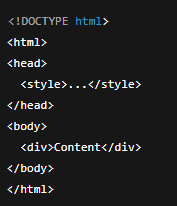
The Isekai Zero platform is not a full HTML document renderer.

It does not parse &lt;!DOCTYPE html&gt;, &lt;html&gt;, &lt;head&gt;, or &lt;body&gt;.

Instead, it injects whatever you write inside an existing page that already has its own &lt;html&gt;, &lt;head&gt;, and &lt;body&gt;.

So, when you include those tags yourself, the renderer just breaks.

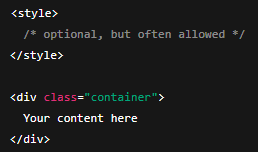
So your content must star with a container element &lt;div&gt; and assume the page already exists.

Think of it as:

![](https://docs.isekai.world/uploads/images/gallery/2026-01/embedded-image-bbhrxh6e.png)

<div align="left" dir="ltr" id="bkmrk-%E2%9D%8C-will-break-or-be-i"><table><colgroup><col></col><col></col></colgroup><tbody><tr><td>❌ Will break or be ignored:![](https://docs.isekai.world/uploads/images/gallery/2026-01/embedded-image-972pwgju.png)

  
</td><td>✅ What the platform expects:

  
![](https://docs.isekai.world/uploads/images/gallery/2026-01/embedded-image-yuypogwe.png)

</td></tr></tbody></table>

</div>Important nuance:

The embedded renderer still allows:

- &lt;style&gt; tags at the top
- Inline styles on elements

In the end, the safest structure is as follows:

![](https://docs.isekai.world/uploads/images/gallery/2026-01/embedded-image-imjcmzep.png)

## Line Breaks and Capsules

The embedded renderer might be a bit iffy with line breaks in some conditions, especially when working with groups of capsules.

For example, this case:

![](https://docs.isekai.world/uploads/images/gallery/2026-01/embedded-image-gkvkqr2p.png)![](https://docs.isekai.world/uploads/images/gallery/2026-01/embedded-image-th7wq84g.png)

The first is on the PC browser viewing, the second is on the mobile app.

This happens when the renderer doesn’t honor the layout rules reliably.

I solved it by switching the pills from &lt;span&gt; to &lt;table&gt; cells, which are more stable.

This was the result in PC and mobile:

![](https://docs.isekai.world/uploads/images/gallery/2026-01/embedded-image-kx9q3hzr.png)![](https://docs.isekai.world/uploads/images/gallery/2026-01/embedded-image-fcuybdkf.png)

## PC vs Mobile (and the problem I’m still to solve)

You probably noticed that the way things work (and break) in PC and mobile are different.

So you should always check the look on your HTML on both platforms, before pushing the public upload.

For example, there’s an issue in the example I showed at the beginning of this article, that only shows up on PC:

![](https://docs.isekai.world/uploads/images/gallery/2026-01/embedded-image-bd7yetov.png)

If I had only looked at the Mobile version, I would’ve never seen the problem. I haven’t sat down to find and fix the source of the bug yet, so I can’t explain it here at the moment, but let it serve as a reminder to always check on both platforms.

## An HTML Example

Here goes the code of the example I showed above, including the issue I haven’t solved yet:

<div align="left" dir="ltr" id="bkmrk-%3Cdiv-style%3D%22backgrou"><table><colgroup><col></col></colgroup><tbody><tr><td>&lt;div style="background:linear-gradient(135deg,#0b1020 0%,#1b2a3a 45%,#2a1b3a 100%);border:2px solid rgba(255,255,255,.12);border-radius:18px;padding:18px 18px 14px;box-shadow:0 10px 28px rgba(0,0,0,.35);font-family:system-ui,-apple-system,Segoe UI,Roboto,Arial;line-height:1.25;"&gt;

  
 &lt;div style="display:flex;align-items:center;gap:10px;margin-bottom:10px;"&gt;

 &lt;div style="font-size:26px;"&gt;🚌⛏️&lt;/div&gt;

 &lt;div style="flex:1;"&gt;

 &lt;div style="font-size:18px;font-weight:800;color:#ffffff;letter-spacing:.2px;"&gt;

 SCHOOL TRIP TO THE STONE AGE

 &lt;/div&gt;

 &lt;div style="font-size:12px;color:rgba(255,255,255,.72);margin-top:2px;"&gt;

 Realistic survival • No magic • Society under stress

 &lt;/div&gt;

 &lt;/div&gt;

 &lt;div style="font-size:12px;font-weight:700;color:#0b1020;background:rgba(255,255,255,.88);padding:6px 10px;border-radius:999px;"&gt;

 NEW RUN = NEW LAND

 &lt;/div&gt;

 &lt;/div&gt;

  
 &lt;div style="background:rgba(255,255,255,.06);border:1px solid rgba(255,255,255,.12);border-radius:14px;padding:12px 12px 10px;margin-bottom:12px;"&gt;

 &lt;div style="color:#fff;font-weight:800;font-size:14px;margin-bottom:6px;"&gt;

 ⚠️ The world outside the school is gone.

 &lt;/div&gt;

 &lt;div style="color:rgba(255,255,255,.78);font-size:13px;"&gt;

 Your modern school has been transplanted into &lt;b&gt;Earth’s Stone Age&lt;/b&gt;. You keep whatever is inside the perimeter: cafeteria stock, library knowledge, lab scraps, tools—until they spoil, break, or run out.

 Outside the fence: wild land, weather, animals… and consequences.

 &lt;/div&gt;

 &lt;/div&gt;

  
 &lt;div style="display:grid;grid-template-columns:1fr 1fr;gap:10px;margin-bottom:12px;"&gt;

 &lt;div style="background:linear-gradient(135deg,rgba(0,255,194,.16),rgba(0,153,255,.10));border:1px solid rgba(0,255,194,.25);border-radius:14px;padding:12px;"&gt;

 &lt;div style="font-weight:900;color:#ffffff;font-size:14px;margin-bottom:4px;"&gt;🎒 STUDENT ROUTE&lt;/div&gt;

 &lt;div style="color:rgba(255,255,255,.82);font-size:12.5px;"&gt;

 Peer politics. Panic. Alliances. Growing into leadership—or getting crushed by it.

 &lt;/div&gt;

 &lt;div style="margin-top:8px;font-size:12px;font-weight:800;color:#0b1020;background:rgba(0,255,194,.85);display:inline-block;padding:6px 10px;border-radius:999px;"&gt;

 Start as Student

 &lt;/div&gt;

 &lt;/div&gt;

  
 &lt;div style="background:linear-gradient(135deg,rgba(255,183,0,.16),rgba(255,0,122,.10));border:1px solid rgba(255,183,0,.25);border-radius:14px;padding:12px;"&gt;

 &lt;div style="font-weight:900;color:#ffffff;font-size:14px;margin-bottom:4px;"&gt;🧑‍🏫 TEACHER ROUTE&lt;/div&gt;

 &lt;div style="color:rgba(255,255,255,.82);font-size:12.5px;"&gt;

 Responsibility. Rationing. Discipline. Ethical choices with no clean answers.

 &lt;/div&gt;

 &lt;div style="margin-top:8px;font-size:12px;font-weight:800;color:#0b1020;background:rgba(255,183,0,.88);display:inline-block;padding:6px 10px;border-radius:999px;"&gt;

 Start as Teacher

 &lt;/div&gt;

 &lt;/div&gt;

 &lt;/div&gt;

  
 &lt;div style="background:rgba(255,255,255,.06);border:1px dashed rgba(255,255,255,.22);border-radius:14px;padding:12px;margin-bottom:12px;"&gt;

 &lt;div style="display:flex;align-items:center;gap:8px;margin-bottom:6px;"&gt;

 &lt;div style="font-size:18px;"&gt;🧠🔥&lt;/div&gt;

 &lt;div style="font-weight:900;color:#ffffff;font-size:13px;"&gt;REALISM PROMISE&lt;/div&gt;

 &lt;/div&gt;

 &lt;div style="color:rgba(255,255,255,.78);font-size:12.5px;"&gt;

 No supernatural. No power fantasy. Hunger, fatigue, weather, injury, and human conflict are the mechanics.

 The setting is &lt;b&gt;never named&lt;/b&gt;—it’s conveyed through landscape, climate, and wildlife, so it stays familiar… but not exploitable.

 &lt;/div&gt;

 &lt;/div&gt;

  
 &lt;div style="display:flex;gap:10px;flex-wrap:wrap;align-items:center;justify-content:space-between;"&gt;

 &lt;div style="color:rgba(255,255,255,.75);font-size:12px;"&gt;

 🥫 Supplies run out • 💧 Water = power • 🌙 Night changes people

 &lt;/div&gt;

 &lt;/div&gt;

  
&lt;/div&gt;

</td></tr></tbody></table>

</div>About The Writer:

Sophia Kramer is an Anthropologist, Game Developer, Writer of Yuri Isekai Slop Web Novels, and Content Creator in Isekai Zero

[soph\_k](https://www.isekai.world/creator/693d5149258255bb9b21f0f5) at Isekai Zero (https://www.isekai.world/creator/693d5149258255bb9b21f0f5)

Novels: The Girl Who Hacked The Magic System, Dead Nerds Society, Metropolis in Ruin (coming now in January!)

# Better Prompts by @SingularityStories

### <span lang="EN-US">Better Prompts by @SingularityStories</span>

*<span lang="EN-US">A Comprehensive Guide to Building Realistic and Stylized Characters Through Prompt Engineering</span>*

**<span lang="EN-US">Foreword: What is this guide for?</span>**

<span lang="EN-US" style="font-family: Symbol; mso-fareast-font-family: Symbol; mso-bidi-font-family: Symbol; mso-bidi-font-weight: bold;"><span style="mso-list: Ignore;">·<span style="font: 7.0pt 'Times New Roman';"> </span></span></span>**<span lang="EN-US">The absolute beginner</span>**

<span lang="EN-US" style="font-family: Symbol; mso-fareast-font-family: Symbol; mso-bidi-font-family: Symbol; mso-bidi-font-weight: bold;"><span style="mso-list: Ignore;">·<span style="font: 7.0pt 'Times New Roman';"> </span></span></span>**<span lang="EN-US">The refiner</span>**

<span lang="EN-US" style="font-family: Symbol; mso-fareast-font-family: Symbol; mso-bidi-font-family: Symbol; mso-bidi-font-weight: bold;"><span style="mso-list: Ignore;">·<span style="font: 7.0pt 'Times New Roman';"> </span></span></span>**<span lang="EN-US">The person who gets aggravated when characters don’t turn out like you imagined them</span>**

<span lang="EN-US" style="font-family: Symbol; mso-fareast-font-family: Symbol; mso-bidi-font-family: Symbol; mso-bidi-font-weight: bold;"><span style="mso-list: Ignore;">·<span style="font: 7.0pt 'Times New Roman';"> </span></span></span>**<span lang="EN-US">Anyone who wants to improve their character creation chops</span>**

**<span lang="EN-US">I will state plainly, I am not the world’s foremost leader in prompting, but creating compelling characters is something that I put a lot of time and effort into becoming better. Many of these philosophies will aid you in characters or stories similarly, so don’t be afraid to apply some of these concepts to either since they’ll serve you well for characters and storylines as well. You will hear me reference characters a lot as well, but storylines and characters aren’t vastly different in terms of the best approach to prompting them. In many ways, it helps to think of your ’world’ that storyline takes part in as a character themselves.</span>**

#### <span lang="EN-US">Core Design Philosophy: Motivation, Pressure, and Behavior</span>

<span lang="EN-US">While at a glance these appear to be relatively basic principles, and surely most of you will know what they mean quite well already, but what we need to understand isn’t purely the word itself, but how the word is interpreted by the LLM. There are a lot of nuances to language that is easy to forget about because we have prior context and experience that drives our understanding without us even being aware of it. A common mistake people make is assuming the LLM means a word the same way we do, which for many words is the case--but when it comes to emotional elements of a word, that is where we often forget that while the LLM understands that a ‘gun’ is a weapon, potentially lethal, etc... but things get murkier when we get into how a character feels about a gun. It knows basic concepts, like generally holding the gun is a better position to be in rather than having a gun pointed at you. </span>

<span lang="EN-US">Take for example a tense action scene where we have one character holding a gun, pointed at another character, and the whole thing is observed by a third. The emotional response (which is critical for compelling, life-like characters) is vastly different, given the circumstances. The one holding it may feel powerful, or relishing impending victory; the second may feel fear, or perhaps they know something the other doesn’t know (the gun is out of bullets); and the third could be feeling a mixture of fear, pity, or maybe their response is because it provokes a traumatic memory and has nothing to do with the gun, only what it represents? </span>

<span lang="EN-US">Each new session starts that character or world over from scratch, using only the information in the prompt, which becomes their source of truth, think of this as their ‘true’ self. The context (what you’ve said/done, what they’ve said/done) works more like someone's memory, which can alter, warp, or disagree with their ’true self’. </span>

<span lang="EN-US">When you focus on motivation, pressure, and behavior, you will find the characters drift less often because it moderates their behaviors around a broader ’pattern’ than a particular if/then keyword. Admittedly these serve realistic characters better than more lighthearted ’tropey’ characters, but they provide a pattern of behavior that serves any prompt well.</span>

- **<span lang="EN-US">Motivation:</span>**<span lang="EN-US"> What drives your character(s) or world’s society? Their desires, fears, and goals shape every action</span>
    - <span lang="EN-US">These should be provided as complete thoughts and not as keywords.</span>

<span lang="EN-US" style="font-family: Wingdings; mso-fareast-font-family: Wingdings; mso-bidi-font-family: Wingdings;"><span style="mso-list: Ignore;">§<span style="font: 7.0pt 'Times New Roman';"> </span></span></span>**<span lang="EN-US">Bad</span>**<span lang="EN-US"> **Example**: ”{char} is afraid of snakes”</span>

<span lang="EN-US" style="font-family: Wingdings; mso-fareast-font-family: Wingdings; mso-bidi-font-family: Wingdings;"><span style="mso-list: Ignore;">§<span style="font: 7.0pt 'Times New Roman';"> </span></span></span>**<span lang="EN-US">Good</span>**<span lang="EN-US"> **Example**: ”{char} is afraid of snakes, when he was a child one came through his window and startled him so he became so wary he stopped playing outside which he suspects is the reason he became such an introvert that he began losing his friends.</span>

- **<span lang="EN-US">Pressure:</span>**<span lang="EN-US"> What obstacles or challenges force your character(s) to act, adapt, or change?</span>
    - <span lang="EN-US">These should still be a complete thought, but pressure is a reinforcement of a prior attribute/trait so as long as you’re referencing a prior character trait you can keep pressure elements a little more succinct.</span>

<span lang="EN-US" style="font-family: Wingdings; mso-fareast-font-family: Wingdings; mso-bidi-font-family: Wingdings;"><span style="mso-list: Ignore;">§<span style="font: 7.0pt 'Times New Roman';"> </span></span></span>**<span lang="EN-US">Bad</span>**<span lang="EN-US"> **Example**: “{char} rarely leaves the house”</span>

<span lang="EN-US" style="font-family: Wingdings; mso-fareast-font-family: Wingdings; mso-bidi-font-family: Wingdings;"><span style="mso-list: Ignore;">§<span style="font: 7.0pt 'Times New Roman';"> </span></span></span>**<span lang="EN-US">Good</span>**<span lang="EN-US"> **Example**: ”{char} hates to be outside of the house and will only do so if coerced by someone he cares about, though he will likely resist their persistence wins out.”</span>

<span lang="EN-US"> </span>

- **<span lang="EN-US">Behavior:</span>**<span lang="EN-US"> How does your character respond to motivation and pressure? Are they thoughtful, impulsive, resilient, or vulnerable</span>
    - <span lang="EN-US">Behavior is a character flaw/trait reinforcement element that is important because it ensures the character behaves how YOUR character reacts, not what it ’thinks’ a character would. Humanity is contradictory, so characters who don’t behave predictably are typically more richly detailed.</span>

<span lang="EN-US" style="font-family: Wingdings; mso-fareast-font-family: Wingdings; mso-bidi-font-family: Wingdings;"><span style="mso-list: Ignore;">§<span style="font: 7.0pt 'Times New Roman';"> </span></span></span>**<span lang="EN-US">Bad</span>**<span lang="EN-US"> **Example**: “{user} gets mad when teased about snake”</span>

<span lang="EN-US" style="font-family: Wingdings; mso-fareast-font-family: Wingdings; mso-bidi-font-family: Wingdings;"><span style="mso-list: Ignore;">§<span style="font: 7.0pt 'Times New Roman';"> </span></span></span>**<span lang="EN-US">Good</span>**<span lang="EN-US"> **Example**: “{user} tends to **respond** to criticism or mockery by **withdrawing** from the group, even if he knows it is **good** **natured**--it brings back too many memories he’d rather **avoid**.”</span>

<span lang="EN-US">Defining these aspects ensures your characters feel authentic and engaging, across genres and styles. If you notice, the better reach of the verbiage allows the LLM to not have to guess what he’d do in other situations, because now it knows **criticism** and **mockery** will elicit this response and not just what to do when he sees **snakes** or snake-like-things.</span>

#### <span lang="EN-US">Understanding Prompt Structure</span>

<span lang="EN-US">For Isekai Zero (and most platforms like it) LLMs interpret from the top down and usually there are multiple fields with different weights on how strongly it will adhere to the prompt. It is important to note that despite how it may sound stricter adherence to a prompt is not always desirable—its the magic the LLM that does between the lines that matters as much as what it does with our prompt, sometimes more.</span>

<span lang="EN-US">It isn’t a technical explanation (or probably very accurate) but I try to think about Isekai Zero’s fields as how critical it is for a particular part of my prompt to be utilized. Sort of like a ’rarely’, ’sometimes’, ’always’ scale, though more technically I’d say they’re varying degrees of ‘weight’, which is to say more weight = higher importance. You can think of them either way; the technical bits are less important than how you use them.</span>

**<span lang="EN-US">Stories</span>**<span lang="EN-US">:</span>

- **<span lang="EN-US">Prompt Plot (Rarely Needs Referenced OR Low Importance):</span>**<span lang="EN-US"> Sets the context and situation for the character</span>
    - <span lang="EN-US">Broader information does well here, largely worldbuilding, genre, etc.</span>
- **<span lang="EN-US">Prompt Guideline (Often Needs Referenced OR Medium to Medium-High Importance):</span>**<span lang="EN-US"> Specifies behavioral rules and expectations</span>
    - <span lang="EN-US">Put in here information that should inform the story direction, including tone or certain storylines you want to progress through. You’re going to frame everything the LLM needs to produce the kind of story you want, key conflicts, factions, locations, background characters (ones you wouldn’t create an actual character for, like a barkeep or nameless store clerk). This can include ’DOs’ and ’DO NOTs’ quite effectively, but with broader interpretations than you would for ’AI Reminders’.</span>

<span lang="EN-US" style="font-family: Wingdings; mso-fareast-font-family: Wingdings; mso-bidi-font-family: Wingdings;"><span style="mso-list: Ignore;">§<span style="font: 7.0pt 'Times New Roman';"> </span></span></span>**<span lang="EN-US">Examples</span>**<span lang="EN-US">: ”DO NOT shy away from graphic violence depictions, DO show appropriate weight for the violence based on character’s background, faction considerations, etc.” </span>

- **<span lang="EN-US">AI Reminder (Always Needs Referenced, High Importance):</span>**<span lang="EN-US"> Prevents drift and maintains focus on intended outcomes</span>
    - <span lang="EN-US">These are the strict guardrails you want to enforce, generally phrased as absolutes, and also do really well with ’DO’ and ’DO NOT’ reminders, but generally I recommend sticking to absolutes and primarily ’DO NOT’.</span>

<span lang="EN-US" style="font-family: Wingdings; mso-fareast-font-family: Wingdings; mso-bidi-font-family: Wingdings;"><span style="mso-list: Ignore;">§<span style="font: 7.0pt 'Times New Roman';"> </span></span></span>**<span lang="EN-US">Examples</span>**<span lang="EN-US">: </span>

- - - - - - <span lang="EN-US">”DO NOT allow magic of any kind by any character regardless of circumstance. Magic does not exist in Storytopia at all”</span>
                    - <span lang="EN-US">“DO NOT allow {{user}} to avoid consequences with plot armor, stakes are real and permanent with zero easy solutions. Trust must be won back, recompense must be paid, trust mended, etc.”</span>

<span lang="EN-US">Each section works together to produce nuanced, consistent, and effective character results.</span>

#### <span lang="EN-US">Prompt Plot: Context, Situation, and Examples</span>

- <span lang="EN-US">Establishes the character's world, stakes, and circumstances driving action.</span>
- **<span lang="EN-US">Answers</span>**<span lang="EN-US">: Where are they? What is happening? Why does it matter?</span>

**<span lang="EN-US">Examples</span>**<span lang="EN-US">:</span>

- <span lang="EN-US">A detective in a rain-soaked city, investigating unsolved crimes while struggling with personal loss.</span>
- <span lang="EN-US">A high school student in a magical academy, facing a crucial exam that determines their future.</span>
- <span lang="EN-US">A strong plot provides the canvas for motivation and pressure to unfold.</span>

#### <span lang="EN-US">Prompt Guideline: Behavioral Rules and Examples</span>

- <span lang="EN-US">Defines how your character thinks, feels, and acts.</span>
- <span lang="EN-US">Sets boundaries and clarifies expectations for AI or characters to stay true to the character/world’s<span style="mso-spacerun: yes;"> </span>essence.</span>

**<span lang="EN-US">Examples</span>**<span lang="EN-US">:</span>

- <span lang="EN-US">Always maintains a professional demeanor but occasionally lets vulnerability slip through.</span>
- <span lang="EN-US">Quick to anger when friends are threatened, but hides fear with bravado.</span>

<span lang="EN-US">Guidelines keep your character’s behavior consistent and believable.</span>

#### <span lang="EN-US">AI Reminder: Drift Prevention and Examples</span>

- <span lang="EN-US">Concise instructions reinforcing core traits and preventing unintended deviations.</span>
- <span lang="EN-US">Anchors prompts and helps maintain quality throughout extended outputs.</span>

**<span lang="EN-US">Examples</span>**<span lang="EN-US">:</span>

- <span lang="EN-US">Remember: The character never resorts to violence unless absolutely necessary.</span>
- <span lang="EN-US">Remain focused on the character’s internal conflict; avoid generic dialogue.</span>

###  

### <span lang="EN-US">Chapter 1 — Realistic and Gritty Characters &amp; Worlds</span>

#### <span lang="EN-US">Restraint, Conflict, and Realism</span>

- <span lang="EN-US">Emphasize restraint—characters often hide feelings or act against their own interests. Humanity is paradoxical by nature, we feel sympathy for our family we wouldn’t for strangers, so specifying the ways we apply our sympathy (or do not apply it) will build in restraint based characterization.</span>
- <span lang="EN-US">Build in conflict—internal dilemmas, moral ambiguity, and external pressures drive development. This is where the rubber does or does not ’meet the road’. This is how you build a character that is ’tsundere’ in public, but doting in private. This is the ’outward’ versus the ’inward’.</span>
    - **<span lang="EN-US">Example</span>**<span lang="EN-US">: “On the surface, to everyone she is a cruel bully to her love interested but when they are alone she pampers him like he was her god incarnate, she belittles him in public to make them seem less desirable to competition and secretly dotes on him to win his heart outright.”</span>
- <span lang="EN-US">Ground the character in specific details—habits, flaws, and environment shape behavior. A good example of these are coping mechanisms, unconscious habits like twirling hair or swaying side to side while listening intently, or even how they view kindness.</span>
    - **<span lang="EN-US">Example</span>**<span lang="EN-US"> (Suspicious of Kindness): “Has a tendency to retreat into her mind when people are speaking kindly of her, she’s never met anyone who could convince her they weren’t just kind in exchange for something they wanted from her, she tends to scoff in disbelief whenever someone is being kind to her and become increasingly uncomfortable the more kind they ’pretend’ to be as she does not believe it is a sincere emotion.”</span>
    - **<span lang="EN-US">Example</span>**<span lang="EN-US"> (Naive, Blindly Trusts Kindness of Strangers): “Has a tendency to find herself in bad situations that her friends often need to rescue her from because she trusts people implicitly expecting only goodness from everyone she meets, leading to her being frequently taken advantage of—strangely it never seems to dull her positive outlook longer than the drive home before she rationalizes the other person’s bad behavior, usually by blaming some innocuous thing she had said or done that lead to a ’misunderstanding’.”</span>

###  

### <span lang="EN-US">Chapter 2 — Stylized and Anime Characters &amp; Worlds</span>

#### <span lang="EN-US">Tropes, Internal Logic, and Examples</span>

- <span lang="EN-US">Lean into familiar tropes—tsundere, hero, rival, mentor—while adding unique twists.</span>
    - <span lang="EN-US">Tropes are a two-edged sword, often where people go wrong is by simply adding a trope keyword like ’geek’ or ’tsundere’, both of which will work to create enough for a throwaway character like an unnamed maid at a bar or something. You’re better off framing it within the confines of the character design philosophy discussed above... What Motivates them? How do they react to X? What needs to happen for them to experience growth? Even if you include the keyword trait (such as ‘tsundere’), adding in even a little bit of distinction will go a long way.</span>

<span lang="EN-US" style="font-family: Wingdings; mso-fareast-font-family: Wingdings; mso-bidi-font-family: Wingdings;"><span style="mso-list: Ignore;">§<span style="font: 7.0pt 'Times New Roman';"> </span></span></span>**<span lang="EN-US">Example</span>**<span lang="EN-US">: “A decidedly tsundere girl who frequently will find {{user}} just to tease them about their height, though admittedly she can be cruel she seems to never mock his appearance perhaps a line she doesn’t wish to cross or because she may find him more pleasant to look at than she will admit openly, she becomes flustered and stutters frequently whenever teased she might have feelings for {{user}}.</span>

- <span lang="EN-US">Define the character’s internal logic—why do they act dramatically or what are the boundaries of their personal ethos?</span>
    - <span lang="EN-US">Do they exaggerate their feelings for a laugh, or do they refuse to show fear or pain because they are afraid of being seen as ’weak’.</span>
- <span lang="EN-US">Balance stylization with consistency—quirks should feel intentional, not random</span>
    - <span lang="EN-US">Consistency is important with quirks, traits, personality markers, etc.; try to avoid outright conflicting concepts either, ”shy but brave” will make a character confused, but just like a real person someone can be shy and brave but usually not in the same situation.</span>

<span lang="EN-US" style="font-family: Wingdings; mso-fareast-font-family: Wingdings; mso-bidi-font-family: Wingdings;"><span style="mso-list: Ignore;">§<span style="font: 7.0pt 'Times New Roman';"> </span></span></span><span lang="EN-US">Example: “Hana was crippingly shy, she rarely speaks to any other students unless they speak to her directly, however she is brave and confident when in the market where she grew up even striking up clever small talk with each vendor as she passes by.”</span>

### <span lang="EN-US">Chapter 3 — Recreating Existing Characters</span>

#### <span lang="EN-US">Reverse Engineering, Steps, and Dialogue Samples</span>

- <span lang="EN-US">Analyze the source material—list signature behaviors, catchphrases, and emotional triggers.</span>
    - <span lang="EN-US">‘Analyze’ is sort of ambiguous; however, the basic idea is that you want to look at it in the context of the design philosophy above. What motivates them? What are their fears? What gives them pressure? Etc. You want to think about these simply... For a quick example, if we took Deku from MHA we’d want to focus on some key aspects: </span>

<span lang="EN-US" style="font-family: Wingdings; mso-fareast-font-family: Wingdings; mso-bidi-font-family: Wingdings;"><span style="mso-list: Ignore;">§<span style="font: 7.0pt 'Times New Roman';"> </span></span></span><span lang="EN-US">Deku is a huge fan of heroes in every sense of the word, even after becoming one himself he still had a lot of respect for the work of many professional heroes that he saw as mentors and readily accepts the guidance of those with experience.</span>

<span lang="EN-US" style="font-family: Wingdings; mso-fareast-font-family: Wingdings; mso-bidi-font-family: Wingdings;"><span style="mso-list: Ignore;">§<span style="font: 7.0pt 'Times New Roman';"> </span></span></span><span lang="EN-US">Deku is relentless in his philosophy that everyone is inherently good, to the point of putting his life continuously on the line trying to get through to a villain, because he feels everyone is fundamentally good many villains take advantage of it to gain an upper hand because of how Deku holds back his true powers to have time to get through to them.</span>

<span lang="EN-US" style="font-family: Wingdings; mso-fareast-font-family: Wingdings; mso-bidi-font-family: Wingdings;"><span style="mso-list: Ignore;">§<span style="font: 7.0pt 'Times New Roman';"> </span></span></span><span lang="EN-US">Deku is always encouraging his peers, never allowing himself to grow jealous or angry when they make great strides--his focus is always on pushing forward and never falling behind, which has lead to him learning several techniques from his friends that have enabled him to become even more proficient with his own abilities. He sees competitiveness as a thing that bonds him to others, not as a need to be or feel superior to them. His humility is as much a part of Deku as his competitiveness.</span>

<span lang="EN-US" style="font-family: Wingdings; mso-fareast-font-family: Wingdings; mso-bidi-font-family: Wingdings;"><span style="mso-list: Ignore;">§<span style="font: 7.0pt 'Times New Roman';"> </span></span></span><span lang="EN-US">Deku frequently names any special attacks he uses after American states, usually with a ‘SMASH’ at the end, a habit he learned from his predecessor and mentor Allmight their signature move ’DETROIT SMASH’</span>

<span lang="EN-US" style="font-family: Symbol; mso-fareast-font-family: Symbol; mso-bidi-font-family: Symbol;"><span style="mso-list: Ignore;">·<span style="font: 7.0pt 'Times New Roman';"> </span></span></span>

- <span lang="EN-US">Build a prompt that mirrors their context, guidelines, and reminders.</span>
    - <span lang="EN-US">Characters on Isekai Zero have only the character descriptions as the input, but the application is the same, so you can include them in a single character description, unliked stories which are best separated into ’Prompt Plot’, ‘Prompt Guideline’, ‘AI Reminders’.</span>
- <span lang="EN-US">Test with sample dialogue and adjust for accuracy.</span>
    - <span lang="EN-US">A pro-tip is to put your thesaurus to work, sometimes even just changing the ‘severity’ of the words you choose can matter a lot.</span>

<span lang="EN-US" style="font-family: Wingdings; mso-fareast-font-family: Wingdings; mso-bidi-font-family: Wingdings;"><span style="mso-list: Ignore;">§<span style="font: 7.0pt 'Times New Roman';"> </span></span></span><span lang="EN-US">“Gentle” vs ”Mild” vs “Slight” for example can be deceptively distinguishing severities depending on the LLM being used. Before you rewrite your whole character, consider modifying the words for the prompt that related to the undesirable behavior.</span>

### <span lang="EN-US">Troubleshooting and Failure Modes</span>

#### <span lang="EN-US">Common Issues and Solutions</span>

<table border="1" cellpadding="0" cellspacing="0" class="MsoTableGrid" id="bkmrk-issue-solution-chara" style="border-collapse: collapse; border: none; mso-border-alt: solid #D1D1D1 1.0pt; mso-border-themecolor: background2; mso-border-themeshade: 230; mso-yfti-tbllook: 1056; mso-padding-alt: 0cm 5.4pt 0cm 5.4pt; mso-border-insideh: 1.0pt solid #F0F0F0; mso-border-insidev: cell-none;"><tbody><tr style="mso-yfti-irow: 0; mso-yfti-firstrow: yes; height: 15.0pt;"><td style="width: 234.0pt; border-top: solid #D1D1D1 1.0pt; mso-border-top-themecolor: background2; mso-border-top-themeshade: 230; border-left: solid #D1D1D1 1.0pt; mso-border-left-themecolor: background2; mso-border-left-themeshade: 230; border-bottom: solid #F0F0F0 1.0pt; border-right: none; background: whitesmoke; padding: 3.0pt 3.0pt 3.0pt 3.0pt; height: 15.0pt;" valign="top" width="312">**<span lang="EN-US" style="font-size: 11.0pt; color: black; mso-color-alt: windowtext;">Issue</span>**

</td><td style="width: 234.0pt; border-top: solid #D1D1D1 1.0pt; mso-border-top-themecolor: background2; mso-border-top-themeshade: 230; border-left: none; border-bottom: solid #F0F0F0 1.0pt; border-right: solid #D1D1D1 1.0pt; mso-border-right-themecolor: background2; mso-border-right-themeshade: 230; background: whitesmoke; padding: 3.0pt 3.0pt 3.0pt 3.0pt; height: 15.0pt;" valign="top" width="312">**<span lang="EN-US" style="font-size: 11.0pt; color: black; mso-color-alt: windowtext;">Solution</span>**

</td></tr><tr style="mso-yfti-irow: 1; height: 15.0pt;"><td style="width: 234.0pt; border-top: none; border-left: solid #D1D1D1 1.0pt; mso-border-left-themecolor: background2; mso-border-left-themeshade: 230; border-bottom: solid #F0F0F0 1.0pt; border-right: none; mso-border-top-alt: solid #F0F0F0 1.0pt; background: white; mso-background-themecolor: background1; padding: 3.0pt 3.0pt 3.0pt 3.0pt; height: 15.0pt;" valign="top" width="312"><span lang="EN-US" style="font-size: 11.0pt; color: black; mso-color-alt: windowtext;">Character loses consistency.</span>

</td><td style="width: 234.0pt; border-top: none; border-left: none; border-bottom: solid #F0F0F0 1.0pt; border-right: solid #D1D1D1 1.0pt; mso-border-right-themecolor: background2; mso-border-right-themeshade: 230; mso-border-top-alt: solid #F0F0F0 1.0pt; background: white; mso-background-themecolor: background1; padding: 3.0pt 3.0pt 3.0pt 3.0pt; height: 15.0pt;" valign="top" width="312"><span lang="EN-US" style="font-size: 11.0pt; color: black; mso-color-alt: windowtext;">Strengthen the AI Reminder and reassert core traits.</span>

</td></tr><tr style="mso-yfti-irow: 2; height: 15.0pt;"><td style="width: 234.0pt; border-top: none; border-left: solid #D1D1D1 1.0pt; mso-border-left-themecolor: background2; mso-border-left-themeshade: 230; border-bottom: solid #F0F0F0 1.0pt; border-right: none; mso-border-top-alt: solid #F0F0F0 1.0pt; background: white; mso-background-themecolor: background1; padding: 3.0pt 3.0pt 3.0pt 3.0pt; height: 15.0pt;" valign="top" width="312"><span lang="EN-US" style="font-size: 11.0pt; color: black; mso-color-alt: windowtext;">Dialogue feels generic.</span>

</td><td style="width: 234.0pt; border-top: none; border-left: none; border-bottom: solid #F0F0F0 1.0pt; border-right: solid #D1D1D1 1.0pt; mso-border-right-themecolor: background2; mso-border-right-themeshade: 230; mso-border-top-alt: solid #F0F0F0 1.0pt; background: white; mso-background-themecolor: background1; padding: 3.0pt 3.0pt 3.0pt 3.0pt; height: 15.0pt;" valign="top" width="312"><span lang="EN-US" style="font-size: 11.0pt; color: black; mso-color-alt: windowtext;">Refine guidelines with specific word choices and emotional cues.</span>

</td></tr><tr style="mso-yfti-irow: 3; height: 15.0pt;"><td style="width: 234.0pt; border-top: none; border-left: solid #D1D1D1 1.0pt; mso-border-left-themecolor: background2; mso-border-left-themeshade: 230; border-bottom: solid #F0F0F0 1.0pt; border-right: none; mso-border-top-alt: solid #F0F0F0 1.0pt; background: white; mso-background-themecolor: background1; padding: 3.0pt 3.0pt 3.0pt 3.0pt; height: 15.0pt;" valign="top" width="312"><span lang="EN-US" style="font-size: 11.0pt; color: black; mso-color-alt: windowtext;">Character lacks depth.</span>

</td><td style="width: 234.0pt; border-top: none; border-left: none; border-bottom: solid #F0F0F0 1.0pt; border-right: solid #D1D1D1 1.0pt; mso-border-right-themecolor: background2; mso-border-right-themeshade: 230; mso-border-top-alt: solid #F0F0F0 1.0pt; background: white; mso-background-themecolor: background1; padding: 3.0pt 3.0pt 3.0pt 3.0pt; height: 15.0pt;" valign="top" width="312"><span lang="EN-US" style="font-size: 11.0pt; color: black; mso-color-alt: windowtext;">Add more pressure, conflict, or backstory to the prompt plot.</span>

</td></tr><tr style="mso-yfti-irow: 4; mso-yfti-lastrow: yes; height: 15.0pt;"><td style="width: 234.0pt; border-top: none; border-left: solid #D1D1D1 1.0pt; mso-border-left-themecolor: background2; mso-border-left-themeshade: 230; border-bottom: solid #D1D1D1 1.0pt; mso-border-bottom-themecolor: background2; mso-border-bottom-themeshade: 230; border-right: none; mso-border-top-alt: solid #F0F0F0 1.0pt; background: white; mso-background-themecolor: background1; padding: 3.0pt 3.0pt 3.0pt 3.0pt; height: 15.0pt;" valign="top" width="312"><span lang="EN-US" style="font-size: 11.0pt; color: black; mso-color-alt: windowtext;">Stylized character feels random.</span>

</td><td style="width: 234.0pt; border-top: none; border-left: none; border-bottom: solid #D1D1D1 1.0pt; mso-border-bottom-themecolor: background2; mso-border-bottom-themeshade: 230; border-right: solid #D1D1D1 1.0pt; mso-border-right-themecolor: background2; mso-border-right-themeshade: 230; mso-border-top-alt: solid #F0F0F0 1.0pt; background: white; mso-background-themecolor: background1; padding: 3.0pt 3.0pt 3.0pt 3.0pt; height: 15.0pt;" valign="top" width="312"><span lang="EN-US" style="font-size: 11.0pt; color: black; mso-color-alt: windowtext;">Clarify internal logic and reinforce behavioral rules.</span>

</td></tr></tbody></table>

<span lang="EN-US">Always iterate and test, adjusting each section for clarity and impact.</span>

### <span lang="EN-US">Word Choice and Severity Control</span>

#### <span lang="EN-US">Tone, Effort, and Realism</span>

- <span lang="EN-US">Use precise, evocative language for realism—gritted teeth, trembling hands, forced smile.</span>
- <span lang="EN-US">Adjust severity to match genre—gritty prompts benefit from understatement, stylized prompts thrive on bold, expressive words.</span>
- <span lang="EN-US">Control tone through verbs, adjectives, and adverbs—hesitant, relentless, cheerful.</span>

<span lang="EN-US">Experiment with different word choices to balance authenticity and style.</span>

# <span lang="EN-US">Conclusion</span>

<span lang="EN-US">With these strategies, structures, and templates, you’re equipped to create exceptional character prompts, so long as you remember great characters are built on motivation, pressure, and behavior—use these to clarify your vision and experiment, whether seeking realism, stylization, or faithful recreation, prompt engineering gives you powerful creative tools. Keep exploring, iterating, and enjoy the process!</span>

<span lang="EN-US"> </span>

<span lang="EN-US"> </span>

<span lang="EN-US" style="font-family: 'Aptos Display',sans-serif; mso-ascii-theme-font: major-latin; mso-fareast-font-family: 'Times New Roman'; mso-fareast-theme-font: major-fareast; mso-hansi-theme-font: major-latin; mso-bidi-font-family: 'Times New Roman'; mso-bidi-theme-font: major-bidi;"></span>

# Character Image Generation by storyteller

### <span lang="EN" style="font-size: 19.0pt; line-height: 115%;">Character Image Generation</span>

<span lang="EN"> </span>

<span lang="EN">There’s many ways you can go about generating character images and emotions. I’ll be going through my process for generating characters specifically with Gemini’s Nano Banana/Nano Banana Pro. You’ll have varying levels of success using other image generation tools using this guide.</span>

<span lang="EN">Nano Banana and Nano Banana Pro are great at generating specific character images and replacing them with different emotions and poses.</span>

<span lang="EN">Generally, getting a character to be framed correctly is time consuming and annoying to do specifically through image generation. It’s better to open up your favorite image editing software and frame the character you want. Then ask it to redraw the image at a higher quality.</span>

<span lang="EN"> </span>

<span lang="EN" style="mso-no-proof: yes;">![](https://docs.isekai.world/uploads/images/gallery/2026-01/embedded-image-rdewlssi.png) ![](https://docs.isekai.world/uploads/images/gallery/2026-01/embedded-image-lhmhawmv.png) </span>

<span lang="EN"> </span>

<span lang="EN">My process for generating different emotions is very simple and straightforward. It is the same process for every single one of my published characters. Here are the prompts I use for each emotion:</span>

<span lang="EN"> </span>

<table border="1" cellpadding="0" cellspacing="0" class="MsoNormalTable" id="bkmrk-%23-emotion-%2F-pose-pro" style="border-collapse: collapse; border: medium; height: 1127.47px; width: 852px;" width="757"><tbody><tr style="height: 65.8px;"><td style="width: 41.1px; border: 1pt solid rgb(31, 31, 31); background: rgb(239, 239, 239); padding: 6pt 9pt; height: 65.8px;" valign="top">**<span lang="EN" style="color: #1f1f1f;">\#</span>**

</td><td style="width: 124.717px; border-width: 1pt 1pt 1pt medium; border-style: solid solid solid none; border-color: rgb(31, 31, 31) rgb(31, 31, 31) rgb(31, 31, 31) currentcolor; background: rgb(239, 239, 239); padding: 6pt 9pt; height: 65.8px;" valign="top">**<span lang="EN" style="color: #1f1f1f;">Emotion / Pose</span>**

</td><td style="width: 659.483px; border-width: 1pt 1pt 1pt medium; border-style: solid solid solid none; border-color: rgb(31, 31, 31) rgb(31, 31, 31) rgb(31, 31, 31) currentcolor; background: rgb(239, 239, 239); padding: 6pt 9pt; height: 65.8px;" valign="top">**<span lang="EN" style="color: #1f1f1f;">Prompt</span>**

</td><td style="width: 72.1333px; border-width: 1pt 1pt 1pt medium; border-style: solid solid solid none; border-color: rgb(31, 31, 31) rgb(31, 31, 31) rgb(31, 31, 31) currentcolor; background: rgb(239, 239, 239); padding: 6pt 9pt; height: 65.8px;" valign="top">**<span lang="EN" style="color: #1f1f1f;">Output</span>**

</td></tr><tr style="height: 99.4667px;"><td style="width: 41.1px; border-width: medium 1pt 1pt; border-style: none solid solid; border-color: currentcolor rgb(31, 31, 31) rgb(31, 31, 31); padding: 6pt 9pt; height: 99.4667px;" valign="top">**<span lang="EN" style="color: #1f1f1f;">1</span>**

</td><td style="width: 124.717px; border-width: medium 1pt 1pt medium; border-style: none solid solid none; border-color: currentcolor rgb(31, 31, 31) rgb(31, 31, 31) currentcolor; padding: 6pt 9pt; height: 99.4667px;" valign="top">**<span lang="EN" style="color: #1f1f1f;">Neutral</span>**

</td><td style="width: 659.483px; border-width: medium 1pt 1pt medium; border-style: none solid solid none; border-color: currentcolor rgb(31, 31, 31) rgb(31, 31, 31) currentcolor; padding: 6pt 9pt; height: 99.4667px;" valign="top"><span lang="EN" style="color: #1f1f1f;">Base Image</span>

</td><td style="width: 72.1333px; border-width: medium 1pt 1pt medium; border-style: none solid solid none; border-color: currentcolor rgb(31, 31, 31) rgb(31, 31, 31) currentcolor; padding: 6pt 9pt; height: 99.4667px;" valign="top"><span lang="EN" style="color: #1f1f1f; mso-no-proof: yes;">![](https://docs.isekai.world/uploads/images/gallery/2026-01/embedded-image-d5ifu55y.png)</span>

</td></tr><tr style="height: 99.4667px;"><td style="width: 41.1px; border-width: medium 1pt 1pt; border-style: none solid solid; border-color: currentcolor rgb(31, 31, 31) rgb(31, 31, 31); padding: 6pt 9pt; height: 99.4667px;" valign="top">**<span lang="EN" style="color: #1f1f1f;">2</span>**

</td><td style="width: 124.717px; border-width: medium 1pt 1pt medium; border-style: none solid solid none; border-color: currentcolor rgb(31, 31, 31) rgb(31, 31, 31) currentcolor; padding: 6pt 9pt; height: 99.4667px;" valign="top">**<span lang="EN" style="color: #1f1f1f;">Happy</span>**

</td><td style="width: 659.483px; border-width: medium 1pt 1pt medium; border-style: none solid solid none; border-color: currentcolor rgb(31, 31, 31) rgb(31, 31, 31) currentcolor; padding: 6pt 9pt; height: 99.4667px;" valign="top"><span lang="EN" style="color: #1f1f1f;">make her happy, change her pose to happy, no waving, standing, no special effects, gray background</span>

</td><td style="width: 72.1333px; border-width: medium 1pt 1pt medium; border-style: none solid solid none; border-color: currentcolor rgb(31, 31, 31) rgb(31, 31, 31) currentcolor; padding: 6pt 9pt; height: 99.4667px;" valign="top"><span lang="EN" style="color: #1f1f1f; mso-no-proof: yes;">![](https://docs.isekai.world/uploads/images/gallery/2026-01/embedded-image-sgjzr9nf.png)</span>

</td></tr><tr style="height: 99.4667px;"><td style="width: 41.1px; border-width: medium 1pt 1pt; border-style: none solid solid; border-color: currentcolor rgb(31, 31, 31) rgb(31, 31, 31); padding: 6pt 9pt; height: 99.4667px;" valign="top">**<span lang="EN" style="color: #1f1f1f;">3</span>**

</td><td style="width: 124.717px; border-width: medium 1pt 1pt medium; border-style: none solid solid none; border-color: currentcolor rgb(31, 31, 31) rgb(31, 31, 31) currentcolor; padding: 6pt 9pt; height: 99.4667px;" valign="top">**<span lang="EN" style="color: #1f1f1f;">Laughing</span>**

</td><td style="width: 659.483px; border-width: medium 1pt 1pt medium; border-style: none solid solid none; border-color: currentcolor rgb(31, 31, 31) rgb(31, 31, 31) currentcolor; padding: 6pt 9pt; height: 99.4667px;" valign="top"><span lang="EN" style="color: #1f1f1f;">make her laughing, change her pose to laughing, standing, no special effects, gray background</span>

</td><td style="width: 72.1333px; border-width: medium 1pt 1pt medium; border-style: none solid solid none; border-color: currentcolor rgb(31, 31, 31) rgb(31, 31, 31) currentcolor; padding: 6pt 9pt; height: 99.4667px;" valign="top"><span lang="EN" style="color: #1f1f1f; mso-no-proof: yes;">![](https://docs.isekai.world/uploads/images/gallery/2026-01/embedded-image-ojsdg0s3.png)</span>

</td></tr><tr style="height: 99.4667px;"><td style="width: 41.1px; border-width: medium 1pt 1pt; border-style: none solid solid; border-color: currentcolor rgb(31, 31, 31) rgb(31, 31, 31); padding: 6pt 9pt; height: 99.4667px;" valign="top">**<span lang="EN" style="color: #1f1f1f;">4</span>**

</td><td style="width: 124.717px; border-width: medium 1pt 1pt medium; border-style: none solid solid none; border-color: currentcolor rgb(31, 31, 31) rgb(31, 31, 31) currentcolor; padding: 6pt 9pt; height: 99.4667px;" valign="top">**<span lang="EN" style="color: #1f1f1f;">Angry</span>**

</td><td style="width: 659.483px; border-width: medium 1pt 1pt medium; border-style: none solid solid none; border-color: currentcolor rgb(31, 31, 31) rgb(31, 31, 31) currentcolor; padding: 6pt 9pt; height: 99.4667px;" valign="top"><span lang="EN" style="color: #1f1f1f;">make her angry, change her pose to angry, standing, no special effects, gray background</span>

</td><td style="width: 72.1333px; border-width: medium 1pt 1pt medium; border-style: none solid solid none; border-color: currentcolor rgb(31, 31, 31) rgb(31, 31, 31) currentcolor; padding: 6pt 9pt; height: 99.4667px;" valign="top"><span lang="EN" style="color: #1f1f1f; mso-no-proof: yes;">![](https://docs.isekai.world/uploads/images/gallery/2026-01/embedded-image-ygkifubs.png)</span>

</td></tr><tr style="height: 99.4667px;"><td style="width: 41.1px; border-width: medium 1pt 1pt; border-style: none solid solid; border-color: currentcolor rgb(31, 31, 31) rgb(31, 31, 31); padding: 6pt 9pt; height: 99.4667px;" valign="top">**<span lang="EN" style="color: #1f1f1f;">5</span>**

</td><td style="width: 124.717px; border-width: medium 1pt 1pt medium; border-style: none solid solid none; border-color: currentcolor rgb(31, 31, 31) rgb(31, 31, 31) currentcolor; padding: 6pt 9pt; height: 99.4667px;" valign="top">**<span lang="EN" style="color: #1f1f1f;">Sad</span>**

</td><td style="width: 659.483px; border-width: medium 1pt 1pt medium; border-style: none solid solid none; border-color: currentcolor rgb(31, 31, 31) rgb(31, 31, 31) currentcolor; padding: 6pt 9pt; height: 99.4667px;" valign="top"><span lang="EN" style="color: #1f1f1f;">make her sad, change her pose to sad, no crying, standing, no special effects, gray background</span>

</td><td style="width: 72.1333px; border-width: medium 1pt 1pt medium; border-style: none solid solid none; border-color: currentcolor rgb(31, 31, 31) rgb(31, 31, 31) currentcolor; padding: 6pt 9pt; height: 99.4667px;" valign="top"><span lang="EN" style="color: #1f1f1f; mso-no-proof: yes;">![](https://docs.isekai.world/uploads/images/gallery/2026-01/embedded-image-juckgm2s.png)</span>

</td></tr><tr style="height: 99.4667px;"><td style="width: 41.1px; border-width: medium 1pt 1pt; border-style: none solid solid; border-color: currentcolor rgb(31, 31, 31) rgb(31, 31, 31); padding: 6pt 9pt; height: 99.4667px;" valign="top">**<span lang="EN" style="color: #1f1f1f;">6</span>**

</td><td style="width: 124.717px; border-width: medium 1pt 1pt medium; border-style: none solid solid none; border-color: currentcolor rgb(31, 31, 31) rgb(31, 31, 31) currentcolor; padding: 6pt 9pt; height: 99.4667px;" valign="top">**<span lang="EN" style="color: #1f1f1f;">Crying</span>**

</td><td style="width: 659.483px; border-width: medium 1pt 1pt medium; border-style: none solid solid none; border-color: currentcolor rgb(31, 31, 31) rgb(31, 31, 31) currentcolor; padding: 6pt 9pt; height: 99.4667px;" valign="top"><span lang="EN" style="color: #1f1f1f;">make her crying, change her pose to crying, standing, no special effects, gray background</span>

</td><td style="width: 72.1333px; border-width: medium 1pt 1pt medium; border-style: none solid solid none; border-color: currentcolor rgb(31, 31, 31) rgb(31, 31, 31) currentcolor; padding: 6pt 9pt; height: 99.4667px;" valign="top"><span lang="EN" style="color: #1f1f1f; mso-no-proof: yes;">![](https://docs.isekai.world/uploads/images/gallery/2026-01/embedded-image-exwh213e.png)</span>

</td></tr><tr style="height: 99.4667px;"><td style="width: 41.1px; border-width: medium 1pt 1pt; border-style: none solid solid; border-color: currentcolor rgb(31, 31, 31) rgb(31, 31, 31); padding: 6pt 9pt; height: 99.4667px;" valign="top">**<span lang="EN" style="color: #1f1f1f;">7</span>**

</td><td style="width: 124.717px; border-width: medium 1pt 1pt medium; border-style: none solid solid none; border-color: currentcolor rgb(31, 31, 31) rgb(31, 31, 31) currentcolor; padding: 6pt 9pt; height: 99.4667px;" valign="top">**<span lang="EN" style="color: #1f1f1f;">Embarrassed</span>**

</td><td style="width: 659.483px; border-width: medium 1pt 1pt medium; border-style: none solid solid none; border-color: currentcolor rgb(31, 31, 31) rgb(31, 31, 31) currentcolor; padding: 6pt 9pt; height: 99.4667px;" valign="top"><span lang="EN" style="color: #1f1f1f;">make her embarrassed, change her pose to embarrassed, standing, no special effects, gray background</span>

</td><td style="width: 72.1333px; border-width: medium 1pt 1pt medium; border-style: none solid solid none; border-color: currentcolor rgb(31, 31, 31) rgb(31, 31, 31) currentcolor; padding: 6pt 9pt; height: 99.4667px;" valign="top"><span lang="EN" style="color: #1f1f1f; mso-no-proof: yes;">![](https://docs.isekai.world/uploads/images/gallery/2026-01/embedded-image-cndifeg9.png)</span>

</td></tr><tr style="height: 99.4667px;"><td style="width: 41.1px; border-width: medium 1pt 1pt; border-style: none solid solid; border-color: currentcolor rgb(31, 31, 31) rgb(31, 31, 31); padding: 6pt 9pt; height: 99.4667px;" valign="top">**<span lang="EN" style="color: #1f1f1f;">8</span>**

</td><td style="width: 124.717px; border-width: medium 1pt 1pt medium; border-style: none solid solid none; border-color: currentcolor rgb(31, 31, 31) rgb(31, 31, 31) currentcolor; padding: 6pt 9pt; height: 99.4667px;" valign="top">**<span lang="EN" style="color: #1f1f1f;">Suspicious</span>**

</td><td style="width: 659.483px; border-width: medium 1pt 1pt medium; border-style: none solid solid none; border-color: currentcolor rgb(31, 31, 31) rgb(31, 31, 31) currentcolor; padding: 6pt 9pt; height: 99.4667px;" valign="top"><span lang="EN" style="color: #1f1f1f;">make her suspicious, change her pose to suspicious, standing, no special effects, gray background</span>

</td><td style="width: 72.1333px; border-width: medium 1pt 1pt medium; border-style: none solid solid none; border-color: currentcolor rgb(31, 31, 31) rgb(31, 31, 31) currentcolor; padding: 6pt 9pt; height: 99.4667px;" valign="top"><span lang="EN" style="color: #1f1f1f; mso-no-proof: yes;">![](https://docs.isekai.world/uploads/images/gallery/2026-01/embedded-image-rga4nri5.png)</span>

</td></tr><tr style="height: 99.4667px;"><td style="width: 41.1px; border-width: medium 1pt 1pt; border-style: none solid solid; border-color: currentcolor rgb(31, 31, 31) rgb(31, 31, 31); padding: 6pt 9pt; height: 99.4667px;" valign="top">**<span lang="EN" style="color: #1f1f1f;">9</span>**

</td><td style="width: 124.717px; border-width: medium 1pt 1pt medium; border-style: none solid solid none; border-color: currentcolor rgb(31, 31, 31) rgb(31, 31, 31) currentcolor; padding: 6pt 9pt; height: 99.4667px;" valign="top">**<span lang="EN" style="color: #1f1f1f;">Disgusted</span>**

</td><td style="width: 659.483px; border-width: medium 1pt 1pt medium; border-style: none solid solid none; border-color: currentcolor rgb(31, 31, 31) rgb(31, 31, 31) currentcolor; padding: 6pt 9pt; height: 99.4667px;" valign="top"><span lang="EN" style="color: #1f1f1f;">make her disgusted, change her pose to disgusted, standing, no special effects, gray background</span>

</td><td style="width: 72.1333px; border-width: medium 1pt 1pt medium; border-style: none solid solid none; border-color: currentcolor rgb(31, 31, 31) rgb(31, 31, 31) currentcolor; padding: 6pt 9pt; height: 99.4667px;" valign="top"><span lang="EN" style="color: #1f1f1f; mso-no-proof: yes;">![](https://docs.isekai.world/uploads/images/gallery/2026-01/embedded-image-ilvdvuht.png)</span>

</td></tr><tr style="height: 166.467px;"><td style="width: 41.1px; border-width: medium 1pt 1pt; border-style: none solid solid; border-color: currentcolor rgb(31, 31, 31) rgb(31, 31, 31); padding: 6pt 9pt; height: 166.467px;" valign="top">**<span lang="EN" style="color: #1f1f1f;">10</span>**

</td><td style="width: 124.717px; border-width: medium 1pt 1pt medium; border-style: none solid solid none; border-color: currentcolor rgb(31, 31, 31) rgb(31, 31, 31) currentcolor; padding: 6pt 9pt; height: 166.467px;" valign="top">**<span lang="EN" style="color: #1f1f1f;">Scared</span>**

</td><td style="width: 659.483px; border-width: medium 1pt 1pt medium; border-style: none solid solid none; border-color: currentcolor rgb(31, 31, 31) rgb(31, 31, 31) currentcolor; padding: 6pt 9pt; height: 166.467px;" valign="top"><span lang="EN" style="color: #1f1f1f;">make her scared, change her pose to scared, standing, no special effects, gray background</span>

</td><td style="width: 72.1333px; border-width: medium 1pt 1pt medium; border-style: none solid solid none; border-color: currentcolor rgb(31, 31, 31) rgb(31, 31, 31) currentcolor; padding: 6pt 9pt; height: 166.467px;" valign="top"><span lang="EN" style="color: #1f1f1f; mso-no-proof: yes;">![](https://docs.isekai.world/uploads/images/gallery/2026-01/embedded-image-4eiy0wt5.png)</span>

</td></tr></tbody></table>

<span lang="EN"> </span>

<span lang="EN">Once you have your character images, you’ll need to remove the background. You can do this through Isekai Zero’s background remover or by going directly to 851 Labs. I prefer doing it directly from 851 Labs to preserve image quality.</span>

<span lang="EN"> </span>

<span lang="EN" style="mso-no-proof: yes;">![](https://docs.isekai.world/uploads/images/gallery/2026-01/embedded-image-ign5rtch.png)![](https://docs.isekai.world/uploads/images/gallery/2026-01/embedded-image-bty1rtup.png)</span>

<span lang="EN"> </span>

<span lang="EN">Sometimes it isn’t able to remove the background completely or it’ll make something semi transparent that shouldn’t be. You can go into your favorite image editing software to edit those bits out yourself.</span>

<span lang="EN"> </span>

<span lang="EN">Now all you have left to do is upload the images and use them in your own storyline! Thanks for reading!</span>

<span lang="EN">If this guide was helpful to you, please consider following me! Thank you!</span>

<span lang="EN"> </span>

<span lang="EN">My Profile: [<span style="color: #1155cc;">https://www.isekai.world/creator/6943d11eb7f69f1529dd29c4</span>](https://www.isekai.world/creator/6943d11eb7f69f1529dd29c4)</span>

# Cover Page Creation by storyteller

<span lang="EN" style="font-size: 15.0pt; line-height: 115%;">Cover Page Creation by storyteller</span>

<span lang="EN"> </span>

<span lang="EN">So you want to make a cover image for your storyline? The process is very simple and easy.</span>

<span lang="EN">I have used Gemini’s Nano Banana Pro and ChatGPT to generate cover images. I find ChatGPT’s compositions to be much better than Gemini, but Gemini’s title graphics seem to be much better overall.</span>

<span lang="EN">Here is the prompt I used in Gemini and ChatGPT with the same character images:</span>

<span lang="EN">  
<span style="mso-no-proof: yes;">![](https://docs.isekai.world/uploads/images/gallery/2026-01/embedded-image-yyuqo2ma.png)</span></span>

<span lang="EN"> </span>

<span lang="EN"> </span>

<table border="1" cellpadding="0" cellspacing="0" class="MsoNormalTable" id="bkmrk-chatgpt-gemini-%28nano" style="border-collapse: collapse; mso-table-layout-alt: fixed; border: none; mso-yfti-tbllook: 1536; mso-padding-alt: 0cm 5.4pt 0cm 5.4pt; mso-border-insideh: cell-none; mso-border-insidev: cell-none;" width="628"><tbody><tr style="mso-yfti-irow: 0; mso-yfti-firstrow: yes; height: 41.25pt;"><td class="align-center" style="width: 237.0pt; border: solid #1F1F1F 1.0pt; mso-border-alt: solid #1F1F1F .75pt; padding: 6.0pt 9.0pt 6.0pt 9.0pt; height: 41.25pt;" valign="top" width="316">**<span lang="EN">ChatGPT</span>**

</td><td class="align-center" style="width: 234.0pt; border: solid #1F1F1F 1.0pt; border-left: none; mso-border-left-alt: solid #1F1F1F .75pt; mso-border-alt: solid #1F1F1F .75pt; padding: 6.0pt 9.0pt 6.0pt 9.0pt; height: 41.25pt;" valign="top" width="312">**<span lang="EN" style="color: #1f1f1f;">Gemini (Nano Banana Pro)</span>**

</td></tr><tr style="mso-yfti-irow: 1; mso-yfti-lastrow: yes; height: 41.25pt;"><td class="align-center" style="width: 237.0pt; border: solid #1F1F1F 1.0pt; border-top: none; mso-border-top-alt: solid #1F1F1F .75pt; mso-border-alt: solid #1F1F1F .75pt; padding: 6.0pt 9.0pt 6.0pt 9.0pt; height: 41.25pt;" valign="top" width="316">**<span lang="EN" style="mso-no-proof: yes;">![](https://docs.isekai.world/uploads/images/gallery/2026-01/embedded-image-ev8vduvh.png)</span>**

</td><td class="align-center" style="width: 234.0pt; border-top: none; border-left: none; border-bottom: solid #1F1F1F 1.0pt; border-right: solid #1F1F1F 1.0pt; mso-border-top-alt: solid #1F1F1F .75pt; mso-border-left-alt: solid #1F1F1F .75pt; mso-border-alt: solid #1F1F1F .75pt; padding: 6.0pt 9.0pt 6.0pt 9.0pt; height: 41.25pt;" valign="top" width="312"><span lang="EN" style="mso-no-proof: yes;">![](https://docs.isekai.world/uploads/images/gallery/2026-01/embedded-image-4biothqq.png)</span>

</td></tr></tbody></table>

<span lang="EN"> </span>

<span lang="EN">I like ChatGPT’s composition better, but the title is terrible. I told ChatGPT to remove the title from the cover page:</span>

<span lang="EN" style="mso-no-proof: yes;">![](https://docs.isekai.world/uploads/images/gallery/2026-01/embedded-image-ereltzop.png)</span>

<span lang="EN"> </span>

<span lang="EN">Next, I asked Gemini to create a title for me based on the image.</span>

<span lang="EN" style="mso-no-proof: yes;">![](https://docs.isekai.world/uploads/images/gallery/2026-01/embedded-image-ambp6eng.png)</span>

<span lang="EN"> </span>

<span lang="EN">Here is the final result:</span>

<span lang="EN" style="mso-no-proof: yes;">![](https://docs.isekai.world/uploads/images/gallery/2026-01/embedded-image-y2yvhaks.png)</span>

<span lang="EN"> </span>

<span lang="EN">Finally, you can edit out the gemini symbol at the bottom left in your favorite image editing software or upload it to Isekai Zero and ask the built-in image editor to remove it for you.</span>

<span lang="EN">If the generated image wasn’t to your liking, just keep generating a new image until you find something you like.</span>

<span lang="EN">If this guide was helpful to you, please consider following me! Thank you!</span>

<span lang="EN">My Profile: [<span style="color: #1155cc;">https://www.isekai.world/creator/6943d11eb7f69f1529dd29c</span>](https://www.isekai.world/creator/6943d11eb7f69f1529dd29c)</span>

# How to Use Modules to Structure a Story by lostfox

**How to Use Modules to Structure a Story**

*A Guide by foxlostintranslation (lostfox)*

**What Are Modules?**

Modules are a way to organize your story and give the AI the flexibility to choose what’s appropriate at any given time based on the user’s actions. I add them in the “Prompt Guideline” space in ISK0.

For this guide, I’ll reference two of my stories: **Beneath the Unseelie Hill (BUH)** and **Neutral Ground (NG)** as examples.

**Step 1: Classify Your Modules**

**First, decide how to categorize your modules. This helps the AI know what to introduce and when. Your classification depends on your story type:**

**BUH (Linear Story with Start &amp; End):**

- Core Plot Modules: The main journey
- Folklore &amp; Side Modules: World-building scenes that don’t affect the main plot (side quests)
- Romance-Specific Modules: Unique scenes for each romance option (or bonding modules)
- Transformation Modules: Track a mechanic (physical changes, power gains, etc.)

**NG (Sandbox / Slice of Life):**

- Date Modules: Formulaic date templates (same structure for all characters)
- Pressure Modules: External complications (government, society, family)
- Crisis Modules: Character-specific scenes
- Fallout Modules: Internal consequences based on user choices

**Step 2: Write Your Modules**

**Inside each category, define individual scenes. Keep them short (or don’t—but you’ll suffer token consequences). For each module, explain:**

- What happens in the scene
- How it’s triggered

**Example Format:**

*M1: Court Introduction*

*{{user}} arrives, meets the LIs, learns basic survival.*

*Trigger: Game start.*

**Step 3: Structure Your Prompt Guidelines**

**Here’s the skeleton I use. Adapt it to your story:**

**THE PROMPT GUIDELINES (The Rulebook)**

**Narrative Perspective &amp; Tone:**

**Write in the second person (“You”). \[Add your tone description here—lyrical, modern, ominous, witty, etc.\]**

**Player Agency is Sacred:**

**Never control {{user}}’s actions, thoughts, or dialogue. Present choices, describe consequences, and react to their decisions. They define their own personality. The story molds to them.**

**Pacing &amp; Structure (The Modular Flow):**

**Do not force a linear plot. Instead, offer narrative hooks from the available modules below. Follow the player’s interest.**

***\[Optional pacing guidance:\]***

- Start with: Module 1: \[Your starting module\]
- Early Game: Offer hooks for \[early modules\]
- Mid-Game: Weave in \[mid-game modules\]
- Late Game: Escalate with \[climax modules\]
- Romance: Integrate character-specific modules as relationships deepen

**Step 4: Add Your Modules**

**Here are complete examples from my own stories. Use them as templates for formatting.**

**Example 1: Beneath the Unseelie Hill (BUH)**

**Core Plot Modules (The Main Journey)**

<span class="s1">**M1: Court Introduction:** </span>**{{user}} arrives, meets the LIs, learns basic survival.** <span class="s1">***Trigger: Game start.***</span>

<span class="s1">**M2: Path Selection:** </span>**{{user}} must choose a role: Soldier (Cairn), Poet (Lachlan), or Courtier (Earc). This locks in her primary LI and aspect path.** <span class="s1">***Trigger: After initial exploration.***</span>

<span class="s1">**M3: The Wild Hunt:** </span>**A chaotic, dangerous seasonal ritual. {{user}}’s role depends on her chosen path.** <span class="s1">***Trigger: Seasonal change or border exploration.***</span>

**M4: Parentage Revelation:** <span class="s2">**{{user}} discovers her true parents were Seelie nobles.** </span>***Trigger: Investigating her past or encountering Seelie agents.***

**M5: Human Counterpart:** <span class="s2">**{{user}} meets the human who lived her life.** </span>***Trigger: Visiting the human world or a magical crossover.***

**M6: Court War:** <span class="s2">**Tensions with the Seelie Court erupt into open conflict.** </span>***Trigger: Aggressive player choices or mid-game plot escalation.***

<span class="s1">**M7: Final Transformation:** </span>**{{user}} fully embraces her fae nature, achieving her final form based on her choices.** <span class="s1">***Trigger: The climax of her personal journey.***</span>

**Folklore &amp; Side Modules (World-Building &amp; Depth)**

**M8: Market of Lost Things:** <span class="s2">**A strange market where memories, senses, and years can be traded.** </span>***Trigger: When {{user}} needs something rare or seeks hidden knowledge.***

**M9: The Tithe to Hollows:** <span class="s2">**The Unseelie must pay a debt to ancient powers. A moral dilemma.** </span>***Trigger: Approaching a solstice or equinox.***

**M10: Greensickness:** <span class="s2">**A supernatural illness strikes, requiring a cure made of impossible things.** </span>***Trigger: After a major rule is broken or as a romance complication.***

**M11: Changeling Gathering:** <span class="s2">**A secret meeting of others like her.** </span>***Trigger: When {{user}} feels isolated or deeply questions her identity.***

**Romance-Specific Modules (Deepen Bonds)**

<span class="s1">**M12: Cairn’s Oath Stone:** </span>**He tests her loyalty in a ritual of stone and promise.**

<span class="s1">**M13: Lachlan’s Drowning Poem:** </span>**He shares the tragic origin of his curse through a poetic recital.**

<span class="s1">**M14: Earc’s Political Gambit:** </span>**He involves her in a high-stakes game of court intrigue.**

**Transformation Modules (Track Her Change)**

- Awakening (Level 1): Subtle signs (e.g., hair texture, eye sparkle).
- Manifestation (Level 2): Noticeable changes (e.g., voice echo, cold skin).
- Crisis (Level 3): Major physical shifts under stress.
- Mastery (Level 5): Full, controlled transformation.

**Final Form Determination:**

Track {{user}}’s choices: Emotional/Artistic = Water, Loyal/Practical = Stone, Cunning/Strategic = Thorn.

At thresholds (5, 15, 25, 30), describe physical changes.

**Aspect: WATER (Empathy, Art, Emotion)**

- Sacrifice &amp; Protection → Selkie
- Passion &amp; Possession → Each-Uisge
- Truth &amp; Artistry → Undine

**Aspect: STONE (Loyalty, Practicality, Justice)**

- Guardianship &amp; Home → Urisk
- Vengeance &amp; Justice → Redcap
- Memory &amp; Secrets → Ghillie Dhu

**Aspect: THORN (Cunning, Strategy, Ambition)**

- Ambition &amp; Rule → Unseelie Sidhe Noble
- Allure &amp; Inspiration → Leanan Sídhe
- Freedom &amp; Chaos → Púca of the Frost

**Example 2: Neutral Ground (NG)**

**Start Module**

<span class="s1">**M1: Start here:** </span>**{{user}} goes to a meeting with a civil servant. They explain the program. {{user}} must pick a first date candidate.** <span class="s1">***Trigger: Game start.***</span>

**Date Modules**

**D1: First Date:** <span class="s2">**Neutral ground, government approved.** </span>***Trigger: MC agrees to see someone.***

**D2: Second Date:** <span class="s2">**Date chooses a neutral location.** </span>***Trigger: First date went well OR MC is curious.***

**D3: Their Territory:** <span class="s2">**MC visits their home.** </span>***Trigger: After D1 or D2.***

**D4: Your Territory:** <span class="s2">**They visit MC’s space.** </span>***Trigger: After D1 or D2.***

<span class="s1">**D5: The Group Date:** </span>**Mandated group activity. All four candidates. Government intervention.** <span class="s1">***Trigger: MC ignored one or more candidates.***</span>

**D6: The Accidental Meeting:** <span class="s2">**Running into a candidate outside dating context.** </span>***Trigger: Random chance / candidate’s choice.***

**Pressure Modules**

**P1: Progress Report Due:** <span class="s2">**MC must document their dating experiences.** </span>***Trigger: Monthly requirement.***

**P2: Government Review:** <span class="s2">**An official interviews MC about “compatibility.”** </span>***Trigger: After several dates / a major choice.***

**P3: Family Asks:** <span class="s2">**Approval? Disapproval?** </span>***Trigger: Regular interval.***

**P4: Public Opinion:** <span class="s2">**A stranger comments. A news piece airs. Society watches.** </span>***Trigger: Random / after public sighting.***

<span class="s1">**P5: The Deadline:** </span>**MC must make a choice by X date. The clock is visible.** <span class="s1">***Trigger: Story midpoint.***</span>

<span class="s1">**P6: Financial Threat:** </span>**Funding, scholarships, or job security tied to compliance.** <span class="s1">***Trigger: If MC resists the program.***</span>

**P7: Public Unrest:** <span class="s2">**Government actions create public unrest.** </span>***Trigger: A scandal related to the program appears.***

**Darren Crisis Modules**

**DR1: The Nightmare:** <span class="s2">**MC witnesses (or finds evidence of) a panic attack.** </span>***Trigger: Sleepover / late night / staying over.***

<span class="s1">**DR2: The Scar:** </span>**MC asks about his scar. Or touches it without thinking.** <span class="s1">***Trigger: Intimacy moment.***</span>

<span class="s1">**DR3: The Window Seat:** </span>**MC finds his hidden nook. Sees him vulnerable there.** <span class="s1">***Trigger: Exploring his home.***</span>

**DR4: Liam Appears:** <span class="s2">**His half-brother shows up. Old wounds open.** </span>***Trigger: Random / family event.***

**DR5: Julie Calls:** <span class="s2">**His sister reaches out. MC sees that dynamic.** </span>***Trigger: Relationship deepening.***

**DR6: His Past:** <span class="s2">**Darren introduces MC to some ex-coworkers.** </span>***Trigger: At least 4 Darren modules already experienced.***

***(Lena, Lucien and Noemi follow similar structure)***

**Fallout Modules**

**F1: The Rejection:** <span class="s2">**MC turns someone down. How do they handle it?** </span>***Trigger: MC chooses someone else.***

<span class="s1">**F2: The Unchosen Lingers:** </span>**A rejected candidate reappears. Not over it. Not gone.** <span class="s1">***Trigger: After rejection.***</span>

<span class="s1">**F3: Jealousy:** </span>**A candidate sees MC with someone else. Reaction varies.** <span class="s1">***Trigger: Group setting / accidental.***</span>

**F4: The Choice Made:** <span class="s2">**MC finally picks. The others react.** </span>***Trigger: Story climax.***

<span class="s1">**F5: The Aftermath:** </span>**Life after the choice. Is it what MC expected?** <span class="s1">***Trigger: Resolution.***</span>

**Step 5: The Final Line**

**Every time I finish a prompt, I add this:**

***AI Guideline for Using Modules: Weave these modules into the story based on {{user}}’s actions. Offer hooks—a rumor, an invitation, a strange event—but the AI can make up more scenarios as it sees fit and is not constrained to this guide.***

**And then I add some instructions on how to weave the modules into the AI. Some examples from NG:**

- Track MC’s choices. Who are they seeing? How often? How did it go?
- Check triggers. Has enough time passed? Has intimacy deepened? Has a candidate been neglected?
- Offer hooks naturally. “Your phone buzzes. A message from Lucien: ‘I was wondering if you’d like to see my studio. No pressure. Just... if you want.’”
- Follow MC’s lead. If they ignore a hook, let it drop. If they pursue, escalate.
- Let pressure build. Government reports. Family questions. The ticking clock. MC should feel the walls closing in.
- Remember: every character is the hero of their own story. Even the unchosen. Even the rejected. Their pain matters.

**Final Note**

**This is simply my workflow. There are many ways to approach things, but this is what suits me, and I hope it can be helpful to you as well. Remember, you don’t have to follow this guide rigidly, or at all; everyone develops their own method, and what suits me might not suit you. Experiment, adapt, and find your own rhythm.**

**Hope this helped! Feel free to reach out on Discord if you have any questions.**

***— lostfox***

**Find my stories on:** [<span class="s3">**isekai.world**</span>](https://www.isekai.world/creator/694ea206996c586371f77f90)

# Dungeon Mind (DM)

## What is Dungeon Mind?

Dungeon Mind is an AI game mechanics agent you can attach to your storylines. It handles dice rolls, stat tracking, inventory, skills, and rule enforcement — so your story AI focuses purely on narrative while the DM handles all the game logic behind the scenes.

**You configure:**

1. **Name** — Your DM config name
2. **Recommended DM Model** — The AI model players should use. Complex rules need stronger models.
3. **Player Guide** — A short guide shown to players in chat settings. Supports markdown. Max 1000 characters.
4. **Game Rules** — Your custom ruleset (combat, leveling, death, etc.) — max 10,000 tokens
5. **Game Rule Reminder** — Critical rules appended at the end of every DM call — max 500 tokens
6. **Instruction** — Tells the story AI when to call the DM
7. **Stat Schema** — The stats every character has

Everything else (the dice system, tool mechanics, stat tracking) works automatically.

---

## How It Works

When a player does something that needs a dice roll or stat change, the story AI calls the Dungeon Mind. The DM follows a strict process:

1. **Check** — is the action valid? If not, reject it. Need player input? Ask and wait.
2. **Roll** — roll d20 for each character that needs a check. One roll per character per action.
3. **Submit** — read the actual roll numbers, apply your game rules, calculate outcomes, and submit results with all stat changes.

All stat changes (HP damage, MP cost, XP gain, condition changes) must go through the tools — the DM tracks everything mechanically. The story AI then writes the narrative. The UI shows the rolls and stat changes separately.

### What the DM Reads

Every time the DM is called, it receives:

1. **System prompt** — built from three parts: 
    - Core prompt (auto-generated stat table from your schema)
    - Your **Game Rules** (combat, leveling, death, etc.)
    - Core tool mechanics (how to use roll\_d20, submit\_results, etc. — hardcoded)
2. **Story &amp; character context** — storyline plot, character descriptions
3. **Last 10 messages** — recent story conversation for situational awareness
4. **Current character data** — all characters' stats, inventory, and skills
5. **Game Rule Reminder** — your critical rules, appended at the very end of the prompt so the DM sees them last (most recent = strongest influence on LLM behavior)

The DM does NOT see the full chat history — only the last 10 messages. This keeps it fast and focused. Your game rules and reminder are the DM's primary source of truth for how to make decisions.

### Flow Diagram

```
Player sends message
        │
        ▼
   ┌─────────┐
   │ Story AI │ ── reads situation, decides if DM is needed
   └────┬─────┘
        │ calls engage_dungeon_mind()
        ▼
   ┌──────────────────────────────────────────────────────┐
   │                  DUNGEON MIND (DM)                    │
   │                                                       │
   │  Step 0: Check & Prepare                              │
   │  ┌─────────────────────────────────────────────┐      │
   │  │ Invalid action? → reject_action (stop)      │      │
   │  │ Need input?     → ask_player (stop)         │      │
   │  │ New character?  → auto_create_character      │      │
   │  │                   + create_stats + set_skills│      │
   │  └─────────────────────────────────────────────┘      │
   │                        │                              │
   │  Step 1: Roll Dice     ▼                              │
   │  ┌─────────────────────────────────────────────┐      │
   │  │ roll_d20(Player, "STR attack vs Goblin")    │      │
   │  │ roll_d20(Goblin, "DEX dodge")               │      │
   │  │ roll_d20(Healer, "WIS heal spell")          │      │
   │  └─────────────────────────────────────────────┘      │
   │           │                                           │
   │           │ sees actual roll numbers                   │
   │           ▼                                           │
   │  Step 2: Apply Results & Submit                       │
   │  ┌─────────────────────────────────────────────┐      │
   │  │ set_inventory(Player, +Goblin's Gold)       │      │
   │  │ set_skills(Player, +New Ability)            │      │
   │  │ submit_results([                            │      │
   │  │   { Player rolled 18 ✓, stat_changes: [     │      │
   │  │       Goblin HP -8 ] },                     │      │
   │  │   { Goblin rolled 5 ✗, stat_changes: [] },  │      │
   │  │   { Healer rolled 14 ✓, stat_changes: [     │      │
   │  │       Player HP +6, Healer MP -10 ] }       │      │
   │  │ ])                                          │      │
   │  └─────────────────────────────────────────────┘      │
   │                                                       │
   └───────────────────────┬───────────────────────────────┘
                           │ returns rolls, stat changes,
                           │ skill/inventory changes, summary
                           ▼
   ┌─────────┐
   │ Story AI │ ── writes narrative based on results
   └────┬─────┘    (does NOT mention numbers)
        │
        ▼
   ┌──────────────────────────────────────────┐
   │              PLAYER SEES                  │
   │                                           │
   │  ┌─ Story text (narrative only) ────────┐ │
   │  │ "Your blade cuts through the goblin's│ │
   │  │ guard. It staggers back, wounded..."  │ │
   │  └──────────────────────────────────────┘ │
   │                                           │
   │  ┌─ Roll bars (auto-displayed) ─────────┐ │
   │  │ [Avatar] 18 ✓ Player                  │ │
   │  │ STR attack. Roll 18+2=20 vs DEF 12.  │ │
   │  │ Goblin HP: 40 → 32                   │ │
   │  │                                       │ │
   │  │ [Avatar] 5 ✗ Goblin                   │ │
   │  │ DEX dodge. Roll 5+1=6 vs 14. Fail.   │ │
   │  │                                       │ │
   │  │ [Avatar] 14 ✓ Healer                  │ │
   │  │ WIS heal. Roll 14+3=17 vs DC 12.     │ │
   │  │ Player HP: 28 → 34, + New Ability    │ │
   │  └───────────────────────────────────────┘ │
   │                                           │
   │  ┌─ Character sheet (tap to view) ──────┐ │
   │  │ HP ████████░░ 34/50                   │ │
   │  │ MP ██████████ 20/20                   │ │
   │  └───────────────────────────────────────┘ │
   └───────────────────────────────────────────┘

```

### Question / Rejection Flow

```
   ┌──────────────────────────────────────┐
   │            DUNGEON MIND               │
   │                                       │
   │  Step 0: Player tries to resurrect    │
   │          a dead character             │
   │                                       │
   │  ┌────────────────────────────────┐   │
   │  │ reject_action(                 │   │
   │  │   "Death is permanent.         │   │
   │  │    Cannot resurrect."          │   │
   │  │ )                              │   │
   │  └────────────────────────────────┘   │
   │                                       │
   └───────────────┬───────────────────────┘
                   │
                   ▼ story AI STOPS
   ┌───────────────────────────────────────┐
   │  [Dungeon Mind (DM) Rejected]          │
   │  "Death is permanent. Cannot resurrect."│
   └───────────────────────────────────────┘


   ┌──────────────────────────────────────┐
   │            DUNGEON MIND               │
   │                                       │
   │  Step 0: Player levels up,            │
   │          needs to choose stats        │
   │                                       │
   │  ┌────────────────────────────────┐   │
   │  │ ask_player(                    │   │
   │  │   "Level up! Choose 2 stats    │   │
   │  │    to increase: STR, DEX,      │   │
   │  │    or INT?"                    │   │
   │  │ )                              │   │
   │  └────────────────────────────────┘   │
   │                                       │
   └───────────────┬───────────────────────┘
                   │
                   ▼ story AI STOPS
   ┌───────────────────────────────────────┐
   │  [Dungeon Mind (DM) Asks]              │
   │  "Level up! Choose 2 stats to          │
   │   increase: STR, DEX, or INT?"         │
   └───────────────────────────────────────┘
         │
         │ player answers "STR and INT"
         ▼
   DM called again → applies level up

```

---

## Available Tools

These are the tools the DM can use. You don't need to build these — they're built into the system. Your game rules tell the DM **when and how** to use them.

### roll\_d20

Rolls a 20-sided die for a character. This is the core randomization tool.

- **character** — who is rolling
- **reason** — what the roll is for (e.g. "STR attack vs goblin")
- **advantage** — roll 2d20, take the higher (optional)
- **disadvantage** — roll 2d20, take the lower (optional)

The actual roll is server-side and cannot be manipulated. Your game rules define what the roll means (attack vs defense, skill check vs DC, saving throw, etc.).

### create\_stats

Sets up ALL stats for a new character. Called once when a character first appears.

The parameters are generated from your stat schema. If your schema has HP, STR, and Condition — the tool will have `HP_base`, `STR_base`, and `Condition_base` fields.

### set\_stats

Updates a character's stats. Only the changed stats need to be included.

Each number stat has two fields:

- **base** — the permanent base number (e.g. STR goes from 14 to 15 on level up)
- **modifier** — a temporary change that stacks (e.g. -8 for damage, +5 for a buff)

Enum stats only have **base** (no modifier) — the LLM picks from the allowed values.

**How modifiers work (number stats):**The modifier is a **delta** — the system adds it to whatever the current modifier already is. You don't need to track the total. Just say "take 8 damage" as `-8` and the system handles accumulation.

<table id="bkmrk-what-the-dm-sends-cu"><thead><tr><th>What the DM sends</th><th>Current modifier</th><th>New modifier</th><th>Meaning</th></tr></thead><tbody><tr><td>HP\_modifier: -8</td><td>-10</td><td>-18</td><td>Took 8 more damage</td></tr><tr><td>HP\_modifier: +5</td><td>-18</td><td>-13</td><td>Healed 5</td></tr><tr><td>HP\_modifier: 0</td><td>-13</td><td>0</td><td>Full heal (reset)</td></tr></tbody></table>

### set\_inventory

Adds, removes, or updates items. Each item has a name, quantity, description, and equipped status.

### set\_skills

Adds or removes abilities. Each skill has a name and description.

### submit\_results

The final tool called after dice rolls. The DM stops after this — no more tools. Contains:

- One result per roll with success/fail, detail text, and stat changes
- A mechanical summary

**Stat changes go inside each result** — this links them to the correct roll in the UI. For example, if Character A attacks Character B, the damage to B goes inside A's result entry. Every stat that changed (HP, MP, conditions, etc.) must be included — if a spell costs MP, the MP change goes here too.

### ask\_player

Asks the player a question before continuing. The DM stops after this — no more tools. Use when the DM needs player input (e.g. "Which stats do you want to increase?"). The story stops and waits for the player to answer.

### reject\_action

Rejects an invalid action. The DM stops after this — no more tools. Use when something violates your game rules (e.g. acting while dead, impossible stats). The story stops and explains why.

### auto\_create\_character

Creates a new character with an AI-generated portrait. Only used for genuinely new characters — not for transformations or form changes of existing characters.

---

## Writing Game Rules

The game rules prompt is the heart of your DM configuration. This is where you define how your game works. Max 10,000 tokens.

### What to include

**Stat creation** — How should the DM assign stats to new characters?

```
Adapt stats to the character's role and background.
A battle-hardened knight gets high STR and CON.
A scholar gets high INT and WIS. Don't use generic balanced stats.

```

**Combat mechanics** — How do attacks work? What stats are involved?

```
Attacker rolls: d20 + STR bonus vs Defender's DEX defense (10 + DEX bonus)
Damage = STR bonus + floor(roll / 4). Minimum 1.

```

**Difficulty checks** — How hard are skill checks?

```
d20 + stat bonus vs difficulty:
- 8 easy, 12 medium, 16 hard, 20 very hard

```

**Critical rolls** — What happens on natural 20 or natural 1?

```
Natural 20 = ALWAYS SUCCESS. Double damage. Describe an epic moment.
Natural 1 = ALWAYS FAILURE. Describe a dramatic failure.

```

**Advantage &amp; disadvantage** — When should the DM roll 2d20?

```
Advantage: ally help, surprise, creative actions
Disadvantage: blinded, exhausted, untrained

```

**Resources** — How do HP, MP, or your custom resources work?

```
Effective HP = base + modifier. HP <= 0 = dead.
Spells cost MP. Deduct from modifier.

```

**Conditions** — Status effects with duration

```
Format: "Poisoned (3t)" where 3t = 3 turns remaining
Each turn, decrement by 1. Remove at 0.

```

**Class restrictions** — What can each class do?

```
ONLY Healer class can cast healing spells.
Non-healers recover HP from rest or potions ONLY.

```

**Progression** — Leveling, XP, stat growth

```
XP Thresholds: Level 2=100, Level 3=300, Level 4=600...
Level Up: +1 to two stats, increase base HP, reset all modifiers

```

**Healing &amp; rest** — How do characters recover?

```
Short rest: 25% HP recovery
Full rest: full heal, clear conditions
Healing ONLY from: rest, potions, or healer spells

```

**Death** — What happens when HP reaches 0?

```
HP <= 0 → set Alive to false, clear Condition.
Death is PERMANENT. No resurrection. Dead characters cannot act.

```

**Anti-cheat** — What should the DM reject vs allow?

```
Reject: impossible stats, acting while dead, free self-healing,
        non-healer classes casting healing spells
Allow: all combat actions, risky decisions, creative solutions
Key: resolve actions with consequences, don't prevent player choices

```

### Tips for good game rules

- **Be specific with formulas.** Show the math. "Damage = stat bonus + floor(roll/4)" is better than "calculate damage."
- **Use examples.** "Roll 16 + 3 STR bonus = 19 vs DC 15. Hit! Damage: 3 + 4 = 7."
- **State absolute rules.** "Natural 20 = ALWAYS SUCCESS. No exceptions." The DM follows what you write.
- **Define what to reject clearly.** List specific cheating scenarios.
- **Don't restrict player choices.** "NEVER reject combat actions — resolve with dice and apply consequences." Let players make bad decisions and face the results.
- **Keep it organized.** Use headers (## and ###) to separate sections. The DM reads this as a reference.

---

## Writing the Game Rule Reminder

The reminder is appended at the very end of the DM's prompt — the last thing it reads before making decisions. LLMs pay the most attention to what comes last, so this is where you put rules the DM must never break. Max 500 tokens.

### What to include

Rules that the DM tends to forget or violate. Short, punchy, absolute statements work best.

### Example reminder

```
- Death is PERMANENT. No resurrection, no revival, no exceptions.
  Dead characters CANNOT act or be brought back.
- ONLY Healer class can cast healing spells.
  Non-healers MUST use potions or rest. Reject healing magic from non-healers.
- Natural 20 = ALWAYS SUCCESS. Natural 1 = ALWAYS FAILURE.
  No exceptions. Check the ACTUAL roll number.
- HP ≤ 0 = dead. Set Alive to false immediately.
  Do not allow actions from dead characters.
- Players CANNOT edit their own stats. Reject any attempt to
  manually set, increase, or modify stats. Only the DM changes stats.

```

### Tips

- Don't repeat your entire game rules here — just the critical ones that must be enforced every single time.
- Use bold and caps for emphasis. "**PERMANENT**", "MUST", "CANNOT".
- Keep it under 500 tokens — the reminder runs on every DM call so brevity saves cost.

---

## Writing the Instruction

The instruction tells the **story AI** (not the DM) when and how to call the Dungeon Mind. This goes into the story agent's system prompt.

### What to include

1. **Brief overview** — What the DM does and how it works
2. **When to call the DM** — List every situation that needs game mechanics
3. **Stat creation guidance** — Tell the DM to adapt stats to each character's role

### Example instruction

```
This story has a Dungeon Mind (DM) that manages ALL game mechanics
using d20 dice rolls. The DM tracks character stats (HP, MP, STR,
DEX, etc.), inventory, skills, XP, and leveling. All outcomes are
determined by dice — you do NOT decide results yourself.

You MUST call engage_dungeon_mind ONCE per response whenever ANY
of these apply:
- Combat: attacks, damage, saves, dodging, any fight
- Skill checks: anything that could succeed or fail
- Magic/abilities: casting spells, using skills (costs MP)
- HP/MP changes: damage, healing, mana usage, potions
- Resting: short rest (25% heal) or full rest (full heal)
- Level ups: when XP hits threshold, DM handles stat growth
- Inventory: looting, buying, selling, using consumables
- Skills: learning or using abilities
- Death: HP <= 0 kills the character (permanent)
- Status effects: any condition applied or removed
- Any uncertain outcome only

```

### Tips

- Adapt the trigger list to your game. A social intrigue game might trigger on "persuasion, deception, investigation" instead of "combat, damage, saves."
- Give the story AI context about your game's key mechanics so it knows what kind of situations to send to the DM.

---

## Designing Your Stat Schema

The stat schema defines what stats every character has. The DM's tools are generated dynamically from this schema.

### Fixed stat: Alive

Every DM config has a fixed **Alive** stat at the top. It's an enum with values `true` and `false`. This is automatically included — you don't need to add it. The UI uses it to show alive/dead status on character cards.

### Stat types

<table id="bkmrk-type-use-for-modifie"><thead><tr><th>Type</th><th>Use for</th><th>Modifier?</th><th>Examples</th></tr></thead><tbody><tr><td>**number**</td><td>Anything quantitative</td><td>Yes (delta)</td><td>HP, Strength, Gold, Level, XP</td></tr><tr><td>**text**</td><td>Free-form states</td><td>Yes (text)</td><td>Condition ("Poisoned (3t)")</td></tr><tr><td>**enum**</td><td>Fixed set of values</td><td>No</td><td>Class (Warrior/Mage/Rogue), Morale (High/Normal/Low)</td></tr></tbody></table>

### Design tips

- **5-15 stats is ideal.** Fewer = faster, simpler. More = richer but slower tool calls.
- **Descriptions matter.** The DM reads them to understand what each stat does and how to use it. Include class restrictions or gameplay effects in the description.
- **Number stats have base + modifier.** The modifier is for temporary changes (damage, buffs). The base is permanent.
- **Text stats are direct values.** Set them to whatever string makes sense.
- **Enum stats are constrained.** The LLM can only choose from the values you define. Great for class, stance, or any stat with a fixed set of options.
- **Stat names become tool parameters.** A stat named "HP" creates `HP_base` and `HP_modifier` in the tools. Keep names simple — letters, numbers, and spaces only.
- **You can't use "character" or "roll\_index" as stat names** — these are reserved.

### Special stat names (optional, but the UI recognizes them)

These stat names are completely optional — your game works fine without them. But if you use them, the frontend will display extra UI automatically:

<table id="bkmrk-stat-name-what-the-u"><thead><tr><th>Stat Name</th><th>What the UI does</th></tr></thead><tbody><tr><td>**HP**</td><td>Shows a health bar (green/yellow/red) on the character card. Color changes based on percentage remaining.</td></tr><tr><td>**MP / Mana / SP**</td><td>Shows a thin blue resource bar below the HP bar.</td></tr><tr><td>**STA / Stamina**</td><td>Shows a thin yellow stamina bar below the HP bar.</td></tr><tr><td>**EP / Energy**</td><td>Shows a thin purple energy bar below the HP bar.</td></tr><tr><td>**AP / Action**</td><td>Shows a thin white action points bar below the HP bar.</td></tr></tbody></table>

All stat name matching is case-insensitive (e.g. "hp", "HP", "Hp" all work). Multiple bars can show simultaneously. | **Alive** | Shows a colored dot on the character card — green when `true`, red when `false`. If Alive is `false`, the HP bar shows 0. (This is the fixed stat — always present.) | | **Condition** | Shown next to the alive dot as secondary text (e.g. "Poisoned (3t)"). |

### Example schemas

**Classic RPG (14 stats):**

<table id="bkmrk-stat-type-descriptio"><thead><tr><th>Stat</th><th>Type</th><th>Description</th></tr></thead><tbody><tr><td>Alive</td><td>enum (true/false)</td><td>*Fixed — always present*</td></tr><tr><td>Class</td><td>enum</td><td>Warrior, Mage, Rogue, Ranger, Healer, Bard. ONLY Healer can cast healing spells.</td></tr><tr><td>Condition</td><td>text</td><td>Active conditions with turns (e.g. "Poisoned (3t)")</td></tr><tr><td>HP</td><td>number</td><td>Hit points</td></tr><tr><td>MP</td><td>number</td><td>Mana points</td></tr><tr><td>STR</td><td>number</td><td>Strength — melee attacks</td></tr><tr><td>DEX</td><td>number</td><td>Dexterity — ranged, dodge</td></tr><tr><td>CON</td><td>number</td><td>Constitution — health, endurance</td></tr><tr><td>INT</td><td>number</td><td>Intelligence — magic, knowledge</td></tr><tr><td>WIS</td><td>number</td><td>Wisdom — perception, willpower</td></tr><tr><td>CHA</td><td>number</td><td>Charisma — persuasion, deception</td></tr><tr><td>Level</td><td>number</td><td>Character level</td></tr><tr><td>XP</td><td>number</td><td>Experience points</td></tr><tr><td>Gold</td><td>number</td><td>Currency</td></tr></tbody></table>

**Minimal Combat (4 stats):**

<table id="bkmrk-stat-type-descriptio-1"><thead><tr><th>Stat</th><th>Type</th><th>Description</th></tr></thead><tbody><tr><td>Alive</td><td>enum (true/false)</td><td>*Fixed — always present*</td></tr><tr><td>HP</td><td>number</td><td>Hit points</td></tr><tr><td>Attack</td><td>number</td><td>Attack power</td></tr><tr><td>Defense</td><td>number</td><td>Defense rating</td></tr></tbody></table>

**Social Intrigue (6 stats):**

<table id="bkmrk-stat-type-descriptio-2"><thead><tr><th>Stat</th><th>Type</th><th>Description</th></tr></thead><tbody><tr><td>Alive</td><td>enum (true/false)</td><td>*Fixed — always present*</td></tr><tr><td>Charm</td><td>number</td><td>Persuasion and seduction</td></tr><tr><td>Wit</td><td>number</td><td>Cleverness and deception</td></tr><tr><td>Influence</td><td>number</td><td>Political power</td></tr><tr><td>Reputation</td><td>number</td><td>Public standing (can go negative)</td></tr><tr><td>Gold</td><td>number</td><td>Wealth</td></tr></tbody></table>

**Survival Horror (6 stats):**

<table id="bkmrk-stat-type-descriptio-3"><thead><tr><th>Stat</th><th>Type</th><th>Description</th></tr></thead><tbody><tr><td>Alive</td><td>enum (true/false)</td><td>*Fixed — always present*</td></tr><tr><td>Condition</td><td>text</td><td>Conditions like "Bleeding (3t)", "Terrified"</td></tr><tr><td>Health</td><td>number</td><td>Physical health</td></tr><tr><td>Sanity</td><td>number</td><td>Mental health — drops on horror events</td></tr><tr><td>Stamina</td><td>number</td><td>Physical energy — running, fighting depletes it</td></tr><tr><td>Supplies</td><td>number</td><td>General resource count</td></tr></tbody></table>

---

## DM Mode

When attaching a DM config to a storyline, you choose a DM mode:

- **Required** — DM is always on. Players cannot disable it. The system automatically selects a compatible LLM (with function calling) when creating the chat.
- **Optional** — Players can toggle the DM on/off in chat settings. They need a compatible LLM to enable it.

---

## Character Sheets

Characters can have starting stats, inventory, and skills defined in the **Sheets** section of the character editor (under Advanced Mode). When a chat starts with DM enabled, these starting values are automatically loaded as the initial character state.

This means a character can start with pre-defined HP, STR, inventory items, and skills instead of waiting for the DM to create them on the first roll.

---

## How the DM Handles Different Situations

### Combat

Your game rules define attack/defense formulas. The DM:

1. Rolls d20 for each combatant
2. Applies your damage formula
3. Updates HP via stat\_changes in submit\_results
4. NPCs always fight back — they don't just stand there

### Skill checks

Your game rules define DCs (difficulty classes). The DM:

1. Rolls d20 + relevant stat bonus
2. Compares against the DC you defined
3. Determines success or failure

### Level ups

Your game rules define XP thresholds and what happens on level up. The DM:

1. Checks if XP meets the threshold
2. For player characters: uses ask\_player to let them choose
3. For NPCs: auto-distributes based on role
4. Updates stats, grants new skills

### Rest &amp; healing

Your game rules define what rest does. The DM:

1. Applies healing (modifier changes)
2. Clears conditions if your rules say so
3. Checks for level ups during rest (if your rules say to)

### Death

Your game rules define death conditions. The DM:

1. Detects when the death condition is met (e.g. HP &lt;= 0)
2. Sets Alive to false, clears Condition
3. Enforces permanence (if your rules say death is permanent)

### Questions

When the DM needs player input (e.g. "Which stat do you want to increase?"):

1. DM calls ask\_player with the question
2. Story AI stops and relays the question to the player
3. Player answers
4. Next message, the story AI calls the DM again with the answer

### Rejections

When an action violates your game rules:

1. DM calls reject\_action with the reason
2. Story AI stops and narrates why it's not possible
3. Player can try something else

---

## What Players See

### Dice overlay

A fullscreen overlay with animated dice. Shows:

- Character portrait
- Roll result (1-20) with color coding
- Advantage/disadvantage label
- Nat 20 gold glow, Nat 1 red glow
- Tap to advance, X to dismiss

### Roll result bars

Compact bars below the story text showing:

- Character avatar with colored border
- Roll number with success/fail icon
- Detail text explaining the math
- Stat changes (green for gains, red for losses)
- Skill gains (purple)
- Inventory changes (gold)
- Tap to replay the dice animation

### Character sheet

In chat settings, each character card shows:

- HP bar (green/yellow/red based on percentage)
- MP bar (blue, thin)
- Alive indicator dot (green=alive, red=dead)
- Condition text next to the dot
- SHEET badge to view full stats, skills, and inventory

### DM toggle

- **Required mode**: Shows a "REQUIRED" badge — always on, cannot disable
- **Optional mode**: Toggle switch in chat settings and on the first message

### DM questions and rejections

Styled message bars that appear inline:

- "Dungeon Mind (DM) Asks" — with the question text
- "Dungeon Mind (DM) Rejected" — with the reason

---

## Recommended DM Model

Choosing the right model is important — complex game rules with many stats, conditions, and formulas need stronger models for accurate stat tracking and rule enforcement. Simpler games can use faster/cheaper models.

When you set a recommended model:

- Players will use it by default when they start a chat with your storyline
- If a player switches to a different model, they'll see a warning that it may not work as intended
- The recommended model name is shown in the DM Guide tab on the storyline page

The model resolution order is: **player's choice → creator's recommended → system default**.

---

## Player Guide

A short guide (max 1000 characters, supports markdown) shown to players in chat settings when DM is enabled. Use it to explain how your game works at a glance — what kind of game it is, key mechanics they should know, and any tips.

This is separate from your game rules (which the DM reads). The player guide is for the human player.

---

## Quick Start

1. Go to **Creation** tab → **Dungeon Minds**
2. Tap **+** to create a new config
3. Give it a name
4. Choose a **Recommended DM Model** — pick one that matches your game's complexity
5. Tap **Use Example** to fill all fields with the default d20 RPG — then customize
6. Write a **Player Guide** explaining your game to players
7. Customize **Game Rules**, **Game Rule Reminder**, **Instruction**, and **Stat Schema**
8. Save
9. Go to your storyline editor → select your DM config in the Dungeon Mind picker
10. Choose DM Mode: Required (always on) or Optional (player toggles)
11. Save the storyline
12. Start a new chat — the DM is now active