Your Guide to Isekai Zero
User's guideline to Isekai Zero
- STORYLINE CREATION GUIDE
- CHARACTER CREATION GUIDE
- What Are Tokens?
- Creator Earnings System
- How To Get Your Storyline Ready For Visual Novel Mode
- Referral System
- Choosing Your LLM Model
- Safe For Work (SFW) Only Tag
- Visual Novel Mode
- Mana Credits and Arcane Credits
- Not Safe For Work (NSFW) Tagging Guide
- Chat Basics - How To Chat as a Beginner
- Summarization and Arc
- Chat Overview
- SMUT TAG — CLASSIFICATION GUIDELINE
- Dungeon Mind (DM)
- Content Creator Guide
- Content Rating Guide
STORYLINE CREATION GUIDE
Storyline Creation Guide: Step-by-Step Tutorial for New Users
Step 1: Access the Creator Centre
- Open the Isekai Zero app.
- Tap on the Creator Centre section.
- You will see two main options at the top.
- “Create Storylines” is on the left.
- Tap on "Create Storylines".
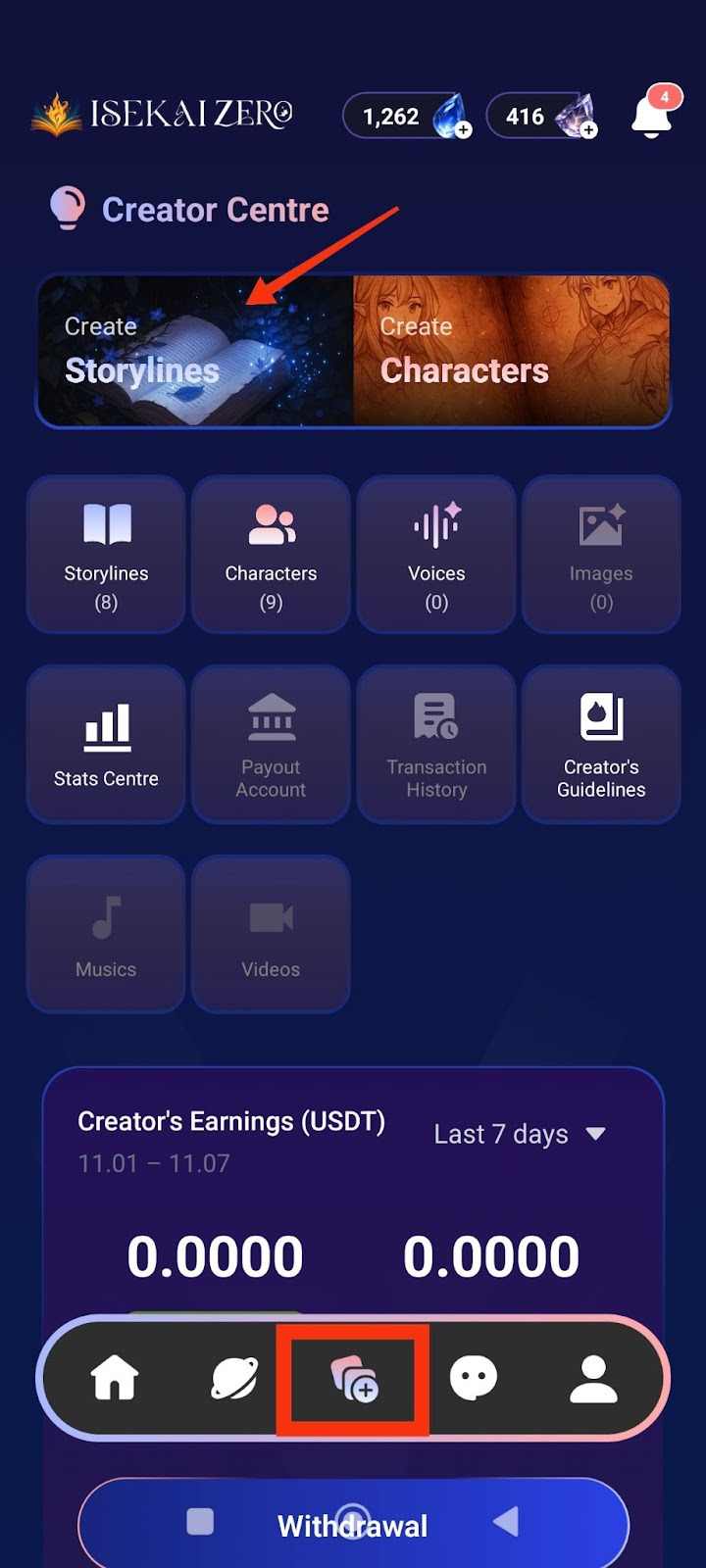
Step 2: Add a Cover Image
*Compulsory for Public Storyline
**Optional for Private Storyline
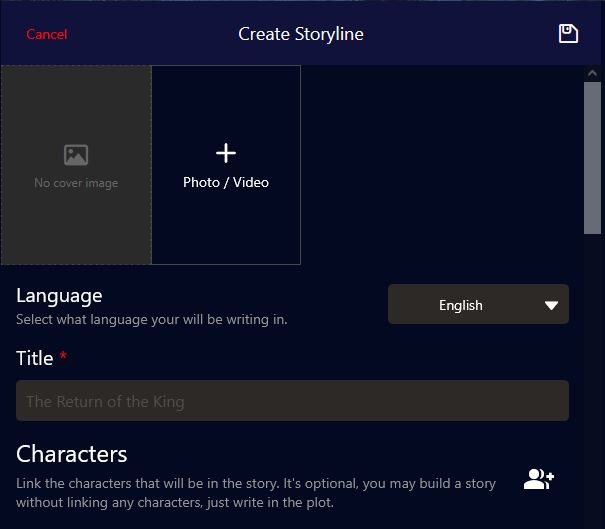
The Create Storyline screen will open. At the top, you'll see:
- A placeholder to add image
- To add a cover image:
- Tap the "+ Photo / Video" button
- Select an image from your gallery
- The first image will be the thumbnail for your storyline
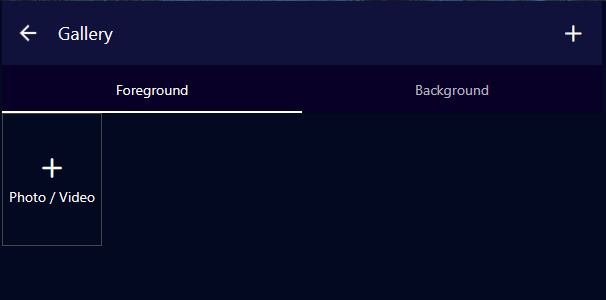
Adding Story Images (Foreground & Background)
These images create the visual experience as your story plays, especially in Visual Novel mode.
Understanding Image Types:
Foreground Image:
- The character or subject image that appears in front
- Usually a PNG image with transparent background
- Shows the character/subject of interest during the ongoing story
- Examples: Character portraits, NPCs, creatures, important objects
Tip: Use PNG files with transparent backgrounds for best results
Background Image:
- The location/environment image behind the character
- Shows where the scene is taking place
- Examples: rooms, dungeons, parks, hallways, forests, castles, city streets
- Sets the mood and atmosphere of the scene
Image Caption:
- Text descriptions that help the right image appear at the right moment
- Allows images to change dynamically based on what's happening in the story
- Example captions: "in the throne room", "during battle", "at sunrise", "talking to the merchant"
- The AI uses these captions to match images to story events
Character Image Captions:
Character image captions allow the right emotions to appear during the story. Use emotional descriptions to trigger appropriate character expressions.
Examples:
- "Jane is happy, wearing pajamas"
- "John is excited"
- "Lola is sad"
This helps the AI system display the matching character emotion/expression based on what's happening in the story narrative.
How to Add Images:
- Tap "Add Foreground Image" to upload character/subject images
- Tap "Add Background Image" to upload location/environment images
- For each image, optionally add an Image Caption to describe when it should appear
- You can add multiple images for different scenes
Image Tips:
For Foreground:
- Use PNG format with transparent backgrounds
- Focus on clear character expressions and poses
- Consider different poses for different emotions (happy, sad, angry, etc.)
For Background:
- Use high-quality landscape/environment images
- Match the atmosphere of your story (dark for horror, bright for adventure)
- Consider having backgrounds for different locations in your story
For Captions: Be specific but concise - "in the castle courtyard" not just "outside"
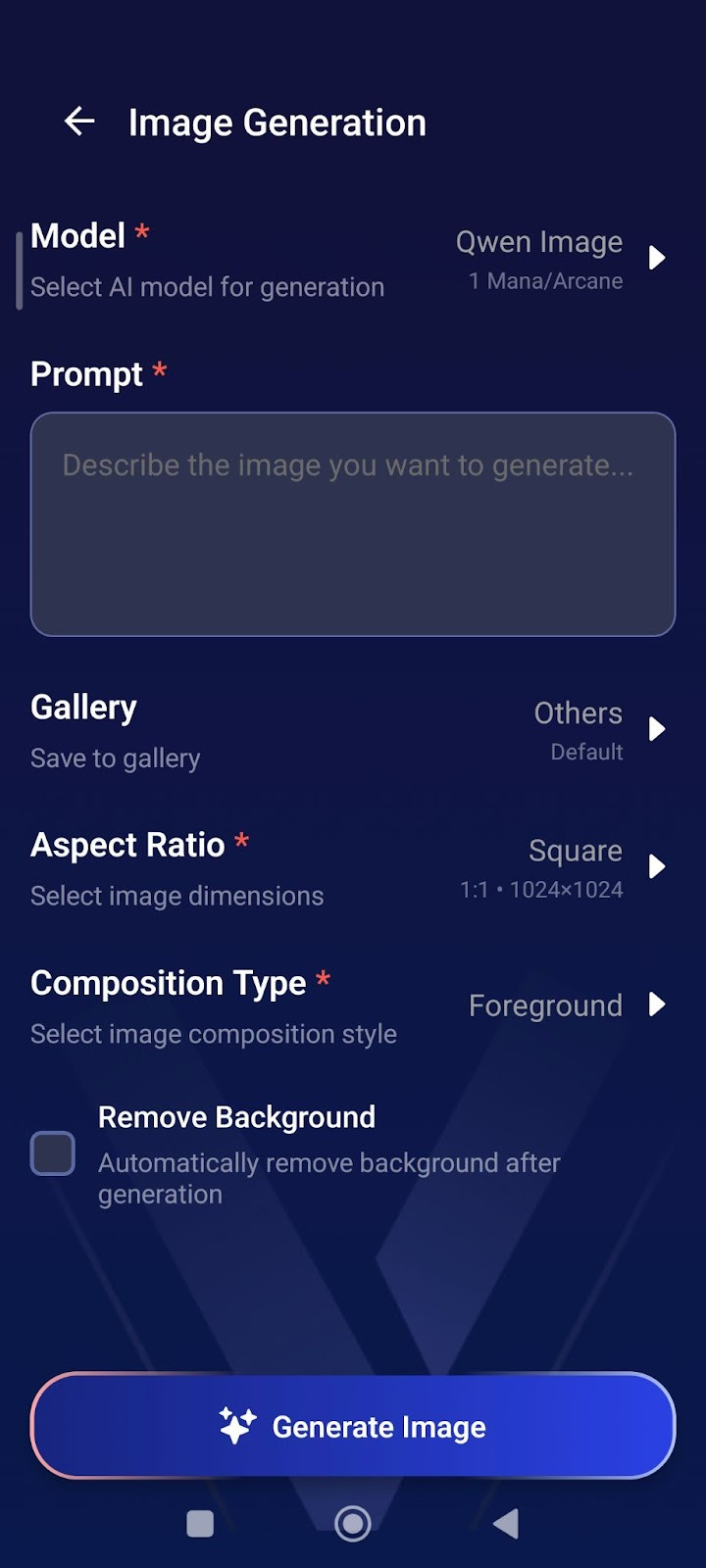
AI Image Generation
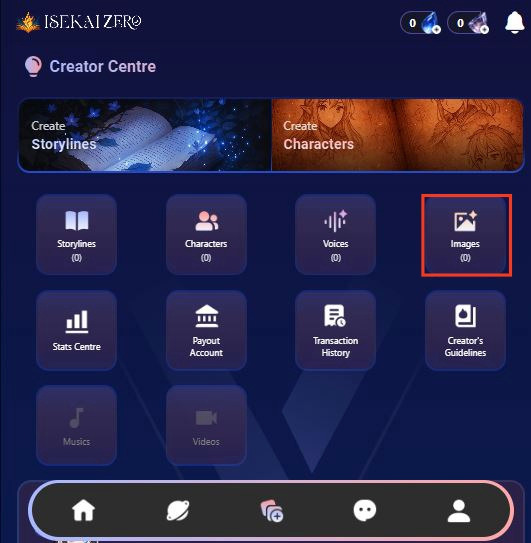
How to Generate Images:
- From Creator Centre, tap "Images"
- Tap "Model" → Select AI model (costs 1 Mana/Arcane)
- Write your "Prompt" → Describe the image you want
- Select "Aspect Ratio" → Choose Square (1:1) for portraits
- Choose "Composition Type" Foreground = Character images, Background = Location images
- Check "Remove Background" (optional) → Creates transparent PNG for characters
- Tap Generate Image
Prompt Tips:
For Characters:
- "Elf warrior, blonde hair, green eyes, leather armor, smiling, anime style"
- Enable "Remove Background" for clean character images.
- For Backgrounds:
- "Dark medieval castle interior, torch lighting, stone walls"
- Keep background unchecked.
Step 3: Select Language
- Find the "Language" dropdown
- Tap to select the language you'll be writing in
Step 4: Enter Your Story Title ⚠️(Required)
- Find the "Title" field (marked with a red asterisk *)
- Type your storyline title.
Step 5: Link Characters (Optional)
- Scroll down to the "Characters" section
- You'll see a icon on the right
- Tap it to link character(s)
- Note: This is optional - you can create a story without linking characters

Step 6: Write Your Plot Summary ⚠️ (Required)
- Read the instructions.
- Write a short, catchy summary (20 words or less)
- Example: "A dark lord rises, and unlikely heroes embark on a quest to destroy a powerful artifact."
Step 7: Write the Full Plot (AI Instructions) ⚠️ (Required)
- Read the instructions.
- Write your complete story plot with details
- Important tips:
- Write {{user}} wherever you want the player's name to appear
- Be detailed - the AI uses this to generate responses
- You can use Markdown formatting (bold, italics, etc.)
- You can use HTML if you want
Example:
As darkness threatens the land, {{user}} and their loyal companion, Elen, set out on a perilous quest to destroy a powerful artifact...
Step 8: Write Plot (User Version) ⚠️ (Required)
- Scroll down to "Plot (User)"
- This is what users will actually read
- Write the same or a modified version of your plot
- Tip: This can be more narrative and engaging since players will see it
Step 9: Configure Advanced Mode (Optional)
- Find the "Advanced Mode" toggle switch
- When ON (green): The plot displayed to users can be different from what the AI reads
- When OFF (gray): The same plot is used for both AI and users
- Leave it ON if you want different versions
Step 10: Configure Secret Mode (Optional)
- Find the "Secret Mode" toggle switch
- When ON: Hides the AI prompt from users
- When OFF: Users can see the prompts
- Choose based on your preference
Step 11: Write Prompt Plot (AI) ⚠️ (Required if using Advanced Mode)
- Find "Prompt Plot (AI)"
- This is specifically what the AI will read to generate responses
- Write detailed instructions for how the AI should handle the story
- Use {{user}} for the player's name
Step 12: Add Prompt Guidelines (Optional)
- Add instructions for the AI's behavior
- Example: "Focus on the relation dynamics" or "Avoid using repeated vocabulary"
Step 13: Add AI Reminder (Optional)
- Find the "AI Reminder" section
- This reminder will be placed after every user message to help the AI remember important details during the story
- Use this for critical instructions you want the AI to consistently follow throughout the chat
- Example reminders:
- "Follow the prompt guideline strictly"
- "Trigger stat system every new day and when user says 'check status'"
- "Keep storyline direction focused on the main quest"
- "Remember character relationships and past events"
*Important Note: Too much reminder text may make AI responses rigid
Works best for very specific, essential instructions rather than general guidance
Step 14: Create First Messages (Scenarios) ⚠️ (Required)
- Write the opening message for your story
- Tap the "+" button to write your opening message
- This is how the story begins for players
- Make it engaging and set the scene
- Use {{user}} for player names
- You can write more than one opening message, the "+" button add more starting scenarios if you want to
Example:
"You're finally awake," Elen says, her voice a mix of relief and gentle teasing. She sits beside the fading campfire...
Step 15: Add Storyline Tags (Optional)
- Tap the
 icon on the right
 - Add relevant tags to help users find your story
- Examples: fantasy, adventure, romance, action
Step 16: Set Player Personas (Optional)
- Tap the icon on the right
- Link characters that players can choose to play as
- Note:
- Use this feature if you have a recommended character for your story - especially helpful for character-focused storylines where you want users to experience the story through a specific character's perspective
- Setting player personas guides users toward the intended gameplay experience
- This is optional - users can choose other characters if you don't set this

Step 17: Choose Visibility Settings
- Scroll down to "Visibility" section
- Tap the dropdown (shows "Private" by default)
- Select from three options:
- Private: Only you can see it
- Unlisted: Anyone with the link can access it
- Public: Everyone can find and play it
Important Note for Public Storylines:
If you select Public visibility, your storyline will be submitted for review before it becomes publicly available.
- Review time: 2-3 business days
- During review: Your storyline will remain private/hidden
- After approval: It will appear in public listings for all users to discover
- You will be notified once the review is complete
- Your storyline will be automatically translated into 10 languages, making it accessible to players worldwide.
💡 Tip: If you want to play immediately, choose Private or Unlisted first. You can always change to Public later.
Step 18: Save Your Storyline
- Scroll to the bottom of the page to tap the large "Save Storyline" button OR tap the on the top right of the page.
- Your storyline is now saved!

Note: You can update your published storylines and characters at any time, but all changes require re-approval (1-3 working days) before going live.
Tips
- Use {{user}} placeholder - This automatically inserts the player's name
- Be detailed in AI Plot - The more detail, the better AI responses
- Make engaging first messages - Hook players from the start
- Test your story - Create it as Private first to test before making it Public
- Add multiple scenarios - Give players different starting points
Public Content Quality Standards
Review Process
All storylines and characters submitted for Public visibility are reviewed to ensure they meet our content guidelines and quality standards.
Important Notice
- Following our Content Creation Policy doesn't automatically guarantee approval.
- Even if your storyline and characters complies with all content guidelines, it may still be rejected if it shows insufficient effort or lacks basic detail.
What We're Looking For
Quality and polished content is always appreciated, but we recognize that experience levels vary and we know everyone starts somewhere. What we are really looking for is genuine thought and effort behind your content.
Your storyline and character should have:
✅ Reasonable detail - Enough information for players to understand the setting and characters
✅ Clear premise - Players should know what to expect from your storyline/character
✅ Basic completeness - Character traits, storyline setup, and relevant context included
✅ Genuine effort - Shows you've spent time developing your idea
We understand:
- Not everyone is a professional writer
- You're still learning and improving
- Creative styles vary
❌ WHAT GETS REJECTED
Content that shows minimal to no effort, such as:
- Extremely vague descriptions (1-2 sentences with no detail)
- Empty or placeholder text
- No character background or personality
- Unclear or missing storyline premise
- Obviously rushed or incomplete submissions
✅ WHAT GETS APPROVED
Content that shows genuine effort, even if not perfect:
- Detailed enough for players to understand the story
- Clear character personalities and backgrounds
- Understandable storyline setup and goals
- Proper categorization and tags
- Shows you've thought about your creation
Remember: We are looking for effort and care!
Quick Examples
❌ Too Minimal (Likely rejected):
Character: Warrior
Description: Fights
Storyline: Battle
This shows no effort or detail.
✅ Sufficient Effort (Likely approved):
Character: Captain Reylan
Description: An experienced mercenary captain who's tough but fair.
She leads a small group of fighters and takes on dangerous jobs.
She's loyal to her crew but haunted by a past mission gone wrong.
Storyline: Captain Reylan is hired to escort medicine through
dangerous territory during a plague outbreak. Things get complicated
when she suspects the plague might not be natural.
Not perfect, but shows clear effort and gives players enough to work with.
If Your Content is Rejected
Don't worry! Rejection doesn't mean your idea is bad.
You'll receive:
- Reason for rejection
- Guidance on what needs improvement
You can:
- Add more details and resubmit
- Expand character backgrounds
- Keep it Private/Unlisted instead
Note: Storylines and characters with images unrelated to the content will be rejected. Ensure your images match your storyline theme and character descriptions.
Most rejections are easily fixable with a bit more detail!
Bottom Line
Put some thought into your creation, give players enough detail to enjoy the story, and you'll be fine.
CHARACTER CREATION GUIDE
Character Creation Guide: Step-by-Step Tutorial for New Users
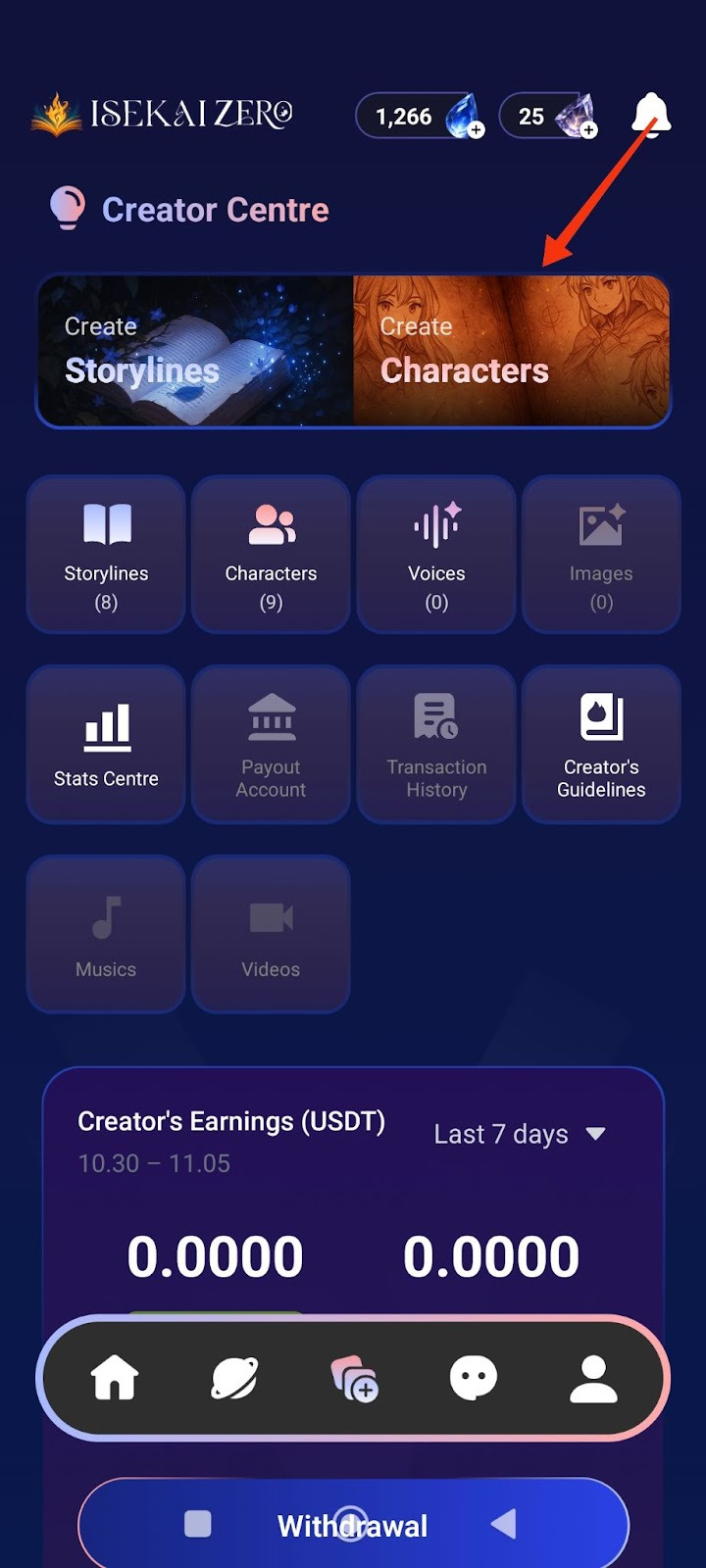
Step 1: Access the Creator Centre
- Open the Isekai Zero app
- Tap on the Creator Centre section
- You'll see two main options at the top.
- “Create Characters” is on the right
- Tap on "Create Characters"
Step 2: Add a Cover Image
*Compulsory for Public Storyline
**Optional for Private Storyline
The Create Characters screen will open. At the top, you'll see:
- A placeholder to add image
- To add a cover image:
- Tap the "+ Photo / Video" button
- Select an image from your gallery
- The first image will be the thumbnail for your Characters
Step 3: Select Language
- Find the "Language" dropdown
- Tap to select the language you'll be writing in
Step 4: Enter Character Name ⚠️ (Required)
- Find the "Name" field
- Type your character's name
- Example: "Yunari, Kuro, Sora"
Step 5: Write Description Summary (Optional)
- Find the "Description Summary" field
- Read the instructions.
- Write a short, catchy description (30 words or less)
- Example: "She is a lively person."
- This is shown to users browsing characters
Step 6: Write Full Description
- Scroll down to the "Description"
- Read the instructions.
- Write complete character details
- Important tips:
- Write {{user}} wherever you want the player's name to appear
- Be detailed - the AI uses this for roleplay
- The more details you include, the better the AI will roleplay your character.
- Consider adding: Full name, age, gender, height, ethnicity, nationality, occupation, status, speech style, appearance, personality, likes, dislikes, fears, hobbies, backstory, etc.
Step 7: Add Character Tags (Optional)
- Tap the icon on the right
- Add relevant tags to help users find your Characters
- Examples: demon, angel, female, loyal
Step 8: Configure Advanced Mode (Optional)
- Find the "Advanced Mode" toggle switch
- When ON (green): The character description displayed to users can be different from what the AI reads
- When OFF (gray): The same character description is used for both AI and users
- Leave it ON if you want different versions
Step 9: Configure Secret Mode (Optional)
- Find the "Secret Mode" toggle switch
- When ON: Hides the AI prompt from users
- When OFF: Users can see the prompts
- Choose based on your preference
Step 10: Write Prompt Description (AI) (Optional)
- This is specifically what the AI will read to generate responses
- Write detailed instructions for how the AI should handle the character
- Use {{user}} for the player's name
Step 11: Add Example Dialogues (Optional)
- Write sample dialogue showing your character's speech style and personality
- Include both narration and dialogue
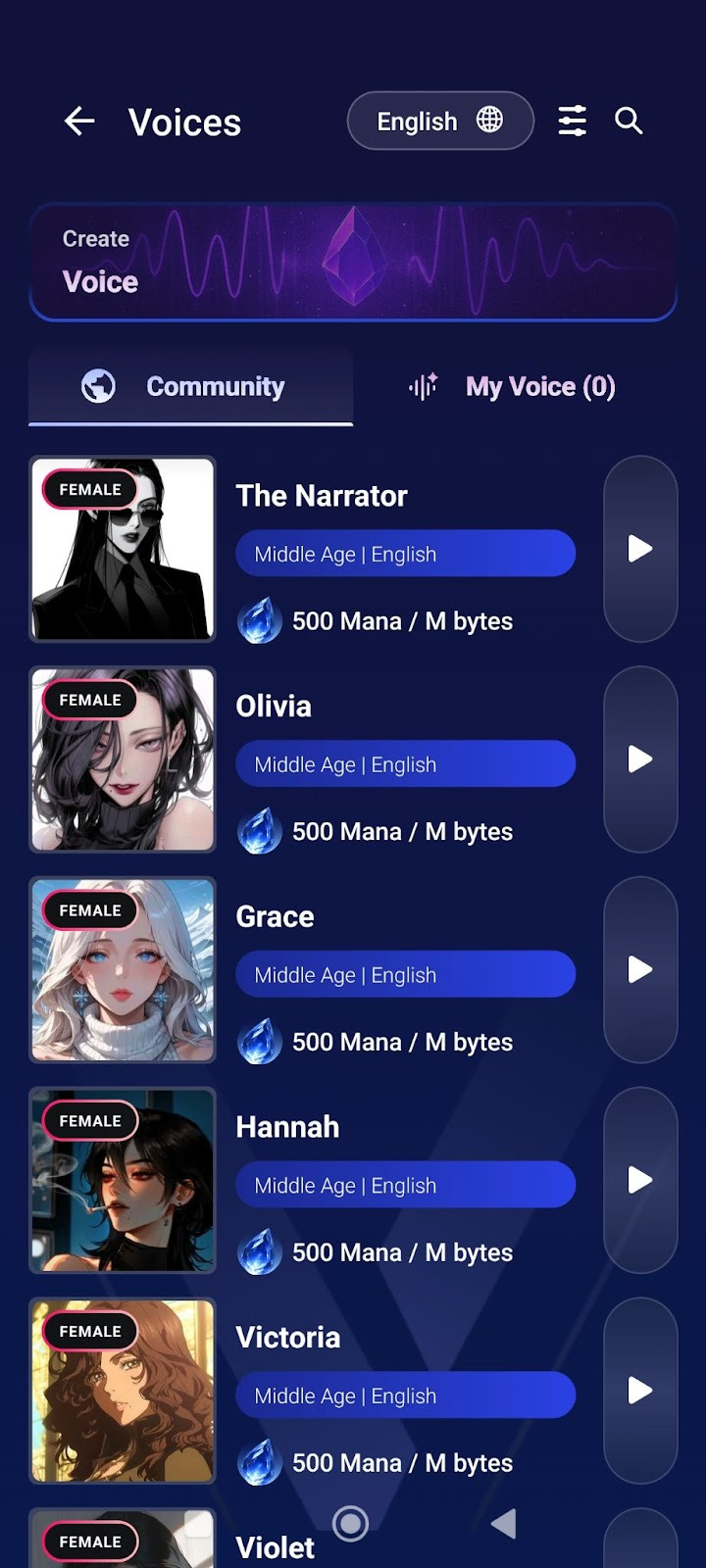
Step 12: Add Voice (Optional)
- Find the "Voice" section
- Tap the icon on the right
- Upload or link a voice file for your character
- This adds audio when character speaks in visual novel mode

Step 13: Choose Visibility Settings
- Scroll down to "Visibility" section
- Tap the dropdown (shows "Private" by default)
- Select from three options:
- Private: Only you can see it
- Unlisted: Anyone with the link can access it
- Public: Everyone can find and play it
Important Note for Public Characters:
If you select Public visibility, your character will be submitted for review before it becomes publicly available.
- Review time: 2-3 working days
- During review: Your character will remain private/hidden
- After approval: It will appear in public listings for all users to discover
- You will be notified once the review is complete
- Your character will be automatically translated into 10 languages, making it accessible to players worldwide.
💡 Tip: If you want to play with the character immediately, choose Private or Unlisted first. You can always change to Public later.
Step 14: Save Your Character
- Scroll to the bottom of the page to tap the large "Save Character" button OR tap the on the top right of the page.

- Your character is now saved!
Note: You can update your published storylines and characters at any time, but all changes require re-approval (1-3 working days) before going live.
Public Content Quality Standards
Review Process
All storylines and characters submitted for Public visibility are reviewed to ensure they meet our content guidelines and quality standards.
Important Notice
- Following our Content Creation Policy doesn't automatically guarantee approval.
- Even if your storyline and characters complies with all content guidelines, it may still be rejected if it shows insufficient effort or lacks basic detail.
What We're Looking For
Quality and polished content is always appreciated, but we recognize that experience levels vary and we know everyone starts somewhere. What we are really looking for is genuine thought and effort behind your content.
Your storyline and character should have:
✅ Reasonable detail - Enough information for players to understand the setting and characters
✅ Clear premise - Players should know what to expect from your storyline/character
✅ Basic completeness - Character traits, storyline setup, and relevant context included
✅ Genuine effort - Shows you've spent time developing your idea
We understand:
- Not everyone is a professional writer
- You're still learning and improving
- Creative styles vary
❌ WHAT GETS REJECTED
Content that shows minimal to no effort, such as:
- Extremely vague descriptions (1-2 sentences with no detail)
- Empty or placeholder text
- No character background or personality
- Unclear or missing storyline premise
- Obviously rushed or incomplete submissions
✅ WHAT GETS APPROVED
Content that shows genuine effort, even if not perfect:
- Detailed enough for players to understand the story
- Clear character personalities and backgrounds
- Understandable storyline setup and goals
- Proper categorization and tags
- Shows you've thought about your creation
Remember: We are looking for effort and care!
Quick Examples
❌ Too Minimal (Likely rejected):
Character: Warrior
Description: Fights
Storyline: Battle
This shows no effort or detail.
✅ Sufficient Effort (Likely approved):
Character: Captain Reylan
Description: An experienced mercenary captain who's tough but fair.
She leads a small group of fighters and takes on dangerous jobs.
She's loyal to her crew but haunted by a past mission gone wrong.
Storyline: Captain Reylan is hired to escort medicine through
dangerous territory during a plague outbreak. Things get complicated
when she suspects the plague might not be natural.
Not perfect, but shows clear effort and gives players enough to work with.
If Your Content is Rejected
Don't worry! Rejection doesn't mean your idea is bad.
You'll receive:
- Reason for rejection
- Guidance on what needs improvement
You can:
- Add more details and resubmit
- Expand character backgrounds
- Keep it Private/Unlisted instead
Note: Storylines and characters with images unrelated to the content will be rejected. Ensure your images match your storyline theme and character descriptions.
Most rejections are easily fixable with a bit more detail!
Bottom Line
Put some thought into your creation, give players enough detail to enjoy the story, and you'll be fine.
What Are Tokens?
Many asked about why it sometimes cost more and sometimes cost less? We work on a transparency principle so it's best for you to learn abit about LLMs rather than just trying to convince you it's magic! We charge you a 30% service fee (25% profit goes to creator) on top of what AI providers charge us. Learn more here Transparent Pricing
Tokens are the basic units that AI language models use to process and understand text. Think of them as the "building blocks" of language that the AI reads and generates.
How it works:
- When you send a message, the AI breaks it down into tokens before processing it
- Tokens can be whole words, parts of words, or even individual characters
- On average, 1 token ≈ 4 characters or ¾ of a word in English
- For example: "Hello, how are you?" = approximately 6 tokens
Why tokens matter:
- Cost: Most AI services charge based on tokens used (both input and output)
- Context limit: AI models have a maximum token limit for chat conversation
- Response limits: The AI can only generate a certain number of tokens per response
Practical examples:
- A short message (50 words) ≈ 65-70 tokens
- A medium paragraph (200 words) ≈ 265-280 tokens
- A long roleplay response (500 words) ≈ 665-700 tokens
3 Types of Tokens
When you chat with AI in ISEKAI ZERO, tokens work in three different ways:
1. Input Tokens
- Your prompts and messages to the AI
- Commands and instructions you give
- Example: "I try to explain to the adventurers that I'm not a real demon."
2. Cache Tokens (Smart Memory System)
- Previous conversation history that gets saved
- Character details and backstory
- World information and scene context
- These are stored so the AI does not have to re-read everything from scratch
3. Output Tokens
- The story content the AI writes back
- Character dialogue and responses
- Scene descriptions and narrative
How Tokens Flow in a Conversation
Step 1: You Send Your Action
Your prompt becomes Input Tokens.
"I try to convince the guards I'm just a normal traveler."
Step 2: AI Processes Your Request
The AI reads your message along with relevant Cache Tokens (previous story context) to understand the situation.
Step 3: AI Responds
The AI generates a story continuation as Output Tokens.
The guard eyes you suspiciously. "Normal travelers don't have horns," he mutters, hand moving to his sword...
Step 4: Important Details Get Cached
The AI automatically saves key information from this exchange as Cache Tokens for future use. This makes your next interaction faster and cheaper because the AI doesn't need to reload the entire conversation history—it already remembers the important parts.
Why This Matters
- Input + Output = Your direct costs (what you pay per message)
- Cache = Your savings (prevents expensive re-processing)
- Longer conversations use more cache but save you money overall
- Each response builds on cached memory, creating a seamless story
Why Do Costs Vary Between Messages?
You often notice that some messages cost more than others, even if they are similar in length.
Here's why:
The Cache System Works on "Best Effort"
The AI tries to cache (save) your conversation history to reduce costs, but it can only reuse what is still valid. The cache system does its best effort with the current context. Not all llm model support cache.
Important: Cached tokens are significantly cheaper than regular input tokens but the exact discount varies depending on the situation.
How Cache Saves You Money
Example:
- Your conversation needs 10,000 input tokens to process
- The AI successfully caches 8,000 tokens from previous turns
- Result: Those 8,000 cached tokens cost a fraction of their original price (often around 10% or less, but this varies)
The savings:
- 2,000 regular input tokens = Full price
- 8,000 cached tokens = Much cheaper (discount varies)
- Total = Significantly less than paying full price for all 10,000 tokens!
Why Cache Effectiveness Varies
Cache works GREAT when:
✅ You are actively chatting (within 5 minutes of last message)
✅ Your conversation history stays unchanged
✅ Character details remain the same
✅ No edits to previous messages
Cache is LOST or REDUCED when:
❌ 5+ minutes pass without interaction (cache expires)
❌ You edit a previous message (invalidates cache from that point)
❌ You modify character details (changes the context)
❌ Previous conversation turns are altered
❌ AI provider service degration
The 5-Minute Rule
Your cache expires after 5 minutes of inactivity.
- If you reply within 5 minutes → Cache is still active → Lower costs
- If you wait longer than 5 minutes → Cache expires → Full input token costs
This is why costs can spike after breaks. The AI has to reload everything at full price.
Bottom Line
The cache system tries to save you money, but it needs:
- Continuous interaction (replies within 5 minutes)
- Unedited conversation history
- Unchanged character information
Pro Tips for Lower Costs:
- Reply within 5 minutes to keep cache active
- Avoid editing previous messages when possible
- Plan your character details before starting
- Take longer breaks between sessions instead of many small breaks
Cache is "Best Effort" — Not Guaranteed
It's important to understand that caching is a best effort system, meaning it tries to work but success is never guaranteed. Several factors beyond your control can cause cache to fail:
Why cache can fail unexpectedly:
- Server-side factors — AI providers may clear caches during high traffic, maintenance, or system updates
- Model routing — Your request might be processed by a different server instance that doesn't have your cached data
- Infrastructure changes — Backend updates or load balancing can invalidate existing caches
- Token limit constraints — If your conversation grows too large, older cached content may be dropped
- Provider policies — Each AI provider handles caching differently, and their systems can change without notice
What this means for you:
Even if you do everything "right" (reply within 5 minutes, don't edit messages, etc.), you may occasionally see higher costs due to cache misses. This is normal and expected — it's simply how distributed AI systems work.
The bottom line: Cache saves you money on average over time, but any individual message might not benefit from caching. Think of it as a discount that usually applies, not a guarantee.
How Tokens are Calculated?
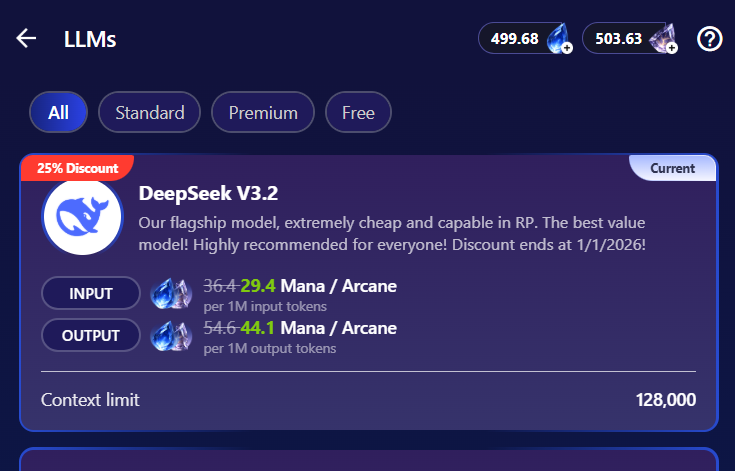
Example:
DeepSeek V3.2, it costs
- 29.4 Mana / Arcane per 1M input tokens
- 44.1 Mana / Arcane per 1M output tokens
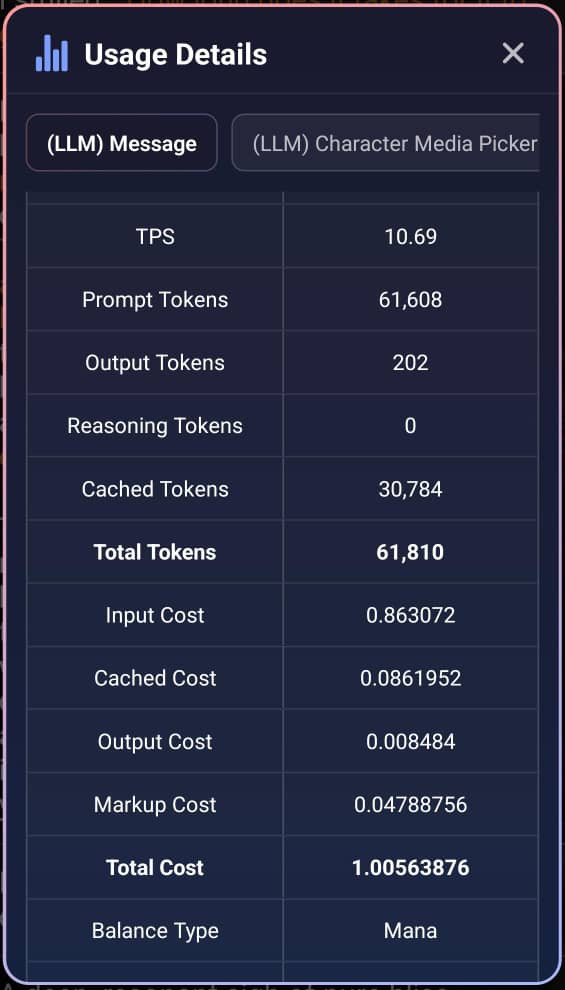
Total Tokens: 61,810
- Prompt Tokens: 61,608
- Cached: 30,784
- Fresh Input: 30,824 (61,608 - 30,784)
- Output Tokens: 202
Cost Calculations
- Fresh Input Tokens Cost = (30,824 / 1,000,000) × 29.4 = 0.9062256 Mana
- Cached Tokens Cost = (30,784 / 1,000,000) × 2.94 = 0.09050496 Mana
- Output Tokens Cost = (202 / 1,000,000) × 44.1 = 0.0089082 Mana
Total Cost: 1.00563876 Mana
If ALL 61,608 prompt tokens were charged at FULL price,
- Input Tokens Cost = (61,608 / 1,000,000) × 29.4 = 1.8112752 Mana
- Output Tokens Cost = (202 / 1,000,000) × 44.1 = 0.0089082 Mana
Without Cache: 1.8201834 Mana
Total Tokens Saved: 0.8147958 Mana (44.75% cheaper)
Token Types Summary
Creator Earnings System
How Creators Earn from Storylines
When users play your storyline using Arcane credits, each AI-generated chat response has a cost. As the creator, you earn a share of the profit from these interactions.
Important:
- You only earn revenue when users play with Arcane credits (Mana credits do not generate revenue)
- Arcane credits spent on your own stories do not count toward earnings
- Storylines based on copyrighted content (e.g., fan fiction of existing anime, movies, books, or other copyrighted works) are not eligible for monetization
How It Works:
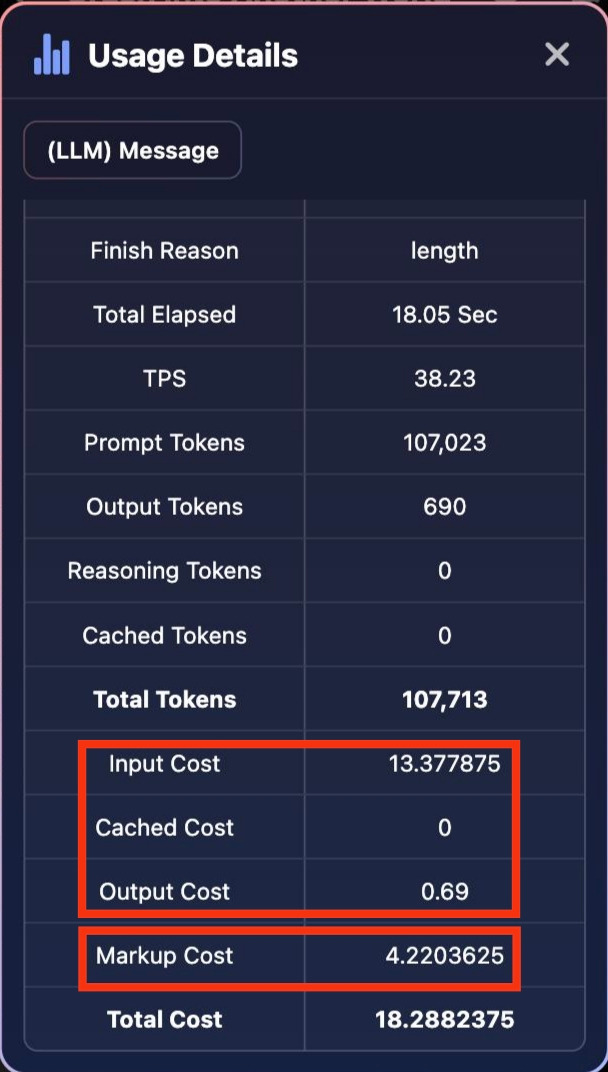
- Base Cost - Each AI response has an input cost and output cost (visible in Usage Details)
- Platform Markup - A 30% markup is added to the base cost
- Creator Share - You receive 25% Profit Share of that 30% markup
- Your Creator Earnings are calculated daily at 00:00 GMT+8.
Example from Usage Details:
100 Arcane = 1 USD
Where to View:
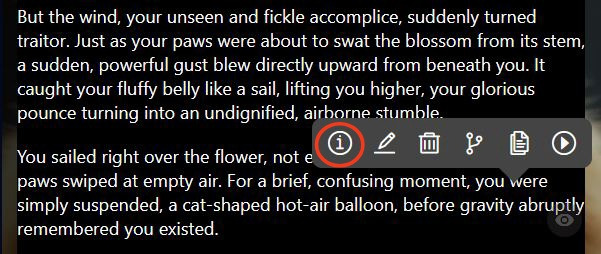
- Tap the ℹ️ (info icon) during gameplay to see usage details
- Check your Creator's Earnings section in Creator Centre
- View Stats Centre for detailed performance
Eligible Content for Monetization:
- Original storylines and characters created by you
- Content that does not infringe on any copyrights, trademarks, or intellectual property rights
- Storylines inspired by genres or themes (without using copyrighted characters, settings, or plots)
Non-Eligible Content:
- Fan fiction based on existing copyrighted works (e.g., One Piece, Harry Potter, Marvel, etc.)
- Storylines using copyrighted characters, settings, or plots from anime, movies, books, TV shows, or games
- Content that infringes on trademarks or other intellectual property rights
Note: Non-eligible content may still be created and shared on the platform, but will not generate earnings for the creator. We reserve the right to disable monetization for any content that infringes on intellectual property rights.
Removal of Demonetized Content
Content demonetized due to copyright infringement or policy violations may be removed at any time without notice.
ISEKAI ZERO reserves the right to remove content that infringes copyright, uses unauthorized materials, or violates platform policies. Removal decisions are final.
Tips to Maximize Earnings:
- Create engaging storylines that encourage longer conversations
- Build quality characters with good descriptions
- Make public storylines to reach more users
- Promote your content to increase plays
- Ensure your content does not infringe on any copyrights or intellectual property
How To Get Your Storyline Ready For Visual Novel Mode
Visual Novel Mode Settings
Auto Create New Background (Recommended)
What it does: Automatically generates background images when the scene changes in the story
Cost: ~0.58-0.7 Mana/Arcane per image
When to use:
- When the creator hasn't uploaded background images
- For dynamic stories with many location changes
- For the most immersive visual experience
How it works:
- AI reads the story context and scene description
- Generates appropriate background (castle, forest, city, etc.)
- Updates when the location changes in the narrative
Tip: This is recommended for the best visual novel experience!
Auto Create New Characters (Recommended)
What it does: Automatically generates character images when new characters appear in the story
Cost: ~0.58-0.7 Mana/Arcane per image
When to use:
- When the creator hasn't uploaded character images
- When new NPCs or characters appear
- For complete visual representation
How it works:
- AI analyzes character descriptions from the story
- Generates character appearance as a foreground image
- Appears when that character is active in the scene
Tip: This is recommended for full character visualization!
Voice & Narration Enabled (Optional)
What it does: Generates voice narration for each character in the story
Cost: ~1-2 Mana/Arcane per Full Narration/Voice Generation
When to use:
- If you want characters to have spoken dialogue
- For a more immersive audio-visual experience
- When you prefer listening to reading
How it works:
- AI generates voice audio for character dialogue
- Each character can have a distinct voice (if creator set it up)
- Narration plays automatically during the story
Note: This is optional and uses additional credits. You can enjoy Visual Novel Mode without voice narration.
Auto Edit Existing Background (Optional)
What it does: Automatically modifies existing background images to match scene changes
Cost: ~2 Mana/Arcane per image edit
When to use:
- When the creator has uploaded backgrounds but they need adjustments
- To adapt existing backgrounds to different lighting/mood
- For scene variations (day to night, weather changes)
How it works:
- Takes the existing background image
- Edits it based on story context (e.g., makes it darker for night scenes)
- Applies changes dynamically
Note: This is optional. Only enable if you want dynamic edits to creator-uploaded backgrounds.
Auto Edit Existing Characters (Optional)
What it does: Automatically generates character expressions, poses, and reactions based on what happens in the scene
Cost: ~2 Mana/Arcane per image edit
When to use:
- When the creator has uploaded character images
- To see dynamic facial expressions and emotions
- For characters reacting to story events
How it works:
- Analyzes the story dialogue and context
- Modifies character images to show appropriate emotions
- Updates expressions based on what's happening (happy, sad, angry, surprised, etc.)
Example: If the story says "Elena smiles warmly," the character image updates to show a smiling expression.
Note: This is optional. Only enable if the creator has uploaded character images and you want dynamic expressions.
How Creator Uploaded Images Work in Visual Novel Mode
If a creator has uploaded Foreground (Character) Images and Background Images with proper Image Captions, Visual Novel Mode will use these images automatically!
Foreground Images (Characters):
- PNG images with transparent backgrounds
- Show characters, NPCs, or subjects
- Appear in front of backgrounds
Background Images (Locations):
- Environment and location images
- Examples: rooms, forests, castles, streets
- Set the scene atmosphere
Image Captions:
Creators use captions to trigger the right images at the right time:
Character Captions:
- "Elena is happy"
- "Marcus is angry"
- "Lola is sad"
Background Captions:
- "in the throne room"
- "at the forest campfire"
- "during the battle"
How it works:
- AI reads the story context
- Matches the situation to the caption
- Displays the appropriate image automatically
Example: If the story says "Elena smiles as she hands you a sword in the throne room," Visual Novel Mode will:
- Show the "throne room" background
- Display Elena's "happy" expression image
Tips for the Best Visual Novel Experience
For Players:
- Enable Recommended Settings First
- Start with Auto Create Background + Characters
- Add voice narration later if desired
- Check Creator Content
- Look for Storylines with uploaded images for better quality
- Creators with image captions provide better visual matching
- Manage Your Credits
- Auto-generation uses credits per image
- Turn off features you don't need to save credits
- Voice narration is optional but enhances immersion
- Beta Features
- Visual Novel Mode is in Beta - improvements coming!
- Report feedback on Discord
- Expect faster, cheaper, more stable experience soon
For Creators:
To optimize your Storylines for Visual Novel Mode:
- Upload Quality Images
- Foreground: PNG with transparent backgrounds
- Background: High-quality environment images
- Use Clear Image Captions
- Character emotions: "Elena is happy", "Marcus is angry"
- Location triggers: "in the castle", "at the campfire"
- Add Voice Files (Optional)
- Upload character voices for authentic narration
- Each character can have a unique voice
- Test Your Storyline
- Play in Visual Novel Mode to see how images trigger
- Adjust captions if images don't appear correctly
Troubleshooting
Images Not Appearing:
- Enable "Auto Create" features if creator hasn't uploaded images
- Check if you have enough Mana/Arcane credits
- Wait for images to generate (takes a few seconds)
Wrong Images Showing:
- This depends on the creator's image captions
- AI matches context to captions - may not always be perfect
- Report issues to the creator or in Discord
Voice Not Playing:
- Ensure "Voice & Narration Enabled" is turned ON
- Check your device volume
- Verify you have enough credits for voice generation
High Credit Usage:
- Turn off optional features (voice, auto-edit)
- Disable auto-generation if creator has uploaded images
- Monitor your credit balance
Current Status: Beta
Visual Novel Mode is currently in Beta. This means:
- Fully functional and available now
- Still being improved and optimized
- Pricing may change as features improve
- Faster performance coming soon
FAQ
Q: Is Visual Novel Mode available for all Storylines?
A: Yes! You can use Visual Novel Mode with any Storyline, but the experience is best with Storylines that have creator-uploaded images.
Q: Do I need to enable all features?
A: No. Only "Auto Create Background" and "Auto Create Characters" are recommended. Others are optional based on your preference and budget.
Q: Can I switch between Narration Mode and Visual Novel Mode?
A: Yes! You can toggle between modes at any time in the Play Mode tab.
Q: How much do credits cost in total?
A: Approximately 1-3 Mana/Arcane per session with recommended settings. Additional features increase the cost.
Q: What if I run out of credits mid-story?
A: Visual Novel features will stop generating new images/audio, but you can continue playing in regular Narration Mode.
Q: Will Visual Novel Mode get cheaper?
A: Yes! The team is working on making it faster, cheaper, and more stable. Check Discord for updates!
Ready to experience your stories in Visual Novel Mode?
We're looking for feedback on Discord! Share your experience and help us improve.
Toggle to Visual Novel Mode, configure your settings, and watch your adventure come to life!
Need help? Ask in #ask-for-help on Discord or email contact@isekai.world
Referral System
- Sharing Your Referral Code (Referrer)
Open the ISEKAI ZERO app and navigate to Profile → My Referrals. Locate your unique referral code displayed on the screen.
Method 1: Copy Code
- Tap Copy to save it to your clipboard
- Paste and share the code via messages, emails, or social media
Important: Your friend must enter the code within 24 hours of creating their account
2. Applying a Referral Code (New User)
- Create your new ISEKAI ZERO account.
- Within 24 hours of signup, open Profile → My Referrals
- Enter the referral code you received from your Referrer.
- Tap Submit to apply the code successfully.
Note: Referral codes can only be applied once and cannot be changed after submission.
3. Tracking Your Referrals
4. Referral Rules & Regulation
- Only new accounts are eligible to apply a referral code.
- Referral codes must be entered within 24 hours of account creation.
- Self-referrals are not permitted.
- Each new user can only apply one referral code - once applied, it cannot be modified.
5. Referral Rewards
For Referrers (Person Who Shares Code)
- Referrers receive 5% profit of their referees' Arcane Credit chat messages usage as referral earnings.
- You'll receive a one-time reward of 50 Arcane Credits for each paying referee you refer.
- This applies to every referee successfully linked to your account.
For Referees (New Users)
- Referees receive 15 Mana Credits + 5 Arcane Credits when they successfully apply a referral code.
- Credits are added immediately after code submission.
How It Works
- Your referee uses Arcane credits on the platform.
- The system automatically calculates 5% of that Arcane usage.
- Your Referral Earnings are calculated daily at 00:00 GMT+8.
- 6 months earning period - earn 5% of your referee's Arcane usage for 6 months from the date they claim your referral code.
- Unlimited referees - refer as many new users as you want; each referee earns you 5% of their usage.
- Continuous rewards - the more active your referees are during the 6 months earning period, the more you earn.
*100 Arcane = 1 USD
Example
100 Arcane = 1 USD
- Your referee used 500 Arcane yesterday.
- You receive 25 (5% of 500) Arcane worth of earning credited to your Referral Earnings.
- You earned USD $0.25.
Important
- The 6 months earning period starts from the date your referee successfully applies your referral code.
- Each referee has their own individual 6 months earning period.
- After the 6 months period expires for a specific referee, you will no longer earn from their Arcane usage
- Example:
- Referee claims your code on 1st of January, 2025
- You earn 5% of their usage until 31st June, 2025
Choosing Your LLM Model
What are LLMs?
- LLM (Large Language Model) powers the AI responses in your Storyline
- Different models offer varying quality, speed, and context capabilities
- Each model has its own strengths, weaknesses, and costs
Three Types of LLM Models
Free Models
- Completely free to use - no Mana or Arcane credits required
- Best for casual play or testing Storylines
- Lower context limits and may have basic capabilities
Standard Models
- Uses Mana credits as primary currency
- If Mana runs out, automatically switches to Arcane credits
- Moderate context limits and capabilities
- Uses Arcane credits only
- Highest quality responses and largest context windows
- Best for immersive, complex storylines
- Advanced capabilities and superior performance
Understanding Model Costs
- Input Tokens: Cost per 1 million tokens you send (your messages)
- Output Tokens: Cost per 1 million tokens the AI generates (AI responses)
Example:
- Free Model: 0 Mana/Arcane for both input and output
- Standard Model: 28 Mana per 1M input, 42 Mana per 1M output
- Premium Model: Higher Arcane costs for premium quality
Key Features
Switch Models Anytime
- You can change LLM models mid-story without losing progress
- Access by tapping the Settings icon (⚙️), then tap the model icon on the Storyline settings page
- Your conversation continues seamlessly with the new model
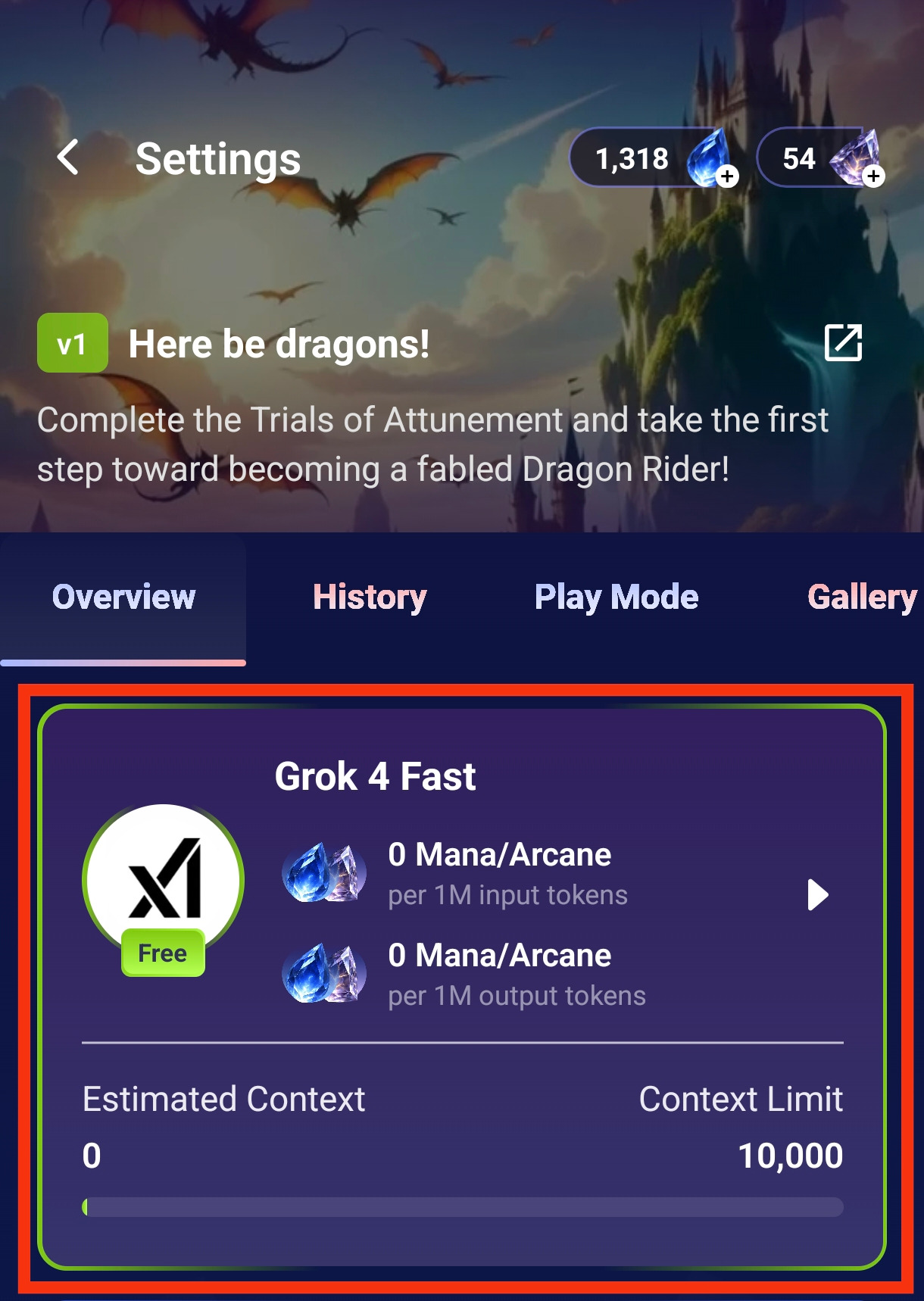
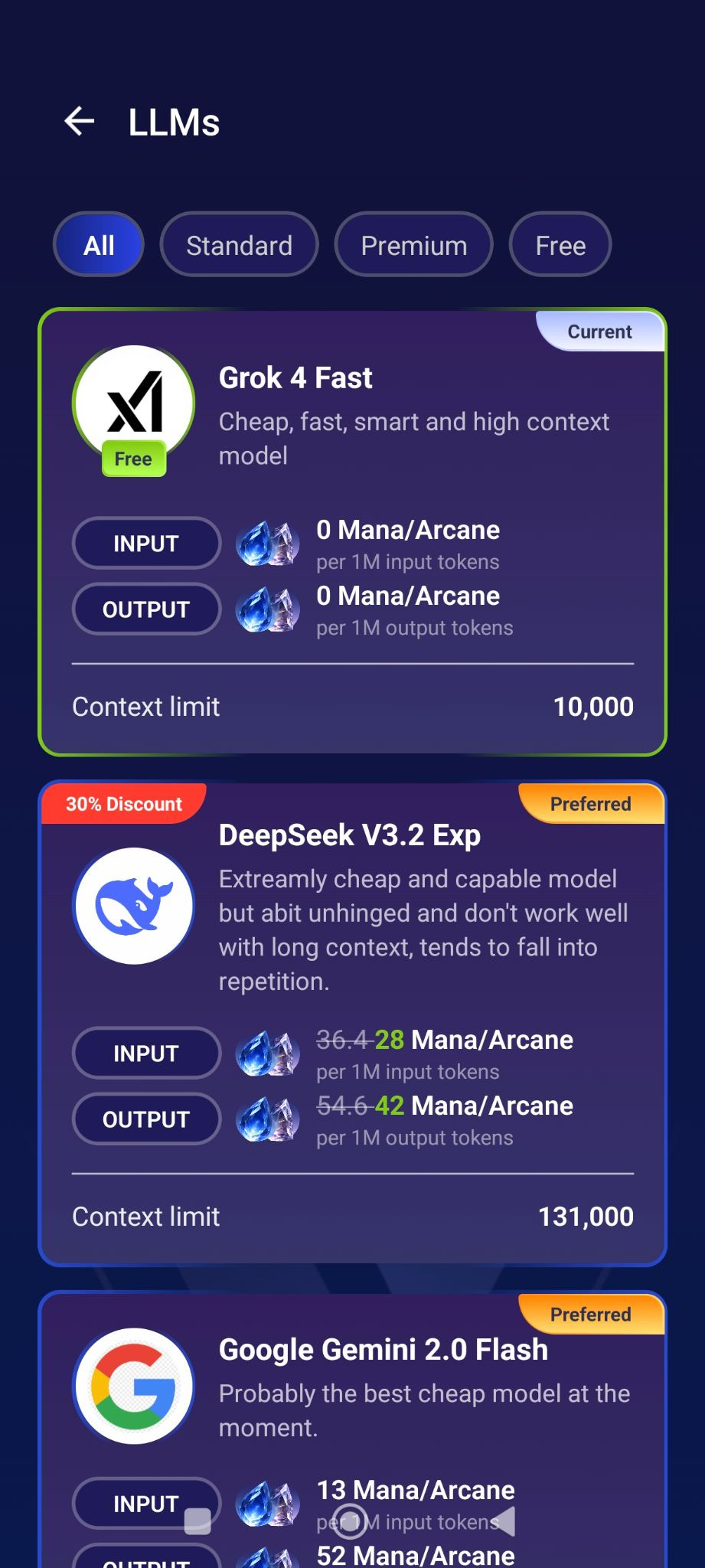
Context Limit
- Shows how much conversation history the model can remember
- Higher limits = better memory of earlier story events
- Ranges from 10,000 (basic) to 131,000+ (premium)
How to Switch Models
- Tap the Settings icon (⚙️) at the top right of your Storyline
- Tap your current LLM model card and tap your choice of LLM
- Browse available models filtered by type (All/Standard/Premium/Free)
- Tap your desired model to switch
- Continue your story with the new model
Quick Tip: Finding Your Current Model
To see which LLM you're currently using, simply check for the "Current" label when viewing the model selection screen. Only your active model will display this badge.
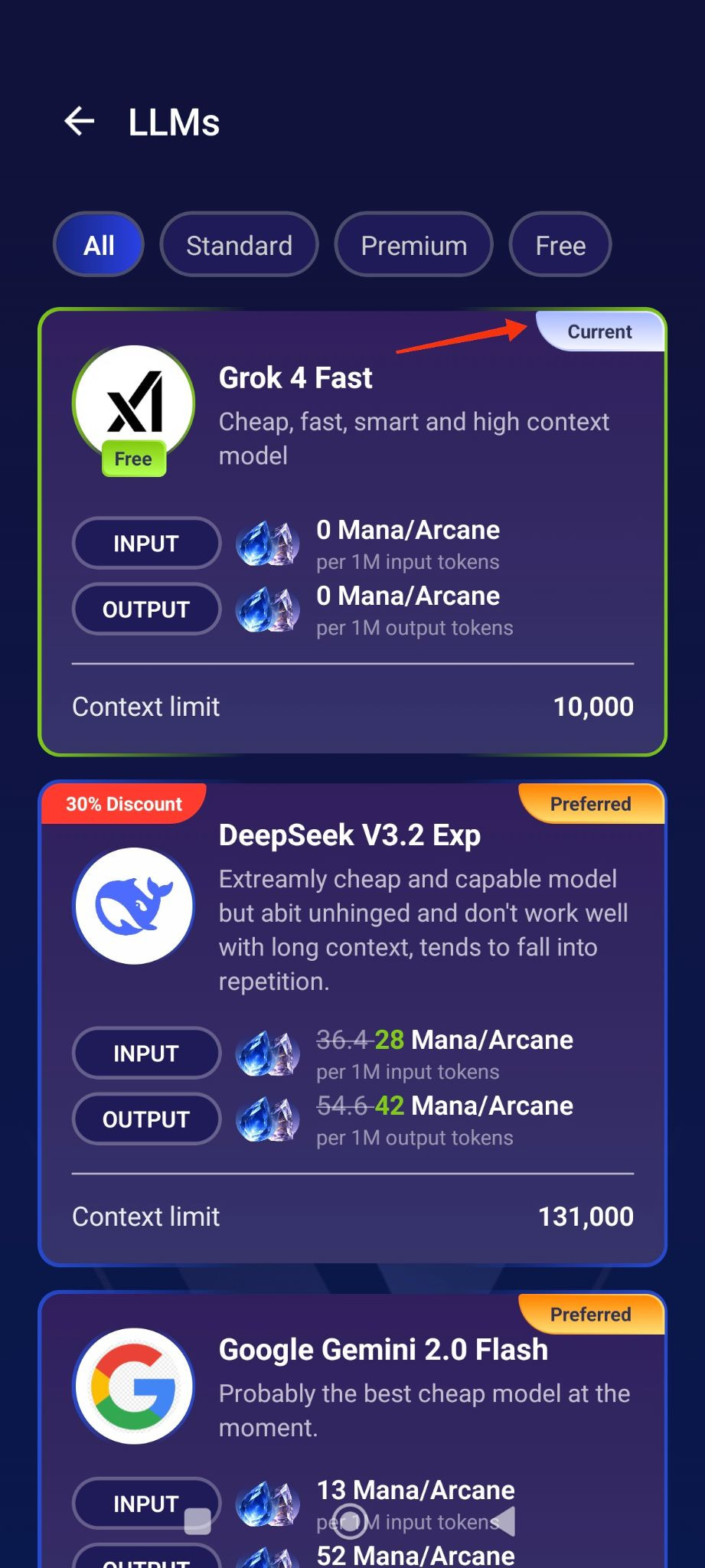
💡 Tip: Check the model description for specific strengths and weaknesses to find the best fit for your playstyle!
Safe For Work (SFW) Only Tag
Safe For Work (SFW) Only Tag
ISEKAI ZERO provides "Safe For Work" (SFW) Only tag that prevents any sexual content in the storyline, including both AI-generated responses and image generation. This feature is designed to ensure content remains appropriate and prevent potential abuse.
How It Works:
- Creators can enable the "SFW Only" tag when creating or editing storylines
- Moderators have final authority to require or enforce SFW Only status during the review process
- Moderators may mandate SFW Only mode for storylines that require it, regardless of creator's initial tagging
- Once enabled, the tag prevents:
- Sexual or explicit content in AI responses
- NSFW image generation
- Players from steering content in sexual directions
Requirements:
- MANDATORY for all storylines featuring underage characters - Any storyline that includes characters under 18 years of age MUST have the "SFW Only" tag enabled
- Moderators will enforce this requirement - Storylines featuring underage characters will be set to SFW Only during moderation review if not already enabled by the creator
- Recommended for family-friendly content - Creators of general audience content are strongly encouraged to use this tag
- For SFW storylines featuring youthful-appearing characters: Even if a character is stated to be 18 or older, if they appear young or child-like, the "SFW Only" tag must be enabled. Visual appearance determines this requirement, not declared age. This prevents potential abuse where young-looking characters in SFW stories could be steered toward inappropriate content.
Purpose:
The SFW Only tag is a critical child safety feature designed to prevent CSAM (Child Sexual Abuse Material) and any potential abuse of storylines featuring underage characters. By enforcing SFW-only interactions at the system level, it ensures that content featuring underage characters cannot be manipulated into inappropriate scenarios.
Enforcement:
- Moderators have final authority to determine if a storyline requires SFW Only mode
- Storylines featuring underage characters without the "SFW Only" tag enabled will be modified by moderators or may be removed
- Creators who repeatedly fail to properly tag content with underage characters will face suspension or permanent ban
- This requirement applies to all storylines where ANY character is depicted as or appears to be an underage.
- Attempting to circumvent or disable mandated SFW Only protections is a serious policy violation
Player Behavior:
Players who attempt to circumvent SFW Only protections or force sexual content in stories featuring underage characters will face immediate account action, including potential permanent ban.
Safeguard Prompts for SFW Romance - Quick Guide
You can add these types of instructions to your Character/Storyline guidelines if you want to keep content appropriate.
Examples:
Basic SFW Protection
This is a SFW story. No sexual content. Physical affection limited to hand-holding, hugs, and sweet moments. If {{user}} attempts inappropriate content, the character politely redirects to wholesome activities.
Character Boundaries
[Character Name] is uncomfortable with sexual content and will firmly decline inappropriate advances. They value emotional connection and respect. Focus on conversation, shared activities, and building trust.
Redirect Instructions
If user tries NSFW content:
- Character declines: "I'm not comfortable with that"
- Suggested alternative: "How about we grab coffee instead?"
- Changes subject to appropriate topics
Setting Limits
Keep all scenes in appropriate settings: public places, cafes, parks, group activities. No bedroom scenes, late-night private scenarios, or intimate locations.
For Underage Characters (With SFW Only Tag)
Character is under 18 years old. STRICTLY age-appropriate content only. No romantic physical contact beyond hand-holding. Focus on friendship, school life, innocent crushes, group activities. Character will firmly reject any inappropriate attempts.
Visual Novel Mode
What is Visual Novel Mode?
Visual Novel Mode transforms your gameplay into an immersive, multimedia experience similar to Instagram Stories or visual novels. Instead of text-only responses, your story comes to life with:
- Voice narration in each character's unique voice
- Dynamic background images that match the scene
- Character images with appropriate expressions and poses
- Instagram Stories-style format for easy viewing and sharing
Status: Experimental - Public Beta
- Feature is actively being improved for stability, speed, and cost optimization
- Share your feedback on Discord to help us enhance the experience
Example: Watch Here
Two Play Modes Available
Narration Mode (Default)
- Traditional text-based storytelling
- Responses appear as text messages
- No additional costs beyond LLM usage
- Best for: Reading-focused players, budget-conscious play
Visual Novel Mode
- Multimedia storytelling with images and voice
- Story displayed in visual novel/Instagram Stories format
- Additional costs for image and voice generation
- Best for: Immersive experience, content creators, sharing stories
Switching Modes:
- Go to Settings (⚙️) → Play Mode tab
- Toggle between Narration Mode and Visual Novel Mode
- Adjust settings as needed
- Continue your story in the new format
Visual Novel Mode Settings
Narrator Voice
- Select the voice for narration and character dialogue
- Tap "Press to select voice" to browse available voices
- Each character can have their own distinct voice
Cost: 1-2 Mana/Arcane per full narration/voice generation
Voice & Narration Enabled
Toggle ON: Generate voice narration for each character in the story
Toggle OFF: Visual Novel mode without voice (images only)
What it does:
- Creates unique voice audio for dialogue and narration
- Matches character personality and tone
- Plays automatically when viewing visual novel output
Cost: 1-2 Mana/Arcane per full narration/voice generation
Auto Create New Background
Toggle ON: Automatically generate new background images when scenes change
Toggle OFF: Use existing backgrounds or no background changes
What it does:
- Detects scene changes in the story (new location, time of day, etc.)
- Generates appropriate background images to match the setting
- Creates visual variety throughout your story
Cost: 0.58-0.7 Mana/Arcane per image
Example: Story moves from a tavern to a forest → New forest background generated automatically
Auto Edit Existing Background
Toggle ON: Modify existing backgrounds to match scene changes
Toggle OFF: Keep backgrounds unchanged
What it does:
- Edits current background instead of creating new ones
- Adjusts lighting, weather, or details to match story progression
- More cost-intensive than creating new backgrounds
Cost: 2 Mana/Arcane per image edit
Example: Same tavern background, but now it's nighttime with dim lighting → Background edited to show evening atmosphere
Auto Create New Characters
Toggle ON: Automatically generate character images when new characters appear
Toggle OFF: No automatic character image generation
What it does:
- Detects when new characters are introduced in the story
- Creates character images based on descriptions
- Adds visual representation to your cast
Cost: 0.58-0.7 Mana/Arcane per image
Example: A mysterious stranger enters the tavern → Character image generated automatically
Auto Edit Existing Characters
Toggle ON: Update character images to show expressions, poses, and changes
Toggle OFF: Character images remain static
What it does:
- Generates new expressions (happy, angry, surprised, etc.)
- Updates character poses and actions
- Shows visual changes (injuries, costume changes, etc.)
- Reflects what happens to characters in the story
⚠️ Warning: This feature can get expensive as it generates multiple image variations per scene
Cost: 2 Mana/Arcane per image edit
Example: Your character gets injured in battle → Character image updated to show wounds and tired expression
Auto Play on New Messages
Toggle ON: Automatically play voice narration when new messages arrive
Toggle OFF: Manual playback only
What it does:
- Voice narration starts automatically as soon as AI responds
- No need to tap play button
- Seamless storytelling experience
We're Actively Improving This Feature!
Visual Novel Mode is in public alpha, which means:
- We're working on stability improvements
- Speed optimizations are ongoing
- Cost reductions are being implemented
- Your feedback matters - join our Discord to share suggestions!
Ready to Transform Your Story?
Head to Settings → Play Mode → Visual Novel Mode and start creating your immersive adventure!
Mana Credits and Arcane Credits
Isekai Zero Mana Credits
Mana Credit is ISEKAI ZERO's free-to-earn currency for accessing affordable AI models and features.
What Are Mana Credits?
- Free virtual currency that can be earned through in-app activities
- Used for standard/affordable AI models and basic features
- Alternative to Arcane credits for budget-conscious users
- Non-transferable between accounts
- Credits don't expire (unless account is terminated)
How to Earn Mana Credits
1. Daily Check-In
- Open ISEKAI ZERO app daily
- Tap the check-in button at the profile section
- Receive free Mana credits instantly
- Consecutive check-ins may earn bonus credits
2. Watch Ads
What Can You Use Mana For?
- Character Interactions - Chat with AI characters using standard models
- Basic Content Generation - Generate text and images with affordable AI
- Storyline Exploration - Engage with storylines using standard processing
- General AI Features - Access core platform features
Checking Your Mana Balance
- View your current Mana balance in the app (displayed separately from Arcane)
- Balance updates in real-time after earning or usage
Earning Tips
✓ Check in daily - Don't miss your daily bonus
✓ Watch multiple ads - Earn more throughout the day
✓ Consecutive logins - May unlock streak bonuses
✓ Participate in events - Special events may offer bonus Mana
Important Notes
- Mana credits have no real-world monetary value
- Cannot be purchased directly - only earned through activities
- Cannot be converted to Arcane credits or vice versa
- Cannot be transferred between accounts or exchanged for cash
- May become inaccessible if account is terminated
Credit Usage Priority
When using AI features:
- The some AI features will typically use Mana credits first (if available)
- Arcane credits are used when Mana runs out or for premium features
No Expiration
- Earned Mana credits do not expire
- Credits remain in your account indefinitely
- Only become inaccessible if account is terminated for violations
Isekai Zero Arcane Credits
Arcane is ISEKAI ZERO's virtual currency used to access premium AI computational resources and features.
What Are Arcane Credits?
- Virtual currency for AI-powered interactions and content generation
- Used to chat with characters, generate content, and access AI features
- No real-world monetary value - cannot be exchanged for cash
- Non-transferable between accounts
- Credits don't expire (unless account is terminated)
How to Purchase
Mobile App
- Tap the Isekai Store in the app
- Select an Arcane package
- Complete purchase through Apple App Store or Google Play Store
- Credits added instantly
Website (Recommended)
- Log in at isekai.world
- Navigate to Isekai Store section
- Choose an Arcane package
- Complete payment accordingly
Purchase Options
One-Time Purchase
- Buy credits as needed
- Available in various package sizes
- Credits added immediately
Payment Methods
We accept:
- Credit/Debit cards (Visa, Mastercard, Amex)
- Apple Pay (iOS)
- Google Pay (Android)
- Stripe (Website)
Credit Usage
- Different AI features consume different amounts of credits
- Credit cost is displayed before you use any feature
- Pricing is uniform regardless of content type (SFW/NSFW)
Check your balance: Track usage in Profile → Credit History → Mana Credit History
Mana Credits and Arcane Credits (Summary)
Not Safe For Work (NSFW) Tagging Guide
Not Safe For Work (NSFW) Tagging Guide for Creators
This NSFW Tagging Guide applies to all creator-authored content on the ISEKAI ZERO platform ("Platform"), including Character profiles, Storyline descriptions, images, thumbnails, first messages, comments, metadata, and any other content you directly create and control. It is designed to help creators accurately classify their content as SFW (Safe For Work) or NSFW (Not Safe For Work) to protect our community, ensure age-appropriate access, and comply with platform policies. Accurate tagging is your responsibility as a creator. Mistagging can lead to content removal, account penalties, or bans. This guide expands on the Sexual and Nudity Content Policy in our Content Creation Policy and focuses on tagging allowed content. Always review the full Content Creation Policy for prohibited content (e.g., no sexualization of minors, non-consensual themes, or illegal content). ISEKAI ZERO is an AI-powered simulation and roleplay platform. While you control initial setups, AI-generated responses during gameplay are not your responsibility—but designs or tagging that enable violations may result in enforcement actions.
1. What is NSFW Tagging?
NSFW (Not Safe For Work) content is material intended for adults (18+) that contains:
- Suggestive or sexual themes
- Partial nudity (within platform guidelines)
- Mature language
- Adult situations or scenarios
SFW (Safe For Work) content is suitable for general audiences and can be viewed in public settings without discomfort.
2. Why Tagging Matters
Proper tagging:
- Protects younger users from inappropriate content
- Helps players find content that matches their preferences
- Ensures compliance with platform policies
- Improves content discovery and moderation
Improper tagging:
- May result in content removal
- Can lead to account penalties
- Misrepresents your content to players
When in Doubt: Tag as NSFW
It is safer to tag questionable content as NSFW. You will not be penalized for caution, but under-tagging mature content may lead to issues.
3. Quick Decision Tool
Answer these questions about your content. If YES to ANY, tag as NSFW. Visual Content (Character Images, Storyline Covers):
- Is it sexual in nature? → NSFW
- Is the character wearing revealing clothing (e.g., lingerie, very low-cut outfits)? → Likely NSFW
- Is the pose explicitly suggestive or provocative (e.g., emphasizing sexual features)? → NSFW
- Would it be uncomfortable to view in a professional setting? → NSFW
Textual Content (Descriptions, Storylines):
- Does it mention sexual themes or scenarios? → NSFW
- Does it describe characters in a sexualized manner? → NSFW
- Does it contain strong profanity or explicit language? → NSFW
- Is physical intimacy a central theme? → Likely NSFW
- Does it reference adult situations (e.g., infidelity, seduction)? → NSFW
If all answers are NO, it can be SFW. Additional Decision Tests for Gray Areas:
Use these three tests for borderline cases:
- Intent Test: What is the clear intent? (e.g., "seducing" or "intimate" → NSFW)
- Context Test: What is the setting? (e.g., bedroom + suggestive pose → NSFW; beach + swimwear → SFW)
- Parent Test: Would a parent be okay with a 13-year-old seeing this? (No → NSFW; Unsure → NSFW)
4. The "Most Mature Element" Rule
Tag your ENTIRE content based on the MOST mature element. If ANY part (e.g., image, description, first message) is NSFW, the whole Character or Storyline must be tagged NSFW. Remember, images can trigger NSFW even if text is SFW.
Examples:
- Example 1: Fully clothed image, but description includes "seductive encounters" → Tag as NSFW (description is mature).
- Example 2: Family-friendly cover, but first message implies nudity → Tag as NSFW.
- Example 3: Standard clothing, but ahegao (orgasmic) expression → Tag as NSFW (expression is explicitly sexual).
5. Visual Content: SFW vs NSFW
Focus on intent and explicitness. Not all revealing elements are NSFW if contextual (e.g., beachwear at a beach).
SFW - Safe for General Audiences
Clothing:
- Casual wear (t-shirts, jeans, dresses)
- Professional or athletic attire
- Modest fantasy outfits
- Appropriate school uniforms
- Beachwear in beach/pool contexts
Poses & Composition:
- Standard portraits or action poses
- Platonic interactions
- Professional or casual settings
Settings:
- Public spaces (parks, cafes)
- Adventure/fantasy locations
NSFW - Requires 18+ Tagging
Clothing:
- Lingerie or undergarments
- Deliberately sexualized outfits (e.g., sheer clothing showing undergarments)
- Towels/sheets as primary covering
Poses & Composition:
- Provocative poses emphasizing curves or features
- Seductive expressions (e.g., bedroom eyes)
- Intimate positioning
Settings:
- Bedrooms or bathrooms (if implying intimacy)
- Adult-themed establishments
Partial Nudity (Must Be Within Guidelines):
- Side/underboob
- Bare back/shoulders with strategic covering:
- Hand over chest and lower body = does NOT count
- Transparent/translucent fabric showing outlines = NOT allowed
Borderline - Tag as NSFW if Unsure
- Bikinis in non-beach settings (context matters—e.g., pool party vs. bedroom).
- Tight clothing if not overly suggestive.
- Mildly flirtatious poses.
Automatic NSFW Visual Indicators:
- Character in process of undressing
- Partial nudity with strategic covering with
- Bedroom/intimate setting + suggestive pose
- Lingerie or revealing sleepwear
- Positions suggesting "before/after intimacy"
Image Guidelines Reminder: All images must be "browse-safe." No exposed genitalia, nipples, or explicit acts. Use SFW images for covers to boost discoverability. Characters in NSFW must appear as adults.
6. Textual Content: SFW vs NSFW
SFW:
- Focus on adventure, friendship, or non-romantic plots.
- Mild romance (e.g., hand-holding, innocent crushes).
- No sexual references or profanity.
NSFW:
- Suggestive descriptions (e.g., "passionate embraces").
- Mature themes like seduction or intimacy.
- Profanity or sexual slang.
- Adult relationship themes (e.g., BDSM/NTR/netorare, love triangles with betrayal, matured tropes—tag NSFW but ensure consent and no prohibitions).
Borderline:
- Implied romance without details → SFW if mild, NSFW if central.
- Fantasy elements with mature undertones → Evaluate overall.
Automatic NSFW Text Indicators:
- Keywords like "seducing," "seduction," "seductive," "intimate," "bedroom activities," "tempting," "teasing," "provocative," "undressing," "taking clothes off," "alluring" with romantic context.
- Context clues like wedding night scenarios, "private" or "alone time" situations, post-coital implications, physical intimacy described.
7. Common Scenarios, Edge Cases, and Gray Areas
- Minors or Youthful Characters: Enable "SFW Only" tag (locks to SFW interactions). Required if under 18 or appearing youthful, even if stated 18+.
- Fantasy Settings: Magical intimacy → NSFW if suggestive.
- Humor/Satire: Sexual innuendo → NSFW.
- Edge Case: Bedrooms: Fully clothed in a neutral bedroom scene → Can be SFW if no intimacy implied. Suggestive context → NSFW.
- Edge Case: Beachwear: In beach story → SFW; in bedroom → NSFW.
- Adult Themes such as Infidelity/BDSM/Sexual Kinks: Must be consensual and tagged NSFW, No non-consent.
Special Gray Area: Playfully Flirty / Teasing Characters
Examples:
- "She loves to tease people with clever jokes and witty comebacks."
- "Playful character who flirts with everyone but never seriously."
Playfully Flirty = NSFW When:
- Involves sexual innuendo, physical teasing, or intent to arouse.
- Suggestive poses, "bedroom eyes," or teasing about body parts.
- "Playing hard to get" in sexual context.
Examples:
- "Teases {{user}} by whispering suggestive things in their ear."
- "Loves to tease and see them flustered" + bedroom setting.
More Common Gray Areas:
8. Examples
9. Tagging Process:
- Select SFW/NSFW during creation.
- Enable "SFW Only" if required.
- Add metadata/tags (e.g., "Romance," "Erotica").
- Public content undergoes review—adjustments may occur.
Best Practices:
- Test as a player: Would it fit SFW expectations?
- Focus on quality: Well-tagged NSFW thrives in adult sections.
- Stay updated via notifications.
By following this guide, you contribute to a safe, enjoyable platform.© 2026 ARx Media Sdn. Bhd. All rights reserved.
Chat Basics - How To Chat as a Beginner
CHAT BASICS - CHAT AS A BEGINNER
The first thing you will see when selecting a storyline is the persona selections screen, this is where you pick the character you want to play as for the storyline you have chosen.
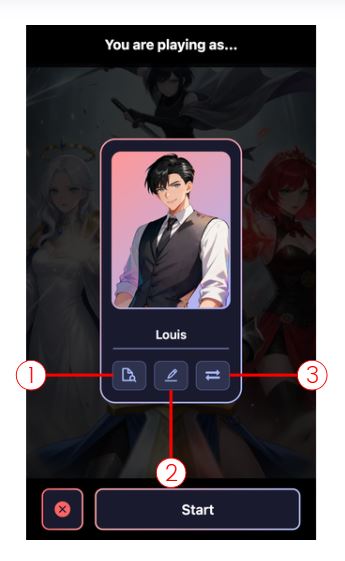
You will see three buttons at the bottom of the characters card.
Following the numbering, these are:
- View Character - Allows you to look and review the character sheet
- Edit Character - Takes you to the Edit Character screen
- Switch Character - Takes you to your list of available characters to choose from
Once you have your character selected and hit start, it takes you to the Chat Screen, clicking on any message will bring up a few options:

Following the numbering, these are:
1. Narration mode - The AI reads the story aloud in a narrator voice. Traditional text-based role play with optional voice narration.


2. Light Novel mode - Story presented in novel-style prose format with AI-generated illustrations appearing at key moments. Like reading a light novel with periodic artwork.

3. Manga mode - Story displayed as manga/comic panels with speech bubbles and sequential art. Visual storytelling in comic format.


4. Visual Novel mode - Full visual novel experience with character sprites, backgrounds, dynamic expressions, and optional voice narration.

5. Music (Coming Soon)
6. Video (Coming Soon)
7. Usage Details
Selecting this option will bring up a screen that gives you the full breakdown of the tokens used and Mana/Arcane cost for the selected message. More info on transparent pricing and token usage here:
What Are Tokens? | ISEKAI ZERO
Transparent Pricing | ISEKAI ZERO
8. Edit Message - This option opens the message in an editable screen and allows you to change, remove, or add whatever you want to the message. Yes, you can edit the AI responses as well!
9. Delete Message - Deletes the selected message.
10. Create Branching Message - This option will start an entirely new chat that is an exact copy of your current chat up to the selected message, think of it as an alternative timeline.
11. Copy Message - Copies the selected message’s text.
12. Save Message - Save the selected message so you can quickly return to it later.
More info on Play Mode here:
At the bottom of the chat screen, you will see another group of option:
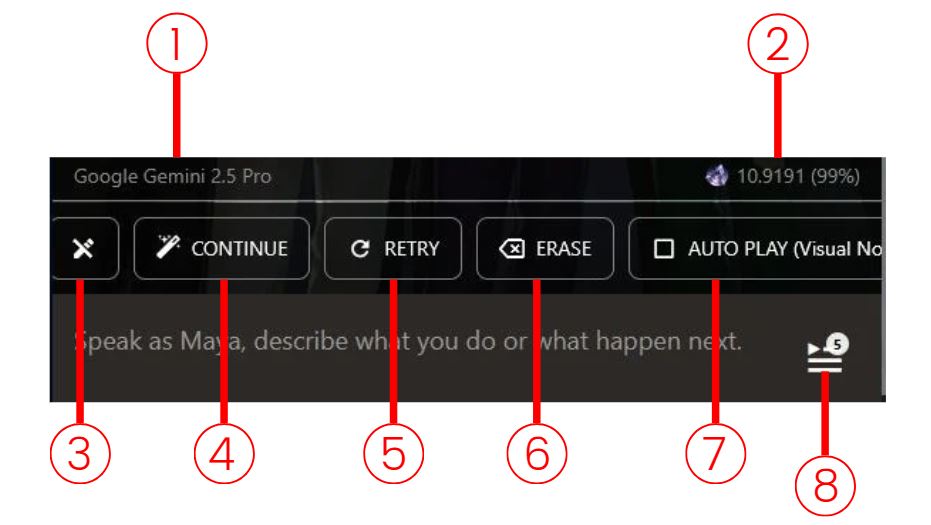
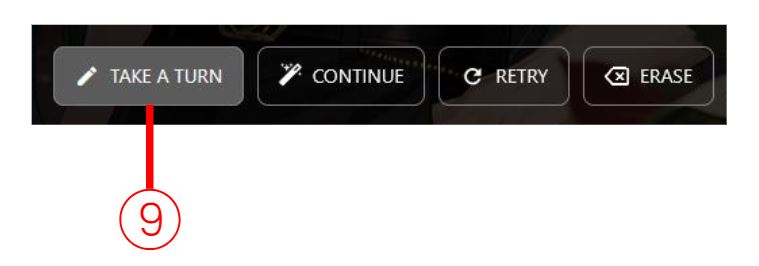
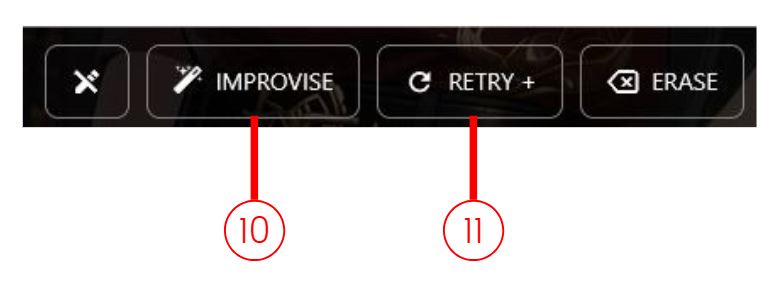
Following the numbering, these are:
- LLM model used to generate the message.
- Mana/Arcane cost for the message and the percentage amount of the tokens cached.
- Close Chat - This button will close the chat field
- Continues the scene from the current message without any input from you or your character.
- Tells the AI to re-do the last message. Useful for when you did not quite like the last response.
- Delete the most recent message.
- Toggle Auto Play - Toggles each new message to automatically play either Narration or Visual Novel mode depending on your settings.
- Choose Your Destiny - Allows you to choose from several AI generated responses to the current message.
- Take A Turn - If the chat field is closed, this button will open it back.
- Takes whatever you have typed into the chat field and uses that as instruction to continue the previous scene without any input from your character.
- This option will take whatever you have typed into the chat field as instructions for how you want the last message to be redone.
Special Chat Commands
Unlike most other AI chat platforms, bots on Isekai Zero are interactive AI storylines, not just simple one-one character chat bots. This means we have a few more options than just conversational interactions. When you select a bot from the homepage, you are choosing a Story that you want to explore, and we interact with them in a few different ways:
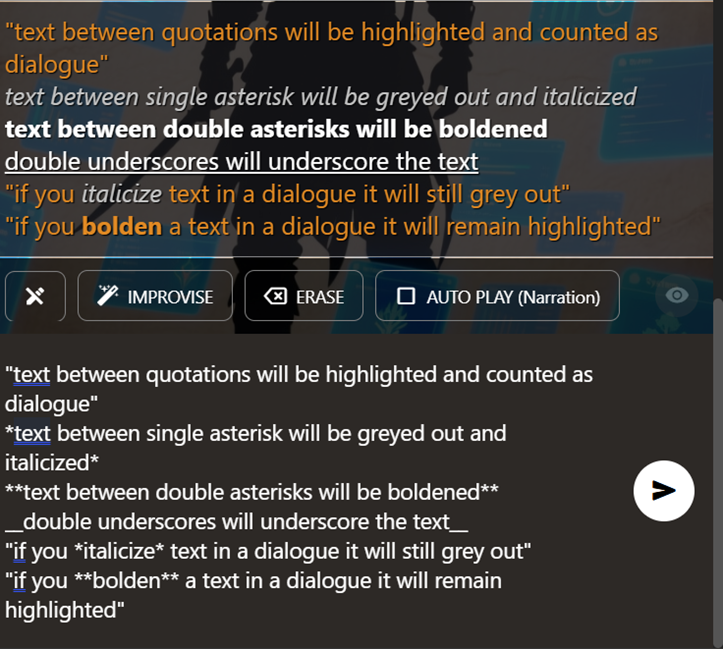
The bottom section of this image is the chat input field, and the top is the output and as you can see, there are a few different ways you can show emphasis or relay importance.
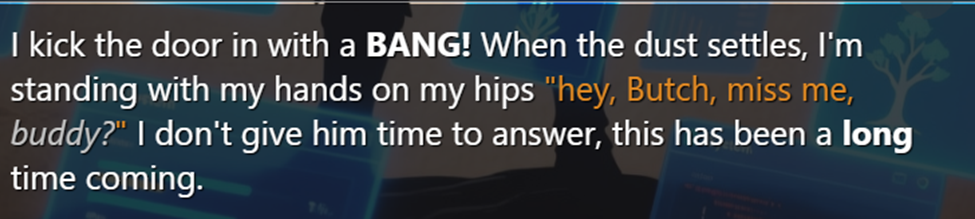
Your dialogue should always be between quotation (“ ”) marks; this lets the AI know what your character is saying, vs what they are doing. It also makes it easier to read because all dialogue is highlighted (the orange-colored text).
If you want to emphasize something, using single or double asterisks lets the AI know **to pay attention to this!**
- You can also use the double asterisk to indicate **Loud Speech** like yelling, shouting, or aggressive emphasis.
Example: “I have **NO** idea!” or “hey, **WATCH OUT!**”
- Single asterisks are more for *Low Speech* whispering, telepathy, or sarcastic emphasis.
Example: “oh, yeah, I'm *definitely* going to make sure I remember that” or, *”keep your voice down, we need to whisper!”*
Basically, bold when you want to yell, italics when you need to whisper.
Here is an example where I want my character to kick in the door of a bar and make a big scene.
The input:
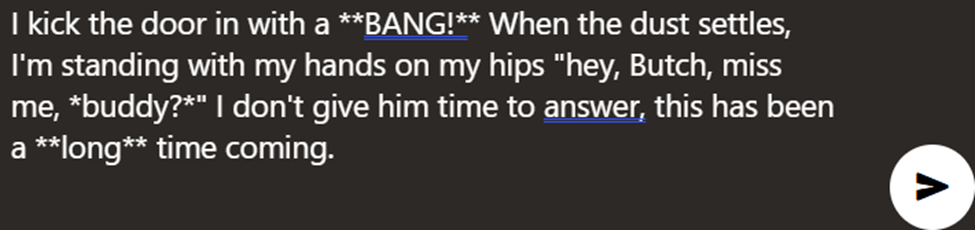
The output:
OOC: Out Of Character
Sometimes we can get a little lost in the story, or forget where we left off, who an important character was, exactly how the magic system in the story was playing works exactly. It happens, there are a lot of different worlds to keep track of and it can be a hassle having to go back and re-read stuff just to catch back up. This is where OOC comes in handy. OOC is “Out of Character,” and is basically the command you can use to talk to the AI directly. Think of it as asking the DM a question.
Implicit OOC
Just start a new line with "ooc" anywhere in your message. The AI will pick up on it automatically.
For example:
Heyy what's up
ooc slow down the pace
As long as "ooc" is the first word on a new line, the AI will treat everything after it as an out-of-character instruction.
Explicit OOC
After you type something in the input box, you'll see a new OOC button. Use this when you want to fully step out of the roleplay — whether that's to have a direct conversation with the model or to give it a specific command. Clicking the button switches the entire message to OOC mode, so nothing you write will be interpreted as part of the RP.
New: Custom User Input Prompt
This might look similar to the Guidance Prompt, but it works differently. The Custom User Input Prompt gets appended to every single message you send. That makes it ideal for persistent reminders or rules you always want active (e.g., "keep responses under 500 words" or "always stay in first person").
A word of caution: because it applies to every input, avoid putting anything too specific or situational in here — otherwise the AI will try to follow that direction no matter what, even when it doesn't make sense.
Summarization and Arc
Save your tokens with
The Summarization Tool!
Getting deep into a story and finding that your messages are starting to get expensive? That is what our Summarization Tool is for! Every message you send adds to the context, and increases the token usage.
More about context and tokens here: What Are Tokens? | ISEKAI ZERO.
In the simplest terms, more context equals more tokens, more tokens equals more mana/arcane cost, so the lower you can keep that context, the cheaper your chats are going to be! So, let's take a look at how to use the Summarization tool, and how to keep the token usage as low as possible.
First thing we need to do it hit the settings button in the top right of the chat screen, that will take us to this screen:
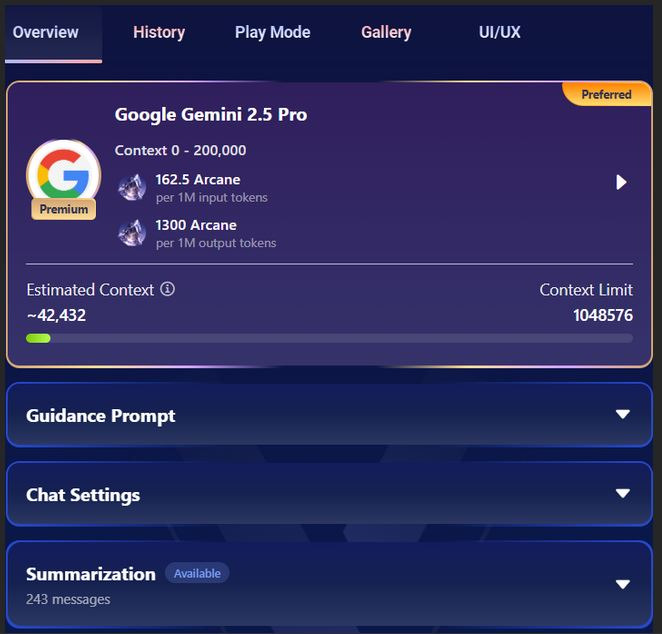

As you can see, I currently have 243 messages in this chat, and a context of about 43,000, this is translating to about 3 arcane per message with Gemini 2.5 Pro, so lets try and drop that.
I am going to select the Summarization tool, and get this screen:
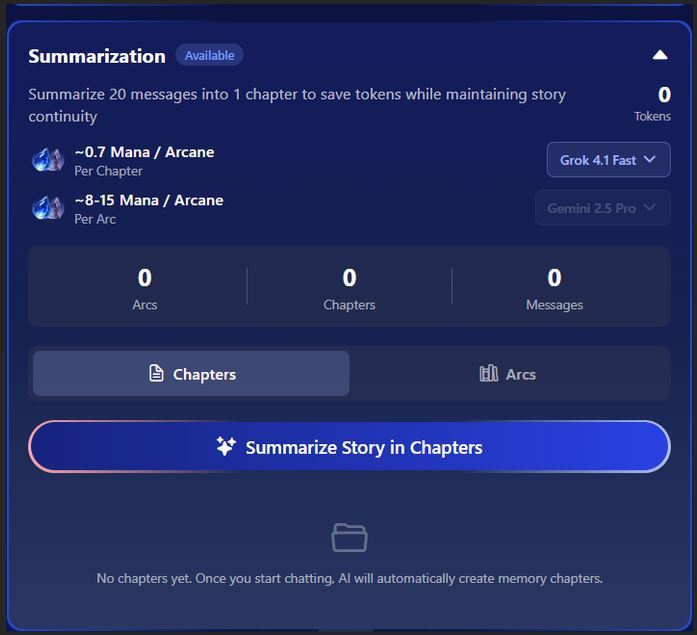
Summarization works by taking your chat and breaking it down into chapters. A chapter is an AI summary of 20 messages; this condenses the information in those 20 messages so you can continue the story while keeping the important information the AI needs to maintain your continuity. With 243 messages, I can get 11 chapters:
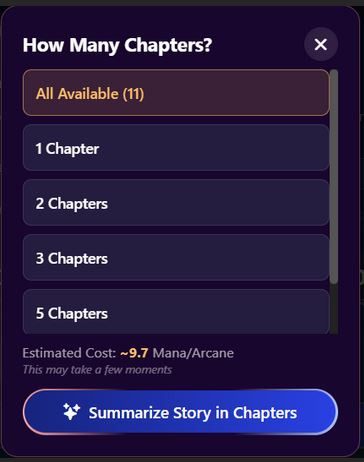
Now that we have our chapters, we can see that we have halved our original context:
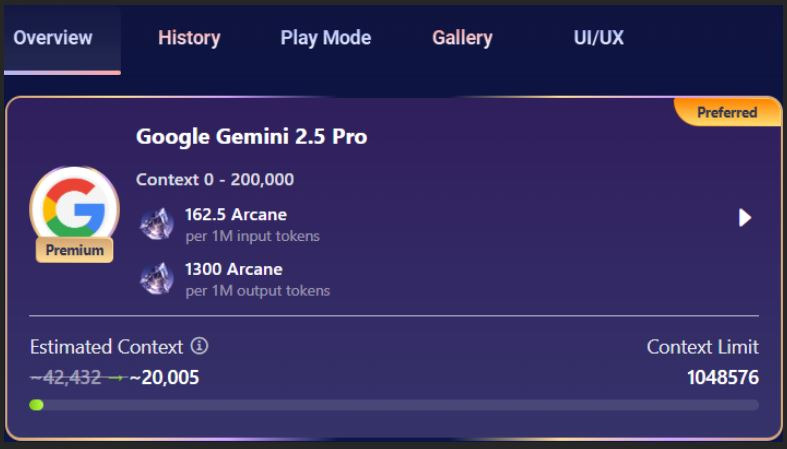
And dropped our message cost:

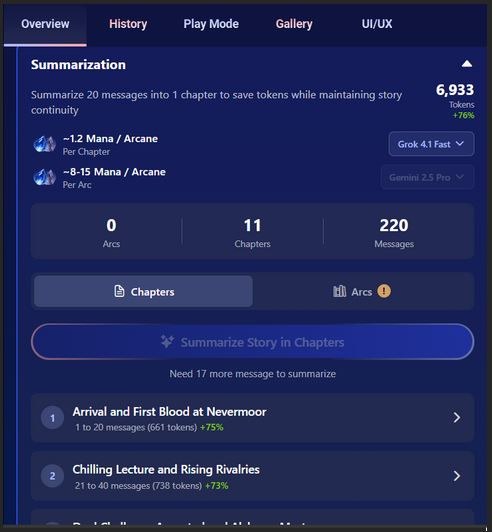
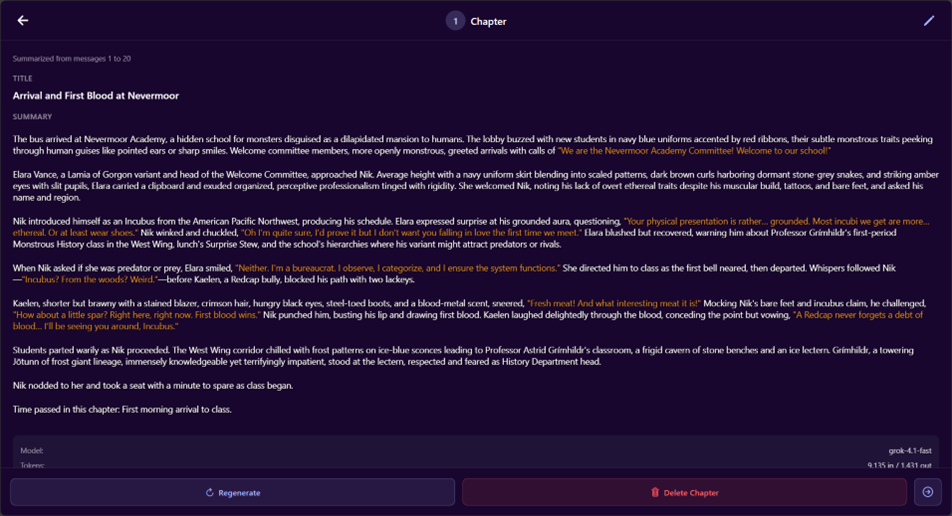
Selecting a chapter will bring up the summary, this allows you to regenerate or edit it if you feel like something is missing.
From Chapter to Arc
Once you have 10 chapters you can summarize even further by condensing them into a single Arc, condensing your context even more:



We started with around 40,000 contexts and ended with just under 16,000. Just by creating a single arc. Saving us not just in Mana/Arcane cost, but also extending the time we can spend with our story!
Chat Overview
Chat Overview
First thing we see here is the overview screen, in it we have:
- Current LLM
- Guidance Prompt
- Chat Settings
- Summarization
LLM (Large Language Model)
The LLM (Large Language Model) screen is going to be where you pick which AI you want to run your stories, this decision can be important as each LLM has its own context limit, personality, and cost:
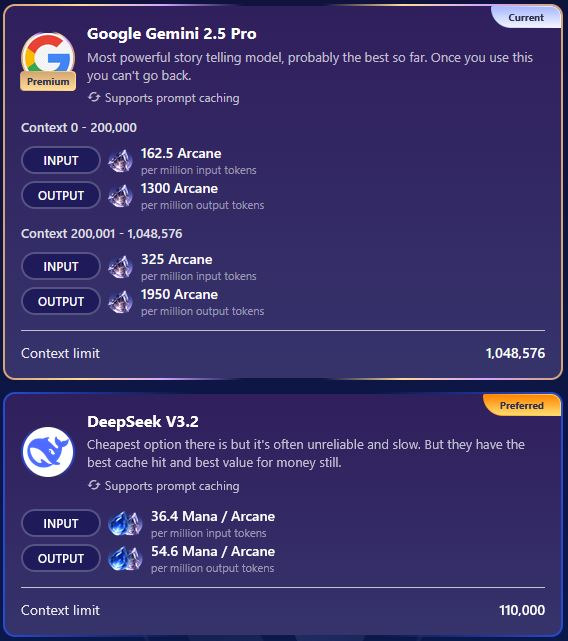
As you can see, Google Gemini 2.5 Pro has a significantly higher context limit than Deepseek V3.2, but also comes with a steeper cost. More about Tokens and Context here: What Are Tokens? | ISEKAI ZERO
Guidance Prompt
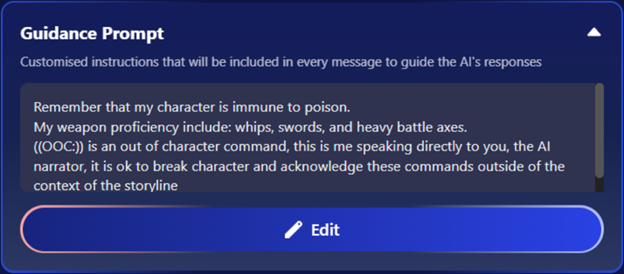
The Guidance Prompt is unique to each storyline and is a custom prompt you can add to modify your chat experience. This prompt will be added to the end of each of your messages and can be used to remind the AI of important information about your character, NPCs you have encountered, important plot points, or to solve any problems you might be encountering with any specific storyline. In this example I have added a prompt to make the AI recognize OOC commands.
You can find more helpful prompts on our Discord!
Chat Settings
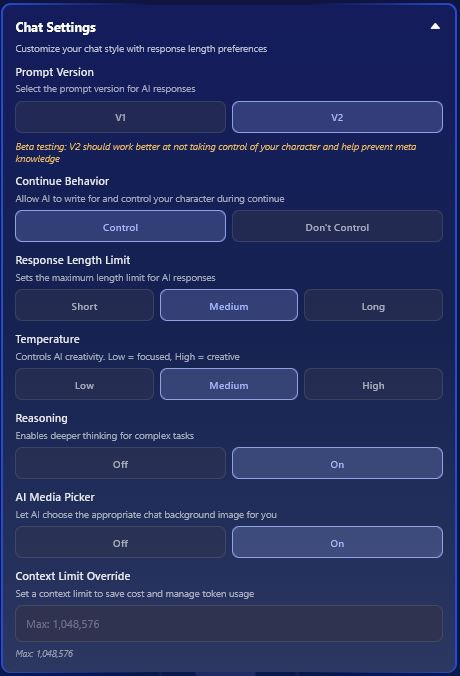
Prompt Version
- Prompt Version lets you pick between V1 and V2. These are going to be the main, back-end, prompts that are going to determine the way the AI responds to your messages.
- V1 is going to have less restrictive prompting, allowing for a more free form experience
- V2 contains prompts more geared towards role-play specifically
- The rest of the options are the same between V1 and V2, the only difference is if you choose V2 you have an additional option Continue Behavior.
Continue Behavior
- This tells the AI if it can speak for your character when you hit the continue button.
- This is great for those who do not want the AI acting for them in any way during their scenes.
Response Length Limit
- Response Length Limit is the same for both V1 and V2, and sets the limit for how many tokens the AI can use in a single response:
- Short ≈ 150 tokens
- Medium ≈ 300 tokens
- Long ≈ 500 tokens
Temperature
- The Temperature setting determines how creative the AI can be with its responses, this is basically the AI Imagination setting.
Reasoning
- The Reasoning toggle allows the AI to think deeper and complete more complex tasks.
AI Media Picker
- The AI Media Picker lets the AI pick the image that will appear behind your chat window, these images are selected from the list of available images the story creator has made available.
Context Limit Override
- This option lets you limit the token amount for the chat to keep from going over budget.
After that, we have Summarization in which had been covered full here:
Summarization and Arc | ISEKAI ZERO
After Summarization is the Players Persona, this shows you the character that you are currently playing as in the story.
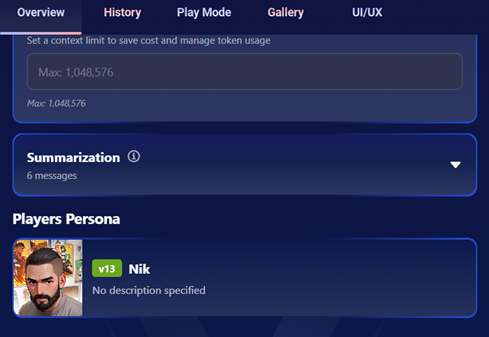
Any NPCs the AI has introduced will appear under Support Characters (AI-Generated) after Players Persona
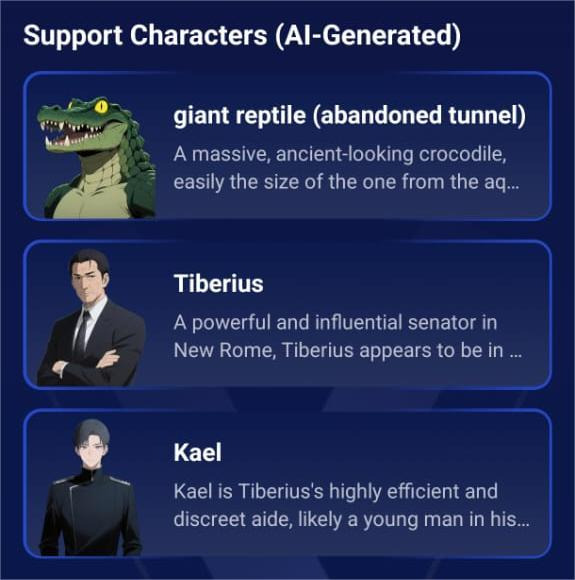
SMUT TAG — CLASSIFICATION GUIDELINE
PURPOSE
Identifies submissions where sexual content is the primary purpose, not a narrative element within a broader story.
SMUT TAG APPLIES WHEN:
1. Sexual core loop — The premise, objective, or progression is built around sexual encounters as the main content. Narrative exists only to bridge between sexual scenes.
2. Pornographic character writing — Character profiles contain:
-
- Pre-written sexual scenes disguised as character traits
- Graphic genital descriptions (size, color, shape, texture)
- Arousal-focused anatomical language (e.g., "plump camel toe," "rock-hard nipples," "50cm penis")
3. Degrading creator-level framing — The creator (not a character in dialogue) labels characters using crude sexual terms such as "fuck toy," "breeding hole," "personal slut," etc.
4. Kink-dominant profiles — Sexual preferences/kink sections are longer and more detailed than personality, backstory, motivations, and goals combined.
5. Interchangeable sexual partners — Multiple characters exist with no narrative distinction beyond offering different sexual experiences.
6. Sex-scene sequencing — The storyline is structured as a chain of escalating sexual encounters with only thin narrative bridges connecting them.
7. Pre-written explicit content — Opening scenes, plot descriptions, or example dialogues already contain graphic sexual acts.
NOT SMUT:
- Stories with dark/mature themes where sex exists within a larger narrative (intrigue, character growth, trauma, relationships, conflict)
- Having an NSFW tag alone
- Listing sexual preferences in character profiles using directive language
- Including explicit content guidelines or heat level ratings
STORYLINE SMUT INDICATORS:
1. Plot Architecture
2. Narrative Structure
3. Worldbuilding Purpose
4. Prompt/Guideline Intent
NON SMUT STORYLINE:
- Stories where sexual content is gated behind relationship progression, trust-building, or narrative milestones
- Dark/mature worlds where sexual dynamics exist alongside political, social, cultural, and survival systems
- Settings with sexual themes (e.g., succubus characters, courtesans, romance) where those themes serve character development and narrative conflict
- High heat level settings with equivalent or greater investment in worldbuilding, pacing, and character guidelines
COMBINED EVALUATION NOTE:
When evaluating a borderline submission, assess character cards AND story together. A clean story with smut-level characters, or a clean set of characters in a smut-level story, both receive the tag. The submission is a single product — evaluate it as one.
FINAL DETERMINATION
We reserve the final right to apply the Smut tag to any submission. The criteria and checklists above serve as guidance, but tagging decisions remain at the moderation team's discretion.
SMUT IMAGE INDICATORS:
1. Character Images
2. Scene/Cover Images
3. Pattern Recognition
NOT SMUT IMAGE:
- Characters in revealing but culturally/narratively justified attire (warriors, dancers, beach settings, fantasy armor)
- Artistic nudity that is not sexually posed or genitally focused
- Single provocative image among otherwise balanced character presentation
- NSFW-tagged submissions with explicit images that match the story's established tone and context
IMPORTANT DISTINCTION:
An explicit image alone may not trigger the Smut tag if the submission is otherwise narratively strong. However, explicit images combined with other smut indicators (character-side or story-side) strengthen the case for tagging. Evaluate images in context of the full submission, not in isolation.
FINAL DETERMINATION
We reserve the final right to apply the Smut tag to any submission. The criteria and checklists above serve as guidance, but tagging decisions remain at the moderation team's discretion.
GREY AREA CHECKLIST
When a submission is borderline, apply these tests:
A submission doesn't need to fail every test — but failing multiple tests strongly indicates the Smut tag applies.
FINAL DETERMINATION
We reserve the final right to apply the Smut tag to any submission. The criteria and checklists above serve as guidance, but tagging decisions remain at the moderation team's discretion.
Dungeon Mind (DM)
Playing with Dungeon Mind (DM)
A beginner-friendly guide to playing ISEKAI ZERO storylines that have the Dungeon Mind (DM) active. If you've never touched a tabletop RPG in your life, you're in the right spot — this covers everything you'll actually see and do as a player.
Heads up: this guide assumes you've already read Chat Basics — How To Chat as a Beginner. If you haven't, go do that first — things like OOC, editing messages, and branching chats are covered there and won't be repeated here.
What is the Dungeon Mind?
Think of the Dungeon Mind — or DM for short — as the referee sitting next to the storyteller. The story AI writes what happens. The DM decides whether your action actually worked.
When you try to swing a sword, pick a lock, cast a spell, or sneak past a guard, the DM rolls dice in the background, checks the rules the creator wrote for that storyline, and hands the result back to the story AI. The story AI then narrates what happens based on that result.
You don't have to do anything special to make it work. Just play normally — the DM activates automatically whenever you do something that needs a dice roll or would change your stats.
|
In short You roleplay. The DM handles the math. The story AI writes the scene. Everyone stays in their lane. |
How do I know if a storyline has a DM?
Storylines with a DM attached will show a wizard hat badge. Once you select the storyline, you can click the Dungeon Mind tab and see the relevant info. This is also going to tell you if the DM mod is required or not:

• Required mode — The DM is always on. You can't turn it off, and the system will auto-pick a compatible AI model for you.
• Optional mode — a toggle switch appears in chat settings and on the first message. You can flip it on or off. If you turn it on, make sure you're on a compatible model (the chat will warn you if you're not).

|
About models Creators can set a recommended AI model for their DM. Stronger models handle complex rules more reliably. If you switch to a different model, you'll see a warning — it may still work, but results can get weird. Stick with the recommended one unless you have a reason not to. |
Your character sheet
Once the DM is active, your character gets a sheet. Tap any character card in chat settings to see it. What's on the sheet depends on the storyline — the creator decides what stats their game uses.

What you'll usually see
• HP bar — your health. Green when you're fine, yellow when you're hurt, red when you're in trouble. If it hits zero, you're probably dead. More on that below.
• Alive dot — green if you're alive, red if you're dead. Appears right on the character card.
• Condition text — status effects like "Poisoned (3t)" sit next to the alive dot. The number in parens is how many turns are left.
• Other resource bars — MP (blue), Stamina (yellow), Energy (purple), Action Points (white). Only the ones your storyline uses will show up.
• SHEET badge — tap this to see the full thing: all stats, skills, inventory, the works.


|
Stats differ between storylines A classic fantasy storyline might give you STR, DEX, CON, INT, WIS, CHA. A survival horror one might give you Health, Sanity, and Supplies. A social intrigue one might be all Charm, Wit, and Influence. Every storyline is its own game. Check the Player Guide (covered at the end of this doc) for the rules of the specific storyline you're in. |
Rolling dice: the part you'll see most
The DM rolls a 20-sided die (a d20) whenever you try something with an uncertain outcome. You'll see this happen visually.
The dice overlay
When a roll happens, a fullscreen overlay pops up with an animated die. It shows:
• Your character's portrait
• The roll number (1 through 20)
• Whether you had Advantage or Disadvantage (more on that in a sec)
• Color coding — a gold glow for a natural 20, a red glow for a natural 1

The roll result bars
After the overlay, compact bars appear below the story text. One bar per character that rolled. Each bar shows:
• The character's avatar with a colored border
• The roll number with a success or fail icon
• Detail text explaining the math — things like "STR attack. Roll 14+3=17 vs DEF 12. Hit."
• Stat changes — green for gains, red for losses
• Skill gains (purple) and inventory changes (gold) if any happened
Tap a bar to replay the dice animation. The roll bars are the transparency layer — they're how you see what the DM actually did behind the scenes. The story text itself won't mention numbers.

Natural 20 and Natural 1
Two roll results matter more than the rest:
• Natural 20 — the die lands on 20 before any bonuses are added. In most games, this is an automatic success. Often it also means an epic moment — double damage, a perfect shot, something special. You'll see a gold glow on the overlay.
• Natural 1 — the die lands on 1. In most games, this is an automatic failure. Often something goes dramatically wrong. You'll see a red glow on the overlay.
|
What counts as a crit? Exactly what a natural 20 or natural 1 does depends on the storyline's rules. Most games treat them as automatic success/failure, but a creator can define them differently. The roll bar will tell you what actually happened either way. |
Advantage and Disadvantage
Sometimes the DM rolls two dice instead of one:
• Advantage — rolls twice, keeps the higher number. You'll get this when the situation favors you — an ally is helping, you caught the enemy by surprise, you did something clever.
• Disadvantage — rolls twice, keeps the lower number. You'll get this when things are working against you — you're blinded, exhausted, trying something you have no training in.
The DM decides when these apply based on the game rules. You'll see the label on the dice overlay so you know what's happening.
A walkthrough: combat turn
Here's what a full turn looks like from your side. Say you're playing a warrior, and there's a goblin in front of you.
Step 1: You type your action
In the chat field, you write something like: "I draw my sword and swing at the goblin, aiming for its neck."

Step 2: The story AI recognizes a combat action
The story AI sees this is a fight move. Instead of just describing what happens, it calls the DM to figure out the actual result.
Step 3: The DM rolls
The dice overlay pops up. Your character's portrait, an animated d20 spinning, and — let's say — it lands on 14.

Step 4: The DM applies the rules
The DM checks the game rules: your 14 beats the stalker’s defense. Hit. Damage gets calculated. The stalker’s HP drops. At the same time the stalker gets a roll, this time it was a crit, an auto hit. You both take damage.
Step 5: The story AI writes the scene
Now the story AI gets the results back and describes what happened.
Notice: no numbers in the prose. The narrative stays clean.

When the DM asks you a question
Sometimes the DM needs your input before it can continue. When this happens, the story pauses and a special message appears in chat that looks like: "Dungeon Mind (DM) Asks."
Common examples:
• "Level up! Choose 2 stats to increase: STR, DEX, or INT?"
• "You found a magic ring and a silver dagger. Which do you want to take?"
• "How are you going to approach the guard — talk, sneak, or fight?"
Just answer in your next message. Type it however feels natural — "I'll put both points into STR" works fine. The DM will pick up your answer, apply it, and the story continues on the next message.
|
Don't skip it If the DM asks a question, the story is waiting on you. You won't make progress until you answer. Ignoring the question and typing something unrelated can confuse the AI. |
When the DM rejects your action
Sometimes you'll try something and the DM will shut it down before it even rolls. When this happens, you'll see a message that says "Dungeon Mind (DM) Rejected" with a short reason why.

This isn't the AI being mean — it's the DM enforcing the rules the creator wrote. Rejections happen when you try something that breaks the game's logic.
Common rejection scenarios
• Trying to act while dead — if your character's HP hit zero and death is permanent in that storyline, you can't just get back up. The DM will reject actions from dead characters.
• Resurrecting a dead ally — many storylines treat death as permanent. Trying to bring someone back usually gets rejected. (Some games have exceptions — check the Player Guide.)
• Healing yourself when you're not a healer — if the game restricts healing magic to a specific class, trying to cast heal on yourself as, say, a warrior will get rejected. You'll need to use a potion or rest instead.
• Manually editing your stats — you can't tell the DM "give me +10 STR" or "set my HP to full." Stats only change through gameplay: taking damage, resting, leveling up, drinking potions. The DM is the only thing that changes stats.
• Impossible actions — things that flatly break the game's rules. If a game says you can't use magic in an anti-magic zone, casting a spell there will get rejected.
What to do when you get rejected
Just try something else. The rejection message usually tells you why, so use that as a hint. If you wanted to heal but can't cast healing magic, look for a potion in your inventory. If you wanted to resurrect a dead ally, maybe there's a shrine or quest that can help — or maybe death really is final and you need to move on.
If you think the rejection is a mistake (for example, the game rules should allow what you're doing), you can try rephrasing your action. Being specific about what your character is doing and why can help. You can also use OOC to ask the AI directly — see Chat Basics for how OOC works.
Healing, death, and leveling up
These are the three moments most players have questions about. The exact rules depend on the storyline, but here's the general shape:
Healing
Most storylines have a few ways to heal:
• Short rest — usually gets back some HP (often around 25%). Good for patching up between fights.
• Full rest — sleep, basically. Full HP back, conditions cleared. Usually requires a safe place.
• Potions — if you have healing potions in your inventory, you can use them. Works for everyone, no class restriction.
• Healing spells — often class-restricted. In many storylines, only healer-type classes can cast them. Check your Player Guide.
To heal, just describe what you're doing: "I take a moment to rest and tend my wounds," or "I drink my healing potion," or "I cast Heal on myself." The DM handles the rest.
Death
When your HP hits zero, your character dies. The alive dot on your card goes red, and you can't take actions anymore.
Whether death is permanent depends entirely on the storyline. Some games have resurrection mechanics, quest rewards, or revival items. Most don't — death usually sticks. Check the Player Guide for the specific rules of your storyline.
|
If you die and want to continue Remember that the chat tools still work. You can use Create Branching Message (covered in Chat Basics) to branch back to before the death and try again. Or you can edit the message that killed you. It's your story — play it however feels right. |
Leveling up
As you do things, you earn XP. When you hit a threshold, the DM will trigger a level-up. Usually this means:
• The DM asks you which stats you want to increase (via a DM Asks message)
• You answer, and the DM applies the changes
• You might get a new skill or ability
• Your HP base often goes up, and any damage modifiers reset
Some games level you up during rest. Some do it mid-scene. Either way, the DM Asks message is your cue to choose.
Inventory and skills

Inventory
When you pick up items, loot enemies, or buy something, it goes into your inventory. You'll see inventory changes in the roll bars (gold-colored entries). To check what you're carrying, tap the SHEET badge on your character card.
To use an item, just describe it: "I drink the healing potion," "I equip the steel sword," "I throw a smoke bomb at the guard." The DM will verify you have it and apply the effect.
Skills
Skills are special abilities your character has. Some are there from the start. Others you learn through the story — a teacher shows you a technique, you unlock a spell, you discover a hidden talent.
New skills show up in the roll bars (purple-colored entries) and in your full character sheet. To use one, describe what you're doing: "I use my Whirlwind Strike technique." If your character has the skill and it makes sense to use it, the DM will handle it.
Tips for playing well with the DM
- Describe what you're doing, not the result. Write "I swing my sword at the goblin" — not "I kill the goblin." The DM decides if you hit. Telling the story what happens before the dice roll can cause weird contradictions.
- Stay specific. "I try to persuade the guard" is fine. "I lean in, lower my voice, and mention that I'm a friend of the captain" is better — it gives the DM more context and can earn you Advantage.
- Accept the rolls. Bad rolls happen. The dice are server-side and can't be manipulated — that's what makes the game feel real. If something goes wrong, lean into it. The story's usually more interesting when it does.
- Watch your resources. If your MP is getting low, don't plan to cast three more spells. If your HP is in the red, consider retreating or resting. The roll bars and character sheet are there for a reason.
- Use OOC when you're confused. If something happened and you don't understand why, start a new line with "ooc" and ask. The AI will explain what went on.
- Branch when you want to experiment. If you're unsure about a big decision, use Create Branching Message to try it out safely. Your main timeline stays intact.
The Player Guide (in chat settings)
Every storyline with a DM can include a short Player Guide written by the creator. It shows up in chat settings when the DM is enabled, and it's where the creator tells you the things specific to their game:
• What stats your character has and what they do
• How combat works in this world
• Whether death is permanent or if there's a way back
• Class restrictions, magic rules, healing mechanics
• Any tips the creator wants to share
It's short — usually a quick overview. Read it before you start playing, especially for storylines with unusual mechanics. It'll save you a lot of confused rejections later.

Quick recap
• The DM rolls dice and tracks stats. The story AI writes the scene. You just play.
• Roll bars below the story text show you what actually happened mechanically.
• If you see "Dungeon Mind (DM) Asks," answer the question to continue.
• If you see "Dungeon Mind (DM) Rejected," try something else.
• Check the Player Guide in chat settings for storyline-specific rules.
• Describe actions, don't narrate outcomes. Let the dice decide.
That's it. Go have fun, make bad decisions, and roll some dice.
Content Creator Guide
The complete reference for creating and publishing on the platform
Consolidated from official ISEKAI ZERO policies and internal moderation guidelines
Table of Contents
1. How This Guide Works
2. Your Responsibilities as a Creator
3. Zero Tolerance & Severe Violations
4. Prohibited Content
5. Underage Characters & the SFW Only Tag
6. Visual Examples — Rejected Characters
7. Image Rules
8. 18+ Tagging Guide
9. The Smut Tag
10. Content Quality & Advanced Mode
11. Spam, Plagiarism & Deceptive Practices
12. Fan Fiction & Copyright
13. Other Content Policies
14. “But I See Other Stories That Passed…”
15. Moderation & Enforcement
16. Consequences for Violations
17. Contact & Support
1. How This Guide Works
This guide consolidates the ISEKAI ZERO Content Creation Policy, 18+ Tagging Guide, Smut Tag Classification Guideline and internal moderation guidelines into a single reference document for creators.
It covers everything you need to know about what you can and cannot create on the platform, how to tag your content correctly, how to structure your storylines for approval, and what happens if you break the rules.
Scope of This Policy This policy applies to content YOU directly author and control: character profiles, storyline descriptions, images, thumbnails, first messages, tags, metadata, comments, collections, and external links. You are NOT responsible for: AI-generated dialogue during gameplay, player inputs, or unexpected AI behavior. However, if you deliberately design content to circumvent policies or generate violations, that IS a policy violation.
2. Your Responsibilities as a Creator
As a creator, you are responsible for:
- Character profiles — names, descriptions, personality traits, backgrounds, appearance
- Storyline content — titles, descriptions, synopsis, plot summaries, premises, AI prompts, guidelines
- Cover images — storyline covers and character images/avatars (any non-hidden image)
- Hidden images — images marked as hidden in storylines or character cards
- First messages — the opening scene or message that begins a storyline
- Tags and metadata — SFW/18+ classification, SFW Only setting, age ratings, content warnings, genre tags
- Comments, collections and external links
All content must be original or properly attributed. ISEKAI ZERO does not tolerate plagiarism or copyright infringement.
3. Zero Tolerance Violations
All violations in this section result in immediate and permanent ban with no warnings, no second chances and no appeals. Bans extend to all official ISEKAI ZERO community platforms (including but not limited to Discord servers, Facebook groups, Instagram, Reddit, Twitter/X, and any other official channels, both current and future).
Tier 1 — Child Safety (Highest Severity)
These are the most severe violations on the platform. In addition to permanent ban, ISEKAI ZERO will report to law enforcement authorities where legally required.
3.1 Child Sexual Abuse Material (CSAM)
- Any sexualization of underage characters, including characters that appear underage regardless of stated age
- Characters in 18+ content that have underage-like features, child-like appearances, or youthful characteristics
- All characters in 18+ content must be clearly depicted as adults (18+) in both appearance and description
- "She's actually 1000 years old" does NOT work — visual appearance and mental capacity determine age classification
- Underage character in NSFW content is strictly forbidden.
Moderator Note: Characters with ambiguous or youthful appearances that are not explicitly stated as underage are handled through revision guidance — see Sections 5 and 6. Failure to address age-ambiguous characters after coaching escalates to Zero Tolerance.
3.2 Circumvention of Underage Protections
- Creating SFW content with underage characters while promoting or encouraging 18+ interactions with those characters on ANY platform (Discord, Reddit, social media, etc.)
- Advertising or suggesting players can engage in 18+ scenarios with underage characters
- Designing SFW storylines with underage characters intended to enable 18+ gameplay
- Discussing, sharing, or encouraging methods to bypass age restrictions or content policies
- Attempting to circumvent or disable mandated SFW Only protections
3.3 Grooming & Predatory Content
- Content depicting grooming dynamics where an adult cultivates a relationship with a minor with intent of future sexual or romantic involvement
- "Wait until they're 18" scenarios: where a character pursues, grooms, or maintains romantic/sexual interest in a minor with the intention of initiating a relationship once the minor reaches the age of majority
- Content where an authority figure (guardian, teacher, caretaker, mentor) who knew or supervised a character as a minor later pursues a sexual or romantic relationship with that character
- Any content that romanticizes, normalizes or portrays predatory behavior toward minors as desirable or consensual
Tier 2 — Zero Tolerance Content Violations
The following are also Zero Tolerance violations resulting in permanent ban.
3.4 Non-Consensual Sexual Content
The following are prohibited:
- Storylines or characters where rape, sexual assault, or violent sexual coercion is built into the premise, plot loop, or gameplay objective — designed as something the player or characters enact
- "Dubious consent" scenarios where consent is unclear or implied to be absent
- CNC (consensual non-consent) scenarios or roleplay
- Characters described as ignoring, overcoming or not understanding consent
- Fantasy or magic-based coercion for sex — slave markets, mind control, drugging, magical compulsion or any mechanism that removes or overrides consent. Removing consent through fictional means is still non-consent.
Note: Mentions of sexual assault in character backstories (e.g., a character who is a survivor) are not automatically a violation — context and framing matter. Content that depicts recovery, consequences or survival narratives may be permissible with appropriate content warnings. The distinction is whether sexual violence is something the story explores vs. something the story facilitates.
Revision Guidance: If your content was rejected for consent issues, you may be able to revise and resubmit. Ensure all sexual interactions are clearly consensual and freely chosen by all characters involved. Power dynamics and dark themes are not prohibited — but sexual activity within them must involve genuine consent.
3.5 Incest & Bestiality
- Incest — sexual content between blood-related family members (parent-child, siblings, grandparent-grandchild, aunt/uncle-niece/nephew, cousins)
- Bestiality — any sexual content involving animals
3.6 School Uniforms & High School Settings
- Storylines or characters featuring school uniforms, school settings, or visual/contextual indicators implying an underage environment (middle school, high school, secondary school) CANNOT be tagged 18+
- Content depicting characters in secondary school uniforms in sexual or suggestive contexts is prohibited regardless of stated age
- "Suggestive" includes: provocative poses, partial undressing, romantic or flirtatious framing, or imagery intended to sexualize the school setting
Exception: 18+ content set in academies, universities, or other educational institutions is permitted ONLY where all characters are clearly adults in appearance and description, the setting does not visually resemble a secondary school, and no element implies underage characters.
Academy/Institute Disguise Warning: Simply renaming a high school as an "academy" or "institute" does not make the content acceptable. Moderators evaluate the actual setting depicted — student ages, uniforms, classroom dynamics, curriculum references (e.g., "first year," "homeroom," "class 1-A") — not just the label used. Settings where final-year students are stated as 18 years old mathematically imply that junior or lower-year students are underage (17, 16, 15, etc.), making the overall setting an underage environment regardless of the institution's label. For a setting to qualify as genuinely adult, the youngest students (first-year or equivalent) must be 18 or older. Cases involving information inconsistency — where images resemble a school setting but the text uses "academy" or "institute" labels — will be carefully inspected and may be rejected.
3.7 Other Zero Tolerance Violations
- Non-consensual intimate imagery
- Terrorism or violent extremism
- Hate speech or discrimination based on any protected characteristic
- Content promoting self-harm or suicide
- Fake engagement and metric manipulation — including alt accounts, bot accounts, like-swapping rings, purchased engagement, or any method to artificially inflate platform metrics. The main account and ALL associated accounts will be permanently banned, all content removed, no refunds.
4. Prohibited Content
Beyond the items in Section 3 above, the following content is also prohibited:
4.1 Explicit Visual Content
See Section 7 (Image Rules) for the complete breakdown of what is and isn’t allowed in cover images vs hidden images. The following are prohibited in ALL images regardless of visibility:
- Exposed genitalia — always prohibited, no exceptions
- Camel toe / any defining lines on the genital region — always prohibited
- Depictions of sexual acts — always prohibited
- Real life human images, including AI-generated photo-realistic images
4.2 Violent & Graphic Content
- Violent physical sexual assaults (text or imagery)
- Perpetrator-perspective descriptions of deadly or major violent events
- Inciting violence against individuals or groups
- Graphic violence, gore, torture, or disturbing scenarios whose primary purpose is to shock or disgust
- Images of corpses with massive injuries (e.g., severed limbs)
- Animal abuse content — coerced fighting, malicious mistreatment, glorifying neglect, staged “rescue” content
4.3 Harmful or Dangerous Content
- Instructions to kill, harm, make explosives, operate firearms to harm, hack, steal, or phish
- Extremely dangerous challenges or pranks
- Content endangering the emotional or physical wellbeing of underage characters
- Bypassing payment for digital content or services
- Cryptophishing — requests for cryptocurrency or wallet details as part of a phishing scheme
4.4 Suicide, Self-Harm & Eating Disorders
- Content providing specific methods, instructions, or detailed descriptions of self-harm, suicide, or disordered eating
- Content that glorifies, romanticizes, or aestheticizes self-harm, suicide, or eating disorders
- Characters or storylines designed to encourage, dare, or pressure players into self-harm or disordered eating
- Pro-anorexia, pro-bulimia, or similar pro-eating-disorder content
- Suicide pacts, suicide games, or self-harm challenges
- Content that mocks or dismisses individuals struggling with mental health conditions
**Recovery narratives showing characters overcoming self-harm, educational content about mental health, depictions showing realistic consequences, mental health awareness content is acceptable.
4.5 Real People’s Names and Images
- Using real people’s names (especially celebrities, public figures, politicians)
- Using real people’s photos or likenesses without permission
- Creating characters based on real living individuals
- Impersonating real people through names or images
**Historical figures (deceased, public domain) and generic common names (John, Maria, etc.) not clearly referencing a specific famous person. However, content featuring historical figures must be respectful and contextually appropriate. Content that trivializes, parodies, or creates redemption arcs for figures associated with genocide, war crimes, or crimes against humanity (e.g., Hitler, Pol Pot, Stalin) is prohibited. When in doubt, ask: would this content be considered offensive or disrespectful to the victims and communities affected by this figure's actions?
5. Underage Characters & the SFW Only Tag
5.1 Who is Considered Underage
- Any character under 18 years of age
- Any character who appears “too young” or child-like, regardless of stated age — claiming a character is “actually 1000 years old” does NOT exempt them
- Any character with the mentality of a child, regardless of stated age
Visual appearance and mental capacity determine age classification, not declared age in descriptions.
5.2 The SFW Only Tag
If your storyline includes ANY underage characters, you MUST enable the “SFW Only” tag.
What it restricts
Sexual activity ONLY. The system adds guardrails that prevent any sexual content in the chat — no explicit AI responses, no sexual image generation, and players cannot steer the conversation in a sexual direction.
What it does NOT restrict
Everything else. Violence, dark themes, horror, conflict, drama, emotional intensity — all still allowed. The SFW Only tag is specifically and exclusively a sexual content lock.
When it’s required
Any storyline where at least one character is, appears to be, or has the mentality of someone under 18. Characters with youthful appearances in SFW storylines must also have this enabled.
Conflict rule
A storyline CANNOT have both the SFW Only tag and the 18+ tag. That’s a conflict and will be rejected.
5.3 Enforcement
- Moderators have final authority to determine if a storyline requires the SFW Only setting
- Public storylines featuring underage or youthful-appearing characters will have this setting enabled during review if not already enabled
- Storylines without proper settings will be modified by moderators or removed
- Creators who repeatedly fail to enable this setting face suspension or permanent ban
- Attempting to circumvent or disable mandated SFW Only protections is a serious policy violation — zero tolerance
5.4 Additional Child Safety Rules
- Do not create content inflicting or advocating physical, sexual or emotional maltreatment of a child
- Do not expose underage characters to mature themes, simulate parental abuse, coerce underage characters or depict violence toward them
- Do not create misleading family content — content appearing suitable for children but containing sexual themes, violence, obscenity or other mature themes
- Do not create content intending to shame, deceive, insult, or harass an underage character
6. Visual Examples — Characters That Got Rejected
The following are real examples of characters submitted in 18+ stories that were rejected for appearing underage or childlike. These span different art styles, species, and approaches — none of them are explicit, but all violate the underage appearance policy when placed in 18+ content.
**Note to Creators: If you see an image here that belongs to you or one of your stories, you can DM @nikk to have it removed from this guide.
Fantasy Species Don’t Exempt Childlike Faces
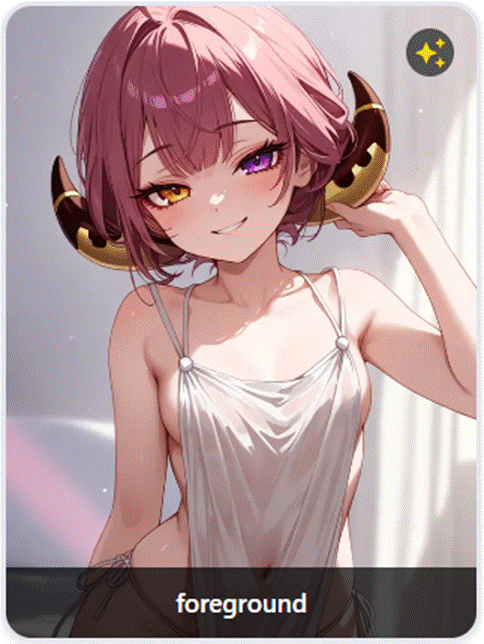
Rejected: Despite being a fantasy “goddess” with horns, the character has a childlike face. Non-human features don’t override a youthful appearance.
School Uniforms + Youthful Appearance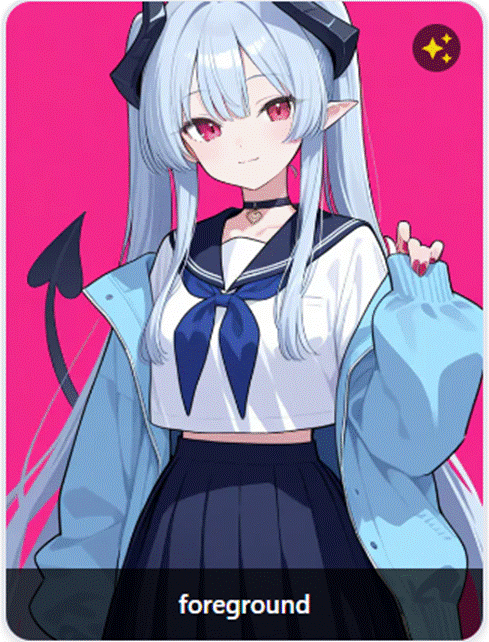
Rejected: School/sailor uniform combined with youthful facial features and small frame. School uniforms inherently imply underage — doubly so when the character already looks young.
Childlike Proportions in Group Scenes
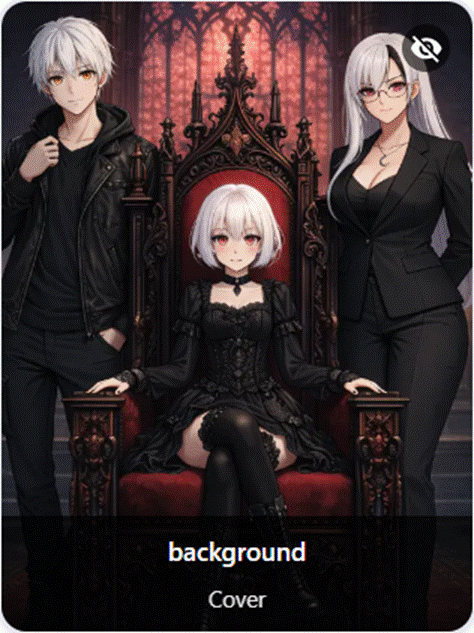
Rejected: The central seated character has clearly childlike proportions compared to the flanking adult characters. Size and body proportions matter.
Non-Human Species Still Need Adult Features
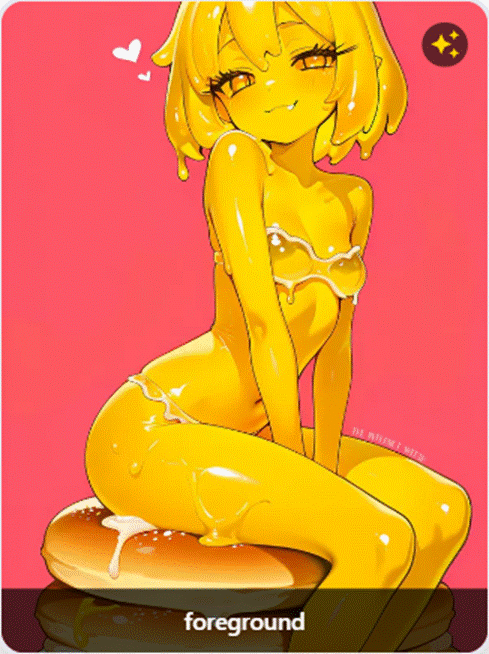
Rejected: Despite being a non-human character, the face and body proportions are childlike. Being a different species does not exempt a character from appearing adult.
Childlike Characters Across Multiple Expressions
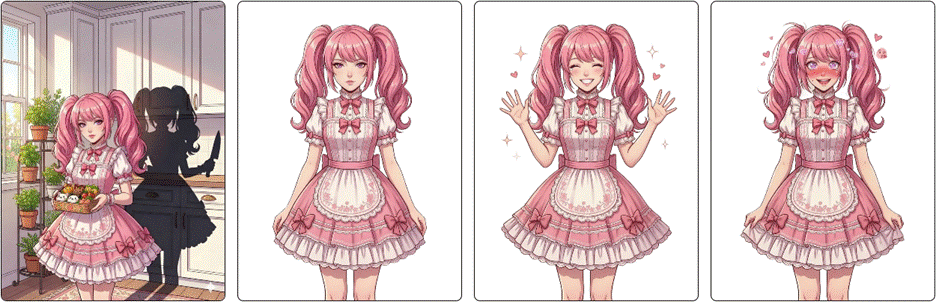
Rejected: Childlike face, small stature, and proportions across every expression variant. Elaborate clothing doesn’t make a child-looking character look adult.
Short Stature + Childlike Face = Underage Appearance
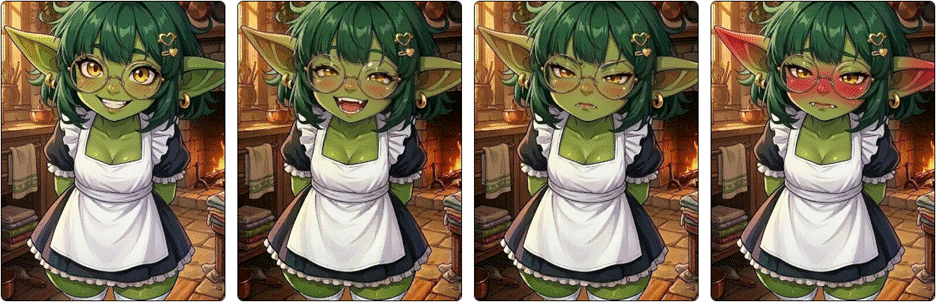
Rejected: Despite being a goblin, the character has a childlike face, tiny proportions, and overall appearance of a small child. Species does not override visual age.
3D Art Style Doesn’t Change the Rules
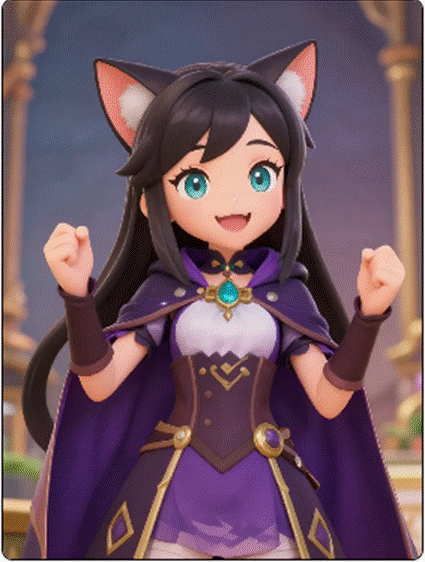
Rejected: Very young-looking face and proportions. Art style (3D vs anime vs illustrated) doesn’t change the age appearance standard.
Hiding the Image Doesn’t Make It OK
Rejected: Obviously child-like appearance. Note the “Hidden” tag — hiding an underage-looking character image doesn’t make it acceptable in 18+ content. The character itself cannot be underage-looking.
School-Age Appearance Across Expressions
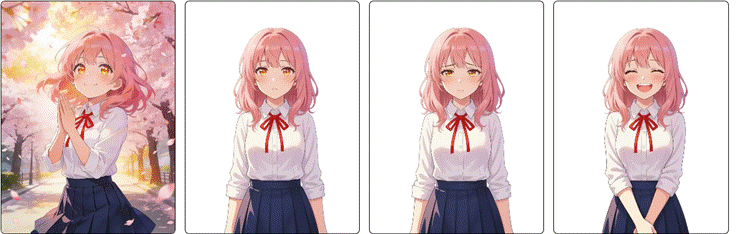
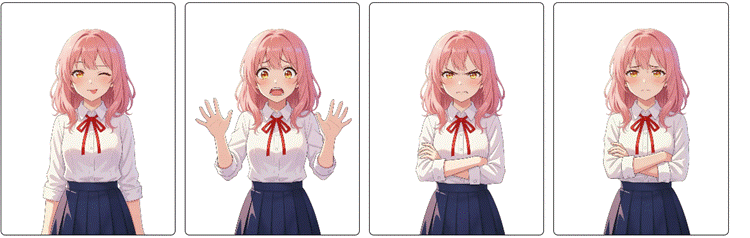
Rejected: School-age appearance, childlike proportions, and youthful styling across all expression variants.
Body Type Doesn’t Override Facial Age
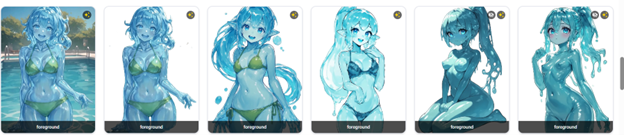
Rejected: Despite a more developed body in some images, the character’s face consistently appears childlike. A mature body does not compensate for a childlike face — both must read as adult.
The Takeaway It doesn’t matter if the character is a goddess, a slime, a goblin, or an elf. It doesn’t matter if you use 3D, anime, or illustrated art. It doesn’t matter if you hide the image. If the character LOOKS like a child, they cannot be in 18+ content. Period. Visual appearance determines age classification. Not the description, not the species, not the stated age.
7. Image Rules
ISEKAI ZERO has two tiers of image rules based on visibility:
Cover images = any image that is NOT hidden. This includes storyline covers, character card images, and any other image visible when someone browses or clicks into your content. If a user can see it without unlocking anything, it’s a cover image.
Functionally nude = actually nude. If clothing is so transparent, tight, or minimal that you can clearly see intimate body parts through the fabric — it’s treated as a nudity violation.
7.1 Cover Images (Any Non-Hidden Image)
These are browsable — anyone can see them. They must be clean, even for 18+-tagged content.
Prohibited in cover images:
- Exposed genitalia (illustrated, AI-generated, or photographic)
- Exposed nipples or areolas
- Full frontal nudity — prohibited in cover images regardless of anatomy
- Camel toe or any genital detailing through clothing
- Transparent, sheer, or see-through clothing revealing nudity underneath
- Anatomical details (nipples, areolas) visible through fabric
- Strategic covering with hands, hair, or small objects — this is still nudity, not clothing
- Explicit sexual acts or simulations
- Sex toys or fetish items
- Pornographic imagery or graphic nudity for sexual gratification
- Violent/gory imagery intended to shock or disgust
- Real life human images, including AI-generated realistic images
- Misleading images that don’t represent the actual content
- Any image deemed too explicit or inappropriate by ISEKAI ZERO at our sole discretion
Camel Toe/ANY defining genital lines = Rejection Camel toe is defined as ANY defining lines on the panties or genital region. This includes tight clothing that outlines or contours genitalia in any way — even if technically “covered.” If the clothing renders genital shapes visible, it gets rejected. This applies to ALL images (cover AND hidden). This rule applies equally to all anatomy — explicit penis outlines through clothing are treated the same as camel toe.
Will get the Smut tag
Explicit nudity (think Hustler — pornographic framing, spread poses, genital focus, graphic body-part emphasis). This imagery will cause your content to be tagged as Smut, not just 18+.
Additionally, if the majority of images in a submission are sexual and explicit, the Smut tag will be applied automatically regardless of how clean the text prompt is.
REJECTED — prohibited even in hidden images:
- Exposed genitalia — always rejected, no exceptions
- Camel toe / any defining lines on the genital region — always rejected
- Depictions of sexual acts, including:
- Active sex acts even if genitals are hidden or obscured
- Implied penetration (stomach bulges, internal outlines)
- Off-camera partners (hands, body parts from someone not in frame, implying sexual activity)
- Positioning that clearly depicts intercourse regardless of what’s hidden
- Explicit body fluid depictions
- Real life human images, including AI-generated realistic images
- Any content that would violate zero-tolerance policies
Not allowed without Smut tag: Explicit posing, pornographic framing, or graphic body-part emphasis (Hustler-style). This imagery requires the Smut tag.
Note: Stylized "Barbie" anatomy (smooth, non-detailed) does not by itself trigger any restriction.
7.3 18+ Character Appearance
- Characters in 18+ content must NOT have underage-like or child-like features — regardless of stated age
- Characters must visually appear as adults with mature physical characteristics
- Age ambiguity in 18+ content = rejection. If character ages aren’t clearly established as adult, your submission will be rejected.
7.4 Common Image Mistakes
| Mistake | Placement | Remark |
| Hands/hair covering nudity instead of clothes | Cover | Rejected — strategic covering is nudity |
| Strategic covering (hands, hair, objects) | Hidden | Hidden images |
| Nipples visible through fabric | Cover | Rejected — anatomical details through clothing |
| Tight clothing with genital outline | Both | Rejected — camel toe, any defining lines |
| See-through clothing showing everything | Cover | Rejected — transparent fabric = nude |
| Nude images not marked as hidden | Cover | Rejected — must be hidden, double-check |
| Explicit/pornographic posing | Hidden | Smut tag or rejection |
| Sex toys in browsable image | Cover | Rejected |
| Sex acts with genitals hidden | Both | Rejected — sex act is the violation |
| Off-camera partner implying sex | Both | Rejected |
| Stomach bulge implying penetration | Both | Rejected |
8. 18+ Tagging Guide
The Golden Rule When in doubt, tag 18+. You will NOT be penalized for caution. Under-tagging WILL cause problems.
8.1 The “Most Mature Element” Rule
Tag your ENTIRE content based on the MOST mature element. If ANY part — image, description, first message, theme — is 18+, the whole character or storyline must be tagged 18+.
- Fully clothed image but description includes “seductive encounters” → 18+
- Family-friendly cover but first message implies nudity → 18+
- Standard clothing but ahegao (orgasmic) expression → 18+
8.2 Quick Decision Tool
Visual content — if YES to any:
Is it sexual? Revealing clothing? Suggestive pose? Uncomfortable to view at work? → Tag 18+
Text content — if YES to any:
Sexual themes? Sexualized descriptions? Strong profanity? Physical intimacy central? Adult situations? → Tag 18+
Three tests for gray areas:
- Intent Test: What’s the clear intent? “Seducing” or “intimate” → 18+
- Context Test: **What’s the setting? Bedroom + suggestive pose → 18+. Beach + swimwear → SFW
- Parent Test: Would a parent be OK with a 13-year-old seeing this? No or unsure → 18+
8.3 SFW vs 18+ at a Glance
| ✔ SFW | ✘ 18+ |
| Casual wear, professional attire, modest fantasy outfits | Lingerie, undergarments, deliberately sexualized outfits |
| Beachwear at a beach/pool | Beachwear in a bedroom |
| Standard portraits, action poses | Provocative poses, seductive expressions, “bedroom eyes” |
| Public spaces, adventure locations | Bedrooms/bathrooms implying intimacy |
| Hand-holding, blushing, innocent crushes | “Passionate embraces,” seduction, “things get heated” |
| “Playfully teases friends with jokes” | “Teases with suggestive comments” |
| Character removing a jacket casually | Character “taking off clothes” |
| Attractive character, no sexual language | Character described as “alluring” or “seductive” |
8.4 Automatic 18+ Triggers
Visual
Character undressing, partial nudity with strategic covering, bedroom/intimate setting + suggestive pose, lingerie or revealing sleepwear, positions suggesting “before/after intimacy”
Text
- Keywords with romantic context: “seducing,” “intimate,” “bedroom activities,” “provocative,” “undressing,” “alluring”
- Context: wedding night scenarios, “private/alone time,” post-coital implications
8.5 18+ Tagging Requirements
- Tag SFW/18+ during creation
- Cover images must be browse-safe even for 18+ content
- First messages should match the 18+/SFW designation
- Moderators may adjust your classification — they can and will retag your content
- 18+ content featuring copyrighted characters or settings is strictly prohibited
8.6 Common Tagging Mistakes
“Conditional 18+” / Secret Mode
If your storyline can produce 18+ content under any condition (e.g., “only allow 18+ if the player initiates”), it STILL needs to be tagged 18+. If it CAN be 18+, it IS 18+.
Age Ambiguity in 18+ Content
If your 18+ content features characters without clearly established adult ages, it will be rejected. Don’t say “new students” without specifying they’re adults. State it clearly.
Content Focused Solely on Sexual Gratification
Storylines that exist purely for sexual gratification with no meaningful narrative will be rejected outright — not just Smut-tagged but rejected. Your content needs actual story elements.
9. The Smut Tag
18+ ≠ Smut 18+ means your content contains mature elements. Smut means sexual content IS the content. A dark fantasy with sex scenes is 18+. A storyline whose entire purpose is chaining together sex scenes is Smut.
9.1 When the Smut Tag Applies
- Sexual core loop — Premise/objective/progression built around sexual encounters. Narrative only bridges between sex scenes.
- Pornographic character writing — Profiles contain pre-written sex scenes as “traits,” graphic genital descriptions, arousal-focused anatomy language.
- Degrading creator-level framing — YOU (not a character) label characters as “fuck toy,” “breeding hole,” etc.
- Kink-dominant profiles — Kink sections longer/more detailed than personality + backstory + motivations + goals combined.
- Interchangeable sexual partners — Multiple characters distinguished only by the sexual experiences they offer.
- Sex-scene sequencing — Chain of escalating sexual encounters with thin narrative bridges.
- Pre-written explicit content — Opening scenes or dialogues already contain graphic sexual acts.
- Explicit (Hustler-style) hidden images — Pornographic framing, spread poses, genital focus in nude images.
9.2 What is NOT Smut
- Stories with dark/mature themes where sex exists within a larger narrative
- Having an 18+ tag alone
- Listing sexual preferences using directive language
- Sexual content gated behind relationship progression or narrative milestones
- Worlds with sexual dynamics alongside political, social, cultural, and survival systems
- High heat level with equivalent or greater investment in worldbuilding and character
9.3 Storyline Smut Indicators
| Category | Smut Indicators |
| Plot Architecture | Sex IS the objective, sex as reward system, sex as game mechanic, sex as conflict resolution |
| Narrative Structure | Every scene funnels to sex, pre-scripted sexual events, no non-sexual stakes, escalation only through sexual intensity |
| Worldbuilding | World exists to enable sex, lore is kink delivery, no depth beyond sexual dynamics |
| AI Guidelines | Majority about writing sex scenes, high heat with no pacing, sexual formatting rules with no narrative equivalent |
9.4 Grey Area Checklist
| Test | Question | Smut Indicator |
| Removal | Remove all sex — is there still a story? | No story remains |
| Language | Directive (“enjoys”) or narrated (“she screams”)? | Narrated porn in profiles |
| Proportion | Sex more detailed than non-sex? | Sex outweighs narrative |
| Character | Distinguishable without kinks? | Only distinguishable by kinks |
| Mechanic | Non-sexual progression path? | Removing sex breaks the loop |
| Description | Intros or sexual ads? | Body-part fixation |
| Structure | Escalating sex scenes? | Scene → scene → scene with bridges |
Combined Evaluation Characters and story are evaluated together.
- Smut characters + Clean story + Clean images = Smut.
- Clean characters + Smut story + Clean images = Smut.
- Clean characters + Clean story + Smut images = Smut.
- Clean characters + Clean story + Clean images ≠ Smut.
If the majority of images in a submission are sexual and explicit, the Smut tag will be applied automatically regardless of how clean the text prompt is.
ISEKAI ZERO reserves the final right to apply the Smut tag. Tagging decisions are at the moderation team’s discretion.
10. Content Quality
One of the most common rejection messages:
"Insufficient content quality. There is not enough information for the AI to navigate and narrate this story properly. You need to add more data to the Plot Prompts to tell the AI what the story is and utilize the Prompt Guidelines to tell the AI how to tell the story."
10.1 The Real Requirement: Sufficient Detail
Submissions are not rejected for using Basic Mode. Submissions are rejected when they don't give the AI enough to work with. A short, low-effort plot field — regardless of which mode it's written in — will not pass review.
If your story can be written sufficiently in Basic Mode, that's fine. Some stories cannot.
10.2 What Advanced Mode Offers
Advanced Mode splits the single Plot field into separate fields, giving you more space and structure to provide the AI with what it needs:
- Plot (User-facing) — What the player sees. Your storyline description and premise.
- Prompt Plot (AI-facing) — What the AI reads. Tells the AI WHAT the story is — full context, world rules, character behaviors, plot structure.
- Prompt Guideline — Tells the AI HOW to tell the story — tone, pacing, writing style, narrative approach.
- AI Reminder — Reinforces key details the AI should remember throughout the chat.
When you activate Advanced Mode, whatever you've written in the Plot field automatically duplicates into both the User and AI fields as a starting point. You are expected to expand the AI-facing version with the additional context the AI needs.
10.3 Plot vs Guideline
| Field | Purpose |
| Prompt Plot (AI) | Tells the AI WHAT the story is — the world, characters, events, rules, plot structure |
| Prompt Guideline | Tells the AI HOW to tell the story — tone, pacing, writing style, what to emphasize, what to avoid |
Think of it this way: The AI Plot is the script. The Guideline is the director's notes.
10.4 Other Quality Requirements
- Content must be written in ONE language only (matching the language setting). Exception: character names and occasional flavor words.
- Plot summary should be a concise overview (display only — the AI doesn't read it).
- First messages must clearly set up the opening scene and match the 18+/SFW designation.
- Character names must be consistent across all fields (title, description, first messages, persona list).
- Characters must have images that relate to their descriptions and are consistent across variants.
- Critical character traits must be in the main Description field, not just the Description Summary (the AI doesn't read the summary).
- Character List is for AI-controlled NPCs. Persona List is for player character options. Don't confuse them.
- Grammar must be comprehensible. It doesn't have to be perfect, but incomprehensible content will be rejected.
11. Spam, Plagiarism & Deceptive Practices
11.1 Spam
- Character/Storyline spam — excessively posted, repetitive, or untargeted content
- Misleading thumbnails or metadata
- Incentivization spam — selling or artificially boosting engagement metrics
- Comments spam, repetitive comments, scams
11.2 Plagiarism
Prohibited
- Directly copying character profiles, descriptions, or storylines from other creators
- Using substantial portions of another creator’s work without permission
- Republishing others’ content as your own, even with name changes or small edits
Allowed
- Content you create yourself from your own imagination
- Content inspired by genres, tropes, or themes (not specific copyrighted works)
- Transformative works with substantial original creative elements
- Content with explicit permission or proper licensing
Important: “I changed the name” does NOT protect against claims. There is NO “safe percentage” for copying. First offense: removed + warning. Pattern: suspension + 90-day monetization loss. Severe: permanent ban.
12. Fan Fiction & Copyright
Fan fiction and inspired works are ALLOWED on the platform. However, they have different monetization and tagging rules.
Fan fiction is NOT a rejection reason. Content is never rejected solely for being fan-made. Monetization status is separate from approval. Demonetization is NOT rejection or punishment — it protects the platform from copyright claims.
12.1 Copyrighted Content Restrictions
Copyrighted content cannot be monetized OR tagged 18+. If your story features copyrighted characters, materials, or IPs, it cannot earn revenue and cannot be published as 18+ content. This applies regardless of how the copyrighted elements are used — even with name changes or AI-generated lookalike images.
12.2 Monetization Rules
DEMONETIZED (no profit sharing) if ANY of the following:
- Text uses copyrighted character names, location names, organization names, or unique terminology
- Images contain official character art, recognizable copyrighted designs (even if renamed), copyrighted logos, or screenshots
- AI-generated images that are 90%+ similar to a copyrighted character
MONETIZABLE (profit sharing allowed) if ALL of the following:
- Not copyrighted character, location, or organization names
- Not copyrighted unique terminology
- Not copyrighted character images, logos, or symbols
- All elements are original or sufficiently transformative
12.3 The Recognition Test
If you removed context, could someone identify the exact copyrighted work?
- YES → Demonetize.
- NO → Monetizable.
Would the IP holder recognize their property?
- YES → Demonetize.
- NO → Monetizable.
12.4 Examples
| Submission | Result |
| “Naruto’s adventure in Konoha” + official art | Approved, demonetized, cannot be 18+ |
| “Ninja Academy Chronicles” (original) + generic ninja art | Approved, monetizable |
| “Alex the superhero” (original name) + Iron Man suit image | Approved, demonetized, cannot be 18+ |
| “30th Galactic Battalion” (original) + original sci-fi art | Approved, monetizable |
| “Hero with quirks at academy” + original art | Approved, demonetized (“quirks” is MHA term) |
12.5 Disputing Your Monetization Status
If your story is not monetized and you believe it should be:
- Step 1: Resubmit your story through Moderation and add a note in the changelog requesting that it be reviewed for monetization.
- Step 2: If it still doesn’t get monetized after re-review, file a ticket on the ISEKAI ZERO Discord server for further assistance.
Creators can also revise demonetized content to make it monetizable by removing all copyrighted elements.
12.6 Sensitive IP
Some licensed properties require special handling. Content featuring characters, settings, or materials from certain third-party properties may be rejected entirely rather than demonetized. When in doubt, create original content.
13. Other Content Policies
13.1 Hate Speech & Discrimination
Do not create content promoting hatred or discrimination based on race, ethnicity, religion, gender, gender identity, sexual orientation, nationality, disability, age, or any other protected characteristic.
This includes slurs, conspiracy theories targeting groups, dehumanization, promoting violence, denying well-documented violent events (Holocaust denial, genocide denial), and defaming real-world royalty.
13.2 Cultural Sensitivity
- Do not mock or demean cultural practices; respectful exploration is encouraged
- Religious content must be respectful; content promoting hatred of religious groups is prohibited
- Political content should not incite violence; terrorism and violent extremism content is strictly prohibited
- Historical content should be educational, not glorifying harmful events; content glorifying war crimes or atrocities is prohibited
13.3 Misinformation
- No misleading census participation information or manipulated content posing serious harm
- No voter suppression content, false candidate eligibility claims, or incitement to interfere with democratic processes
- No content contradicting health authority guidance on prevention, treatment, or vaccines
- No promotion of unproven harmful treatments or denial of specific health conditions
13.4 External Links
Do not post links directing users to: pornography, malware, phishing sites, piracy, terrorist fundraising, CSAI, hate content, violence-promoting content, or election-interfering content.
This includes links to content on or off the platform that contains material violating any ISEKAI ZERO policy, including but not limited to alternate, "uncensored," or "unedited" versions of stories that have been rejected, removed, or modified during moderation review. This applies to links directing users to other content within the ISEKAI ZERO platform, not only external websites.
This is especially relevant for creators attempting to maintain NSFW versions of content that is required to be SFW Only. If your storyline contains underage characters and is tagged SFW Only, you may not link to or promote an alternate NSFW version of that content anywhere — on or off the platform.
13.5 Dramatized or Fictional Content
Content that impersonates real people or depicts real events without clear fictional/parody disclaimers is prohibited.
13.6 Age-Restricted Content
Content containing harmful acts minors could imitate, adult themes in family content, or vulgar language may be age-restricted. Age-restrict your content upon upload if intended for mature audiences.
14. “But I See Other Stories That Passed…”
This is one of the most common questions. You submit a storyline, it gets rejected, and then you see published content that looks similar to what you submitted — or even worse.
14.1 Policies Have Evolved
ISEKAI ZERO has grown significantly, and our content policies have evolved with it to address new challenges and protect the community better. Many stories currently published were approved under earlier versions of these rules, before certain policies existed or were strengthened.
Your submission is always reviewed under the current rules. Previously published content is not a benchmark for what is acceptable today.
14.2 Report It
If you see published content that you believe violates current policies — especially zero-tolerance violations — report it. We take all reports seriously and will review flagged content against the current guidelines.
With a large and growing library of published storylines, we rely on community reports to help identify older content that no longer meets current standards. We do not knowingly leave violating content on the platform.
Use the in-app reporting feature or email contact@isekai.world with specific details (storyline/character names, usernames, screenshots).
14.3 Re-Reviews Use Current Standards
Any previously published story that goes through content moderation — whether through a report, a creator edit, or any other reason — will be reviewed under the current guidelines, not the guidelines in place when it was originally approved.
15. Moderation & Enforcement
15.1 How Moderation Works
- AI Detection — **Automatic scanning of character profiles, storyline descriptions, images, and metadata
- Human Review — **Flagged content is reviewed by trained human moderators
- Context Consideration — **Moderators consider intent, context, and artistic merit
- Decision — **Content is approved, age-restricted, retagged, or removed
- Notification — **Creators are notified of moderation decisions
15.2 What Moderators Can Do
- Approve, reject, or request revisions on your content
- Change your 18+/SFW classification if it’s incorrect
- Enable the SFW Only / Contains Underage Character(s) setting on your behalf
- Apply the Smut tag based on content evaluation
- Demonetize content that uses copyrighted elements
- Content not explicitly listed in these rules may still be restricted if it is determined to compromise the safety or integrity of the platform
15.3 Reporting Content
- Use the in-app reporting feature
- Email: contact@isekai.world
- Include specific details (character/storyline names, usernames, screenshots)
15.4 Appeals Process
- Email appeal: Submit to contact@isekai.world within 30 days. Include your username and content details. Reviewed within 7 business days. Decisions are final.
- Discord ticket: File a ticket on the ISEKAI ZERO Discord server. Discord moderators are not content moderators, but they have insight into the process and can help you understand why your submission was rejected and what to change.
**Note: Appeals are NOT available for zero-tolerance violations. Don’t just resubmit the same thing and hope for a different result — understand what needs to change, fix it, and resubmit.
16. Consequences for Violations
Minor violation → Content removed + warning
Repeated violations → Suspension (3-30 days) + feature restrictions
Severe violations → Permanent ban + all content removed + reported to authorities if applicable
Zero Tolerance (instant permanent ban, no appeals): CSAM, grooming, underage sexualization, school uniforms in sexual contexts, non-consensual sexual content (including CNC/dubious consent), incest, bestiality, terrorism, hate speech, self-harm/suicide promotion, fake engagement
All permanent bans extend to every official ISEKAI ZERO community platform.
17. Contact & Support
General Policy Questions: contact@isekai.world
Content Reports or Appeals: contact@isekai.world or use the in-app report feature
Discord Support: File a ticket on the ISEKAI ZERO Discord server
Objectionable Content Reports (24/7): contact@isekai.world with subject line “Urgent — Objectionable Content Report”
Special Notes for Creators
Popular Content Preservation
If a public character or storyline reaches significant popularity (over 10,000 unique interactions), ISEKAI ZERO reserves the right to preserve that content even if you delete your account. You retain ownership but grant an irrevocable license.
Storyline Cover Modifications
ISEKAI ZERO reserves the right to modify cover images for aesthetic purposes (quality, formatting, branding), when a cover is deemed inappropriate or does not meet platform standards, or for marketing and discovery purposes. This includes replacing covers deemed inappropriate, misleading, or not aligned with platform standards, and improving covers to enhance marketing potential and discoverability. You retain ownership of original content.
Featured Content Support
Exceptional content may receive platform support including enhanced cover artwork, featured placement, and promotional support based on writing quality, character development, engagement, and policy compliance.
EDSA Exception
Content offering Educational, Documentary, Scientific, or Artistic value may receive exceptions to certain guidelines on a case-by-case basis.
© 2026 ARx Media Sdn. Bhd. All rights reserved.
Company Registration: 201901016532 (1325860-T)
By creating content on ISEKAI ZERO, you acknowledge that you have read, understood, and agree to comply with these policies.
Content Rating Guide
ISEKAI ZERO Content Rating Guide_For users
This guide applies to all creator-authored content on the ISEKAI ZERO platform, including Character profiles, Storyline descriptions, images, thumbnails, first messages, metadata and any other content you directly create and control.
Accurate rating is your responsibility as a creator. Misrating can lead to content rejection, removal, account penalties or bans. Always review the full Content Creation Policy for prohibited content.
The Rating System
ISEKAI ZERO uses three content tiers and one moderation outcome:
|
Tier |
What belongs here |
The bright line |
|
SFW |
General browsing content. Light romance, adventure, comedy, fantasy, mild conflict, non-graphic drama. |
No mature content of any kind. |
|
M17 (Mature 17) |
Violence, gore, horror, dark themes, heavy profanity, suggestive material, innuendo, tension, fade-to-black intimacy. Not sexual. |
Mature content is present, but no nudity and no explicit sexual acts are depicted or described. |
|
18+ |
Nudity, explicit sexual content, sexual acts depicted or described. |
Nudity present OR explicit sexual act/content depicted or described. |
|
Rejected |
Content whose primary purpose is sexual gratification or content prohibited by platform rules, app store rules or law. |
No independent story, character, worldbuilding, or artistic purpose remains if the sexual material is removed. Also includes all Zero Tolerance violations. |
The Bright-Line Rule
Classification is based on what is present on the page not on creator intent, tone or subjective quality. Moderators answer yes/no factual questions, not judgment calls about whether something "feels" mature or explicit.
|
Is mature content present (violence, gore, dark themes, suggestive material)? |
Yes = M17 or higher |
|
Is nudity present? |
Yes = 18+ |
|
Is an explicit sexual act depicted or described? |
Yes = 18+ |
|
Do images contain sexually suggestive elements (provocative poses, emphasis on sexual body parts, sexual expressions such as ahegao, or sexualized motion in video covers) even without nudity? |
Yes = 18+ |
|
Does the scenario setup replicate a recognizable sexual premise (e.g., "stuck in a wall," "must share a bed," "magic requires physical contact") while pairing it with sexually suggestive imagery or expressions? |
Yes = 18+ |
|
Is there a mismatch between clean text and sexual imagery, or clean imagery and sexual text? |
Rate based on the most mature element present, regardless of which format it appears in |
|
Does the content have independent story value if the sexual material is removed? |
No = Rejected |
Quick Decision Flow
-
Does the content contain any mature material (violence, gore, horror, dark themes, heavy profanity, suggestive themes)? No → SFW. Yes → continue.
-
Does the content contain nudity or explicit sexual content depicted or described? No → M17. Yes → continue.
-
Does the content have independent story, character, and worldbuilding value beyond the sexual material? Yes → 18+. No → Rejected.

Quick gut-check: Would you be comfortable showing this content to a 13-year-old?
If NO → it is at least M17.
Does it contain nudity or explicit sexual content? If YES → it is 18+.
The "Most Mature Element" Rule
Rate your entire content based on the most mature element. If ANY part - image, description, first message, character profile, qualifies for a higher tier, the whole submission must be rated at that tier.
Examples:
|
Fully clothed character but description includes explicit sexual detail |
18+ |
|
Family-friendly cover, but first message describes nudity |
18+ |
|
Dark fantasy with graphic violence but no sexual content |
M17 |
|
Standard clothing, but ahegao (orgasmic) expression |
18+ |
|
Violent war story with no sexual content |
M17 |
Intent-Based Classification
Content is classified based on its overall intent, not just its individual elements. If the overall design of a submission, including the combination of its title, scenario, images and character presentation signals sexual intent, it will be classified as 18+ regardless of whether each element individually appears clean.
The moderation team evaluates what the content is designed to do, not just what it technically shows.
SFW — Safe For Work
Content suitable for general audiences.
Allowed:
-
Adventure, comedy, drama, fantasy, sci-fi, slice-of-life
-
Mild romance (hand-holding, innocent crushes, light flirting)
-
Mild conflict and non-graphic action
-
Casual language (no heavy profanity)
Not allowed at this tier:
-
Violence, gore or horror
-
Heavy profanity
-
Suggestive or sexual themes
-
Dark or disturbing themes
Underage characters: Any character under 18, appearing to be a minor or possessing a child-like mentality must be in SFW content only, regardless of stated age. Underage characters cannot appear in M17 or 18+ content.
M17
Content that contains mature themes but no nudity or explicit sexual content.
Allowed:
-
Violence, gore, horror, dark themes
-
Heavy profanity
-
Suggestive sexual material, innuendo, sexual tension
-
Fade-to-black intimacy (the scene clearly happens but cuts away before anything explicit)
-
Dark subject matter (war, trauma, psychological horror, crime)
Not allowed at this tier:
-
Nudity of any kind
-
Explicit sexual acts depicted or described
-
Explicit sexual content in text, images, or character profiles
-
Underage characters
The M17 tier does not have an age gate. Content warnings are required.
Copyrighted IP in M17: Copyrighted characters and settings are allowed in the M17 tier (e.g., a dark Warhammer war story). Copyrighted IP is NOT allowed in the 18+ tier.
18+
Content that contains nudity or explicit sexual content. Age-gated to 18+ users only.
The bright line is intentionally simple: any nudity sends content to 18+, and any explicit sexual act or content depicted or described sends content to 18+. This rule does not ask whether the nudity is artistic, tasteful, or gratuitous — that distinction is exactly the subjective call this system is designed to avoid.
Allowed:
-
All content permitted in SFW and M17 tiers
-
Nudity
-
Explicit sexual content and acts depicted or described
-
Mature romantic and sexual themes with narrative substance
Not allowed at this tier:
-
Copyrighted characters or settings
-
Underage characters
-
Content whose primary purpose is sexual gratification with no story value (see Rejected)
-
All Zero Tolerance violations
All characters in 18+ content must clearly appear as adults in both appearance and description.
Rejected
Content that is not published. This is a moderation outcome, not a public-facing tier.
Content is rejected when:
-
Its primary purpose is sexual gratification with no independent story, character or worldbuilding value
-
It violates the Content Creation Policy or Zero Tolerance prohibitions
-
It violates platform rules, app store rules or law
-
The story, characters and setting exist as a thin wrapper around explicit material rather than as creative work in their own right
Visual Content by Tier
SFW:
-
Casual wear, professional attire, modest fantasy outfits, beachwear in context
-
Standard portraits, action poses, platonic interactions
-
Public spaces, adventure/fantasy locations
M17:
-
Dark, violent or horror-themed imagery
-
Blood, gore, weapons, war scenes
-
Intense or frightening imagery
-
Suggestive but not explicit (no nudity, no sexual acts)
18+:
-
Lingerie, undergarments, deliberately sexualized outfits
-
Provocative poses, seductive expressions, intimate positioning
-
Partial or full nudity
-
Sexual acts depicted or implied visually
All cover images across all tiers must be SFW and browse-safe. No exposed genitalia, nipples or explicit acts on covers regardless of tier.
Textual Content by Tier
SFW:
-
Adventure, friendship, non-romantic or mildly romantic plots
-
No sexual references, no heavy profanity
M17:
-
Suggestive descriptions, sexual tension, innuendo
-
Heavy profanity
-
Violence described in detail
-
Fade-to-black intimacy
-
Dark themes (trauma, abuse as backstory, psychological horror)
18+:
-
Explicit sexual descriptions
-
Detailed intimate scenes
-
Sexual slang and explicit language
-
Adult relationship dynamics with explicit content
Heat Level Reference
Heat level is a scale used in prompt guidelines to instruct the AI on how explicit intimate scenes should be.
|
Heat Level |
Definition |
|
Level 0 (None) |
No intimacy. Fade to black or skip entirely. |
|
Level 1 (Mild) |
Kissing, hand-holding, light flirting. |
|
Level 2 (Warm) |
Passionate kissing, suggestive tension, clothes stay on. Fade to black. |
|
Level 3 (Steamy) |
Implied sex, tension and buildup, no graphic details. Fades to black. |
|
Level 4 (Explicit) |
Detailed sexual scenes described in a literary manner. |
|
Level 5 (Graphic) |
Fully explicit sexual detail. |
Levels 0–2: SFW or M17 depending on context.
Level 3: M17
Levels 4–5: 18+.
Common Scenarios
|
Scenario |
Rating |
Reason |
|
Adventure quest, fully clothed hero, no romance |
SFW |
No mature elements |
|
Dark fantasy war story with graphic violence |
M17 |
Violence, no sexual content |
|
Horror story with gore and psychological terror |
M17 |
Dark themes, no sexual content |
|
Romantic story with suggestive tension, fade-to-black |
M17 |
Suggestive but no explicit content |
|
Beach party with bikinis in context |
SFW |
Contextual appropriateness |
|
Lingerie image with explicit sexual description |
18+ |
Nudity/explicit content present |
|
Story with explicit sexual scenes and strong narrative |
18+ |
Explicit content present |
|
Warhammer-style violent copyrighted IP story |
M17 |
Copyrighted IP allowed at M17 |
|
Sexually explicit Harry Potter story |
Rejected |
Copyrighted IP not allowed at 18+ |
|
Pure sexual content, no story value |
Rejected |
No independent story purpose |
Rating Process
-
Select your tier: SFW, M17 or 18+
-
Apply the bright-line questions to determine correct tier
-
Add metadata and genre tags
-
Public content undergoes moderation review. Tier adjustments may occur.
Enforcement
Misrating content may result in tier correction, content rejection or account penalties depending on severity and frequency. Deliberate misrating to avoid age-gating or to gain visibility in a lower tier is a policy violation.
The moderation team holds final discretion on all classification decisions.
© 2026 AISEKAI ZERO. All rights reserved.