
Dungeon Mind (DM)
Playing with Dungeon Mind (DM)
A beginner-friendly guide to playing ISEKAI ZERO storylines that have the Dungeon Mind (DM) active. If you've never touched a tabletop RPG in your life, you're in the right spot — this covers everything you'll actually see and do as a player.
Heads up: this guide assumes you've already read Chat Basics — How To Chat as a Beginner. If you haven't, go do that first — things like OOC, editing messages, and branching chats are covered there and won't be repeated here.
What is the Dungeon Mind?
Think of the Dungeon Mind — or DM for short — as the referee sitting next to the storyteller. The story AI writes what happens. The DM decides whether your action actually worked.
When you try to swing a sword, pick a lock, cast a spell, or sneak past a guard, the DM rolls dice in the background, checks the rules the creator wrote for that storyline, and hands the result back to the story AI. The story AI then narrates what happens based on that result.
You don't have to do anything special to make it work. Just play normally — the DM activates automatically whenever you do something that needs a dice roll or would change your stats.
|
In short You roleplay. The DM handles the math. The story AI writes the scene. Everyone stays in their lane. |
How do I know if a storyline has a DM?
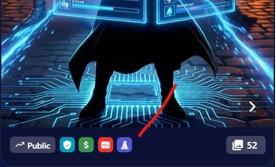
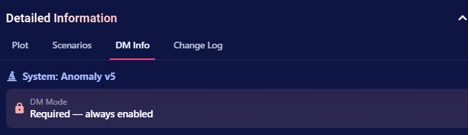
Storylines with a DM attached will show a wizard hat badge. Once you select the storyline, you can click the Dungeon Mind tab and see the relevant info. This is also going to tell you if the DM mod is required or not:
• Required mode — The DM is always on. You can't turn it off, and the system will auto-pick a compatible AI model for you.
• Optional mode — a toggle switch appears in chat settings and on the first message. You can flip it on or off. If you turn it on, make sure you're on a compatible model (the chat will warn you if you're not).
|
About models Creators can set a recommended AI model for their DM. Stronger models handle complex rules more reliably. If you switch to a different model, you'll see a warning — it may still work, but results can get weird. Stick with the recommended one unless you have a reason not to. |
Your character sheet
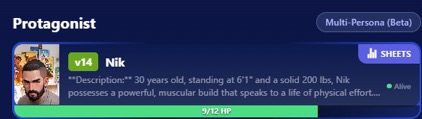
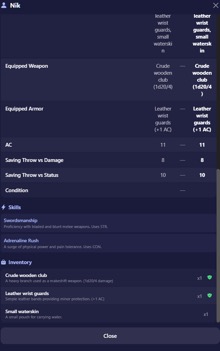
Once the DM is active, your character gets a sheet. Tap any character card in chat settings to see it. What's on the sheet depends on the storyline — the creator decides what stats their game uses.
What you'll usually see
• HP bar — your health. Green when you're fine, yellow when you're hurt, red when you're in trouble. If it hits zero, you're probably dead. More on that below.
• Alive dot — green if you're alive, red if you're dead. Appears right on the character card.
• Condition text — status effects like "Poisoned (3t)" sit next to the alive dot. The number in parens is how many turns are left.
• Other resource bars — MP (blue), Stamina (yellow), Energy (purple), Action Points (white). Only the ones your storyline uses will show up.
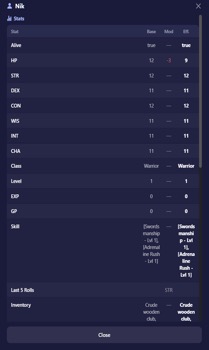
• SHEET badge — tap this to see the full thing: all stats, skills, inventory, the works.
|
Stats differ between storylines A classic fantasy storyline might give you STR, DEX, CON, INT, WIS, CHA. A survival horror one might give you Health, Sanity, and Supplies. A social intrigue one might be all Charm, Wit, and Influence. Every storyline is its own game. Check the Player Guide (covered at the end of this doc) for the rules of the specific storyline you're in. |
Rolling dice: the part you'll see most
The DM rolls a 20-sided die (a d20) whenever you try something with an uncertain outcome. You'll see this happen visually.
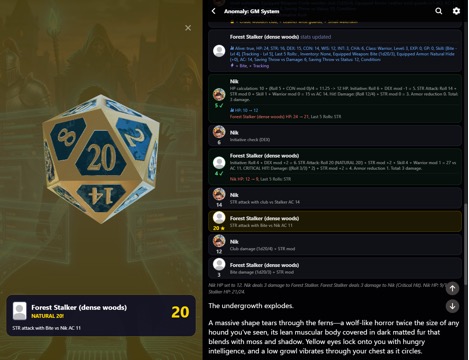
The dice overlay
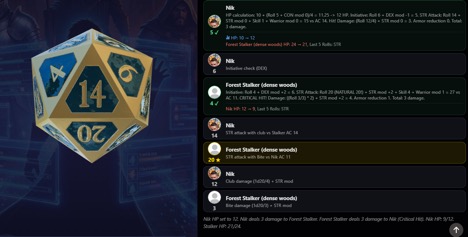
When a roll happens, a fullscreen overlay pops up with an animated die. It shows:
• Your character's portrait
• The roll number (1 through 20)
• Whether you had Advantage or Disadvantage (more on that in a sec)
• Color coding — a gold glow for a natural 20, a red glow for a natural 1
The roll result bars
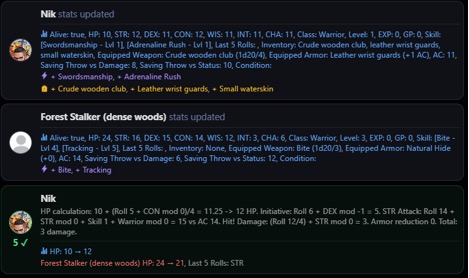
After the overlay, compact bars appear below the story text. One bar per character that rolled. Each bar shows:
• The character's avatar with a colored border
• The roll number with a success or fail icon
• Detail text explaining the math — things like "STR attack. Roll 14+3=17 vs DEF 12. Hit."
• Stat changes — green for gains, red for losses
• Skill gains (purple) and inventory changes (gold) if any happened
Tap a bar to replay the dice animation. The roll bars are the transparency layer — they're how you see what the DM actually did behind the scenes. The story text itself won't mention numbers.
Natural 20 and Natural 1
Two roll results matter more than the rest:
• Natural 20 — the die lands on 20 before any bonuses are added. In most games, this is an automatic success. Often it also means an epic moment — double damage, a perfect shot, something special. You'll see a gold glow on the overlay.
• Natural 1 — the die lands on 1. In most games, this is an automatic failure. Often something goes dramatically wrong. You'll see a red glow on the overlay.
|
What counts as a crit? Exactly what a natural 20 or natural 1 does depends on the storyline's rules. Most games treat them as automatic success/failure, but a creator can define them differently. The roll bar will tell you what actually happened either way. |
Advantage and Disadvantage
Sometimes the DM rolls two dice instead of one:
• Advantage — rolls twice, keeps the higher number. You'll get this when the situation favors you — an ally is helping, you caught the enemy by surprise, you did something clever.
• Disadvantage — rolls twice, keeps the lower number. You'll get this when things are working against you — you're blinded, exhausted, trying something you have no training in.
The DM decides when these apply based on the game rules. You'll see the label on the dice overlay so you know what's happening.
A walkthrough: combat turn
Here's what a full turn looks like from your side. Say you're playing a warrior, and there's a goblin in front of you.
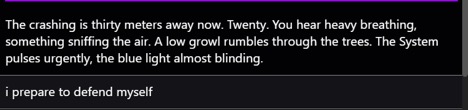
Step 1: You type your action
In the chat field, you write something like: "I draw my sword and swing at the goblin, aiming for its neck."
Step 2: The story AI recognizes a combat action
The story AI sees this is a fight move. Instead of just describing what happens, it calls the DM to figure out the actual result.
Step 3: The DM rolls
The dice overlay pops up. Your character's portrait, an animated d20 spinning, and — let's say — it lands on 14.
Step 4: The DM applies the rules
The DM checks the game rules: your 14 beats the stalker’s defense. Hit. Damage gets calculated. The stalker’s HP drops. At the same time the stalker gets a roll, this time it was a crit, an auto hit. You both take damage.
Step 5: The story AI writes the scene
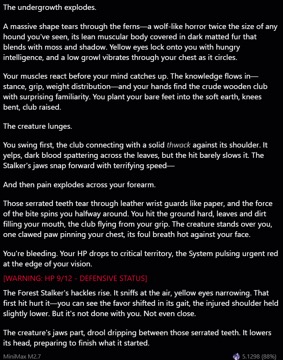
Now the story AI gets the results back and describes what happened.
Notice: no numbers in the prose. The narrative stays clean.
When the DM asks you a question
Sometimes the DM needs your input before it can continue. When this happens, the story pauses and a special message appears in chat that looks like: "Dungeon Mind (DM) Asks."
Common examples:
• "Level up! Choose 2 stats to increase: STR, DEX, or INT?"
• "You found a magic ring and a silver dagger. Which do you want to take?"
• "How are you going to approach the guard — talk, sneak, or fight?"
Just answer in your next message. Type it however feels natural — "I'll put both points into STR" works fine. The DM will pick up your answer, apply it, and the story continues on the next message.
|
Don't skip it If the DM asks a question, the story is waiting on you. You won't make progress until you answer. Ignoring the question and typing something unrelated can confuse the AI. |
When the DM rejects your action
Sometimes you'll try something and the DM will shut it down before it even rolls. When this happens, you'll see a message that says "Dungeon Mind (DM) Rejected" with a short reason why.
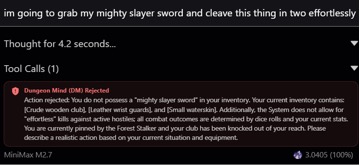
This isn't the AI being mean — it's the DM enforcing the rules the creator wrote. Rejections happen when you try something that breaks the game's logic.
Common rejection scenarios
• Trying to act while dead — if your character's HP hit zero and death is permanent in that storyline, you can't just get back up. The DM will reject actions from dead characters.
• Resurrecting a dead ally — many storylines treat death as permanent. Trying to bring someone back usually gets rejected. (Some games have exceptions — check the Player Guide.)
• Healing yourself when you're not a healer — if the game restricts healing magic to a specific class, trying to cast heal on yourself as, say, a warrior will get rejected. You'll need to use a potion or rest instead.
• Manually editing your stats — you can't tell the DM "give me +10 STR" or "set my HP to full." Stats only change through gameplay: taking damage, resting, leveling up, drinking potions. The DM is the only thing that changes stats.
• Impossible actions — things that flatly break the game's rules. If a game says you can't use magic in an anti-magic zone, casting a spell there will get rejected.
What to do when you get rejected
Just try something else. The rejection message usually tells you why, so use that as a hint. If you wanted to heal but can't cast healing magic, look for a potion in your inventory. If you wanted to resurrect a dead ally, maybe there's a shrine or quest that can help — or maybe death really is final and you need to move on.
If you think the rejection is a mistake (for example, the game rules should allow what you're doing), you can try rephrasing your action. Being specific about what your character is doing and why can help. You can also use OOC to ask the AI directly — see Chat Basics for how OOC works.
Healing, death, and leveling up
These are the three moments most players have questions about. The exact rules depend on the storyline, but here's the general shape:
Healing
Most storylines have a few ways to heal:
• Short rest — usually gets back some HP (often around 25%). Good for patching up between fights.
• Full rest — sleep, basically. Full HP back, conditions cleared. Usually requires a safe place.
• Potions — if you have healing potions in your inventory, you can use them. Works for everyone, no class restriction.
• Healing spells — often class-restricted. In many storylines, only healer-type classes can cast them. Check your Player Guide.
To heal, just describe what you're doing: "I take a moment to rest and tend my wounds," or "I drink my healing potion," or "I cast Heal on myself." The DM handles the rest.
Death
When your HP hits zero, your character dies. The alive dot on your card goes red, and you can't take actions anymore.
Whether death is permanent depends entirely on the storyline. Some games have resurrection mechanics, quest rewards, or revival items. Most don't — death usually sticks. Check the Player Guide for the specific rules of your storyline.
|
If you die and want to continue Remember that the chat tools still work. You can use Create Branching Message (covered in Chat Basics) to branch back to before the death and try again. Or you can edit the message that killed you. It's your story — play it however feels right. |
Leveling up
As you do things, you earn XP. When you hit a threshold, the DM will trigger a level-up. Usually this means:
• The DM asks you which stats you want to increase (via a DM Asks message)
• You answer, and the DM applies the changes
• You might get a new skill or ability
• Your HP base often goes up, and any damage modifiers reset
Some games level you up during rest. Some do it mid-scene. Either way, the DM Asks message is your cue to choose.
Inventory and skills
Inventory
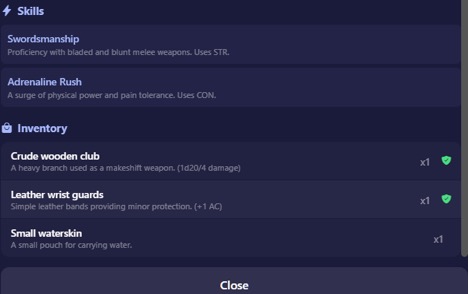
When you pick up items, loot enemies, or buy something, it goes into your inventory. You'll see inventory changes in the roll bars (gold-colored entries). To check what you're carrying, tap the SHEET badge on your character card.
To use an item, just describe it: "I drink the healing potion," "I equip the steel sword," "I throw a smoke bomb at the guard." The DM will verify you have it and apply the effect.
Skills
Skills are special abilities your character has. Some are there from the start. Others you learn through the story — a teacher shows you a technique, you unlock a spell, you discover a hidden talent.
New skills show up in the roll bars (purple-colored entries) and in your full character sheet. To use one, describe what you're doing: "I use my Whirlwind Strike technique." If your character has the skill and it makes sense to use it, the DM will handle it.
Tips for playing well with the DM
- Describe what you're doing, not the result. Write "I swing my sword at the goblin" — not "I kill the goblin." The DM decides if you hit. Telling the story what happens before the dice roll can cause weird contradictions.
- Stay specific. "I try to persuade the guard" is fine. "I lean in, lower my voice, and mention that I'm a friend of the captain" is better — it gives the DM more context and can earn you Advantage.
- Accept the rolls. Bad rolls happen. The dice are server-side and can't be manipulated — that's what makes the game feel real. If something goes wrong, lean into it. The story's usually more interesting when it does.
- Watch your resources. If your MP is getting low, don't plan to cast three more spells. If your HP is in the red, consider retreating or resting. The roll bars and character sheet are there for a reason.
- Use OOC when you're confused. If something happened and you don't understand why, start a new line with "ooc" and ask. The AI will explain what went on.
- Branch when you want to experiment. If you're unsure about a big decision, use Create Branching Message to try it out safely. Your main timeline stays intact.
The Player Guide (in chat settings)
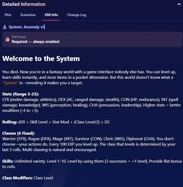
Every storyline with a DM can include a short Player Guide written by the creator. It shows up in chat settings when the DM is enabled, and it's where the creator tells you the things specific to their game:
• What stats your character has and what they do
• How combat works in this world
• Whether death is permanent or if there's a way back
• Class restrictions, magic rules, healing mechanics
• Any tips the creator wants to share
It's short — usually a quick overview. Read it before you start playing, especially for storylines with unusual mechanics. It'll save you a lot of confused rejections later.
Quick recap
• The DM rolls dice and tracks stats. The story AI writes the scene. You just play.
• Roll bars below the story text show you what actually happened mechanically.
• If you see "Dungeon Mind (DM) Asks," answer the question to continue.
• If you see "Dungeon Mind (DM) Rejected," try something else.
• Check the Player Guide in chat settings for storyline-specific rules.
• Describe actions, don't narrate outcomes. Let the dice decide.
That's it. Go have fun, make bad decisions, and roll some dice.